
Choosing the right car charger depends on your daily driving habits, the devices you carry, and how quickly you need to replenish your battery on the road. While a traditional USB-A adapter offers broad compatibility for older cables, a modern USB-C charger delivers significantly faster power outputs required by newer smartphones and laptops. Meanwhile, wireless car chargers offer the ultimate convenience of cable-free mounting, though they typically charge at slower speeds and generate more heat. To find the perfect fit, you must evaluate your vehicle’s cabin layout, inspect your device specifications, and understand how your car cigarett plug delivers power to these different adapter types.
Understanding the Three Main Car Charger Types
Every portable charging setup in a vehicle begins at the auxiliary power outlet, historically known as the cigarette lighter socket. This outlet provides direct current (DC) power, usually rated at 12 volts. A standard car cigarett plug adapter inserts directly into this socket, converting the vehicle’s electrical current into a stable voltage suitable for consumer electronics.
Port-based USB-A adapters feature the familiar rectangular port that has been the industry standard for decades. These adapters require a physical cable to connect to your device. While highly reliable, USB-A ports are physically limited in the amount of power they can transmit.
Products mentioned in this guide
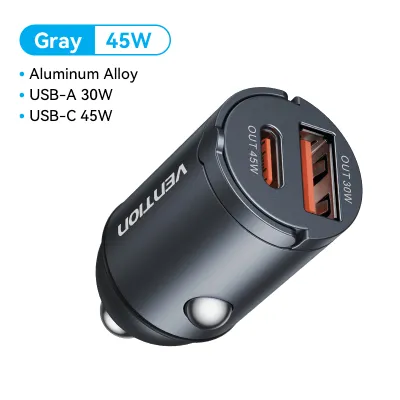
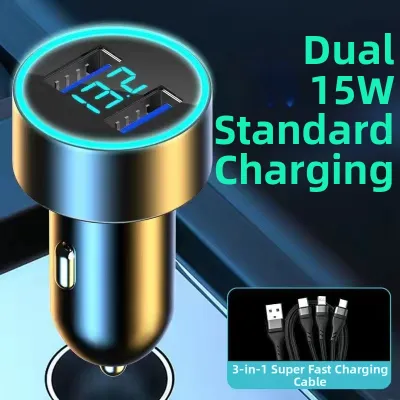
Prices are valid at publication and may change. Please refer to the product page for the latest price.
USB-C adapters utilize the newer, smaller, and reversible oval connector designed to handle higher electrical currents and voltages. These adapters require a physical cable but support modern fast-charging standards that can power up demanding devices, including tablets and compatible laptops, directly from your dashboard.
Wireless car chargers shift the connection from a physical port to an electromagnetic coil housed within a phone mount or flat pad. The adapter still plugs into the 12V socket to draw power, but it transmits energy wirelessly using inductive charging standards like Qi or Qi2. This setup eliminates the need to plug a cable into your phone, though it requires a compatible smartphone.
Comparing Charging Speed and Power Delivery
To understand how quickly a charger will replenish your battery, look closely at the wattage (W) rating printed on the adapter’s label. A basic plug might only output 5 watts, while advanced multi-port adapters can deliver 30W, 45W, or over 100W. Always verify the maximum input wattage your device can accept by consulting its specifications, then match it with an adapter that meets or exceeds that rating.

USB-C adapters lead in charging speed due to their support for Power Delivery (PD) technology. While standard USB-A ports typically cap out at 12W to 18W, a USB-C port can easily deliver 30W or more from a standard 12V outlet. This high output is essential if you run GPS navigation and music streaming simultaneously, as lower-wattage chargers may only slow down battery drain rather than actively charging the device.
Wireless charging operates on a different set of efficiency rules. Even if a mount is rated for 15W, the actual power reaching your phone is lower due to energy lost as heat during transmission. Wireless efficiency is highly sensitive to physical alignment; if your phone is slightly off-center, the speed drops significantly. Furthermore, thick cases, cards, or magnetic plates can block the inductive coils entirely, halting the charge.
Evaluating Cable Management and Cabin Setup
Your vehicle’s interior layout plays a major role in determining which charger type is most practical. Port-based chargers require physical cables running from the 12V socket to your device. If your auxiliary outlet is near the gear shifter or cup holders, loose cables can easily become tangled, creating clutter and potentially interfering with physical controls. To maintain a clean cabin, consider using cable clips, coiled cables, or short cords tailored to the exact distance to your phone mount.
Wireless chargers offer a cleaner visual setup because the cable remains permanently plugged into the mount rather than your phone. However, wireless mounts require careful placement. Typically secured via vent clips, suction cups, or adhesive pads, you must ensure the mount does not obstruct your view of the road, block essential air vents, or interfere with airbag deployment.
Before purchasing, sit in your driver’s seat and locate your 12V socket. Consider where you naturally place your phone. If your vehicle has a dedicated cubby near the outlet, a flat wireless pad or a short wired cable is a seamless solution. If you prefer your phone at eye level for navigation, a robust vent-mounted wireless charger or a long USB-C cable paired with a dashboard mount will serve you better.
Device Compatibility and Future-Proofing
Selecting the right charger requires a quick inventory of the electronics you and your passengers use daily. If you carry a mix of older and newer devices—such as a dashcam, a tablet, and a modern smartphone—a single-port charger will quickly lead to frustration. In this scenario, multi-port adapters combining USB-A and USB-C ports offer the greatest flexibility, allowing you to power legacy accessories alongside modern fast-charging devices.
While wireless charging is convenient, it is not universally compatible. Many budget smartphones, older models, and specialized accessories lack the internal coils required for inductive charging. Additionally, if you use a heavy-duty rugged case or a wallet case containing credit cards, you must remove it to charge wirelessly. For these setups, a direct wired connection via USB-C or USB-A remains the only reliable option.
To future-proof your vehicle’s charging setup, prioritizing USB-C is the smartest path. Consumer electronics have overwhelmingly transitioned to USB-C as the universal standard. Investing in high-quality USB-C adapters and cables ensures your car setup remains fully compatible with future phone upgrades, tablets, and other portable gear, reducing the need to constantly replace accessories.
How to Match the Charger to Your Driving Habits
Your daily routine should dictate which charging technology you choose. For short commutes where you are constantly getting in and out of the vehicle, a wireless charger is highly convenient. You can simply drop your phone onto the mount without fumbling with cables, allowing your battery to top up incrementally throughout the day without wear and tear on your phone’s physical charging port.
For long road trips, intensive navigation, or rideshare driving, a wired USB-C connection is superior. Running GPS navigation with high screen brightness consumes massive power and generates internal heat. A wired USB-C connection delivers the high wattage needed to charge the battery quickly under heavy use, without generating the additional external heat associated with wireless charging.
If you frequently share your car with family, carpool partners, or rideshare passengers, a combination setup is the most practical approach. You can plug a multi-port adapter into your car cigarett plug, running a dedicated wired cable for your own navigation while leaving an open USB-C port or a wireless charging pad available for passengers’ diverse devices.
Before purchasing a high-wattage multi-port adapter, consult your vehicle’s owner’s manual to verify the fuse rating of your 12V auxiliary outlet. Most passenger vehicles use a 10-amp or 15-amp fuse for this circuit, supporting a maximum continuous draw of 120W to 180W. Exceeding this limit by plugging in multiple high-draw devices simultaneously can blow the fuse, cutting off power to the socket entirely.
Safety and Installation Checks for 12V Sockets
Operating electrical accessories in your vehicle requires basic safety precautions. When shopping for a car charger, inspect the packaging or the adapter’s physical label for safety certifications and built-in protection mechanisms. High-quality adapters feature integrated circuitry designed to prevent overcurrent, overvoltage, short circuits, and overheating, shielding your smartphone from electrical spikes.
Thermal management is critical in a vehicle environment. Wireless charging pads and high-wattage USB-C adapters naturally generate heat during operation. Never cover a charging adapter with papers, cleaning cloths, or other cabin clutter, and avoid leaving devices charging on wireless pads under direct sunlight on hot days, as this can trigger thermal shutdown mechanisms in your phone.
Finally, pay close attention to the physical condition of your vehicle’s 12V socket and the adapter. If the adapter fits loosely, wiggles, or if the socket feels unusually hot during use, stop using it immediately. If you observe any signs of melting plastic, discoloration, or a burnt electrical smell, disconnect the adapter and consult a qualified automotive technician to inspect the socket’s wiring before attempting to use it again.
Frequently Asked Questions (FAQ)
Can I use a USB-C to USB-A cable in a USB-A car charger?
Yes, you can physically connect a USB-C to USB-A cable to a USB-A car charger. However, the charging speed will be limited by the maximum output of the USB-A port, which is typically much lower than a native USB-C port. To ensure you get the fastest possible speeds, check the wattage labels on both your adapter and cable to confirm they support your device’s fast-charging protocols.
Does wireless charging drain my car battery when the engine is off?
Whether a wireless charger drains your car battery depends on how your vehicle’s 12V auxiliary outlet is wired. In many vehicles, the 12V socket loses power when the ignition is turned off. In others, the socket remains constantly powered. Test your socket’s behavior by checking if the adapter’s LED indicator light stays on after you lock the vehicle, or consult your owner’s manual to verify if the outlet has a constant power draw.

Community discussion
Share your experience or ask a question. Comments are reviewed before publication.