
Finding the ideal center console organizer and phone mount for the BYD Sealion 8 requires a clear understanding of the vehicle’s unique cabin architecture. This electric SUV features a distinctive dual-tier floating center console, a large rotating central touchscreen, and premium soft-touch materials throughout the dashboard. Standard, generic accessories often fail to fit these specific dimensions or can even interfere with the vehicle’s moving parts. To optimize your cabin storage and keep your smartphone secure, you must select accessories designed specifically for this model’s layout while verifying their physical compatibility and safety.
By focusing on custom-fit solutions, you can preserve the clean, modern aesthetic of your cabin while adding practical storage. The right accessories will not only keep your daily essentials organized but also ensure that your devices remain accessible without compromising driving safety or vehicle functionality.
Safety and Compatibility Checks Before You Buy
Before purchasing any aftermarket accessory for your vehicle, safety must be your primary consideration. The cabin is packed with advanced technology, driver-assist sensors, and essential physical controls that must remain completely unobstructed at all times.
Products mentioned in this guide
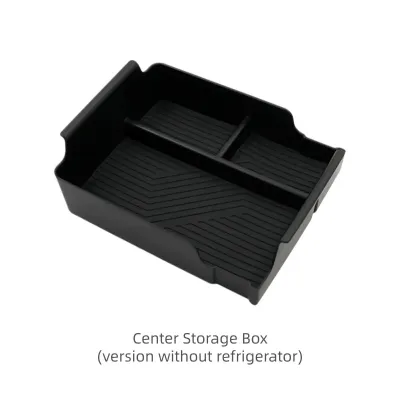
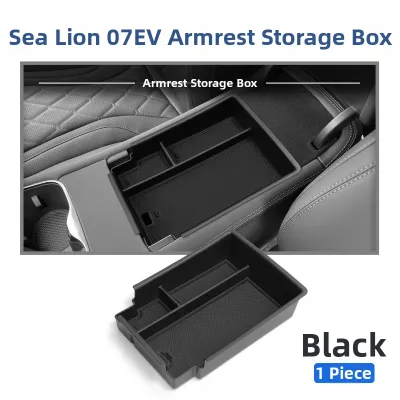
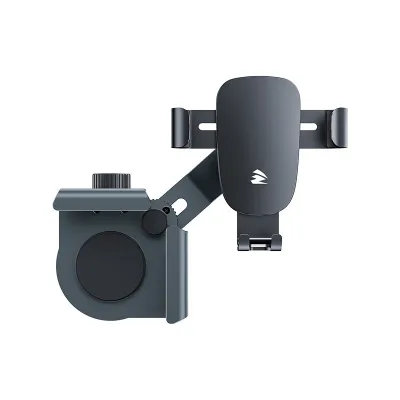
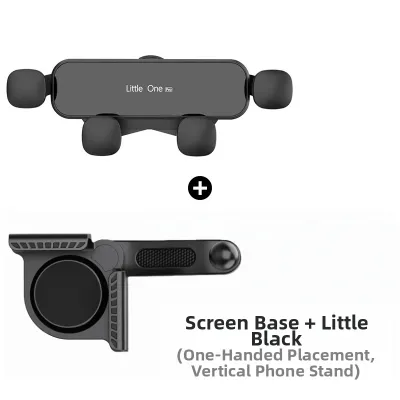
Prices are valid at publication and may change. Please refer to the product page for the latest price.
First, verify the physical clearance around the steering wheel, the crystal-like electronic gear selector, and the armrest hinges. An organizer that sits too high or a phone mount that protrudes too far can interfere with your hand movements while shifting gears or steering. Ensure that any tray placed in the lower section of the floating console does not block access to the emergency physical buttons or the USB ports.
Second, confirm that dashboard-mounted accessories do not obstruct your line of sight or any vehicle sensor arrays. The vehicle utilizes interior sensors and cameras to monitor driver attentiveness and assist with safety systems. Placing a large phone mount directly in front of these sensors can trigger system errors or disable safety features. Additionally, ensure the mount does not block the passenger airbag deployment zones located in the dashboard.
Finally, check that the mounting mechanisms do not damage the interior surfaces. The dashboard and console feature soft-touch materials and synthetic leather wraps that can easily be indented, scratched, or discolored by harsh plastic clips or strong chemical adhesives. If you choose an accessory that clips onto the central screen, ensure it does not put excess pressure on the display bezel or interfere with the motorized rotation mechanism.
How to Choose the Right Center Console Organizer
The center console of this SUV is spacious but lacks built-in divisions, which can lead to a cluttered storage space. Choosing the right organizer involves balancing material durability, noise reduction, and accessibility to integrated vehicle features.

When comparing materials, you will generally choose between rigid ABS plastic custom-fit inserts and flexible silicone trays. ABS plastic organizers offer a highly structured layout with dedicated slots for coins, cards, and sunglasses. However, bare plastic can cause items to slide and rattle while driving. To prevent this, look for ABS trays that include removable, non-slip rubber or silicone mats. Alternatively, solid silicone trays are naturally quiet, highly flexible, and easy to wash, though they may offer less structural rigidity for heavier items.
Anti-rattle features are essential for maintaining the quiet, refined driving experience of an electric vehicle. Without the engine noise to mask cabin sounds, even the slightest vibration of a key or coin in a plastic tray can become highly distracting. Look for organizers with flocked interiors or snug-fitting rubberized edges that dampen vibrations and prevent the tray itself from shifting within the console compartment.
Your organizer’s layout should match your daily storage needs. Consider whether you need quick-access slots for parking cards, a dedicated space for sunglasses, or a deep compartment for larger items. Crucially, ensure that any tray designed for the upper console does not block the wireless charging pad or the integrated USB-C and USB-A ports. A well-designed organizer will feature precise cutouts that allow charging cables to pass through cleanly without pinching.
Because this vehicle is configured for right-hand drive (RHD) in Singapore, always double-check that the organizer you are purchasing is compatible with the RHD layout. Some asymmetrical console trays are designed specifically for left-hand drive markets and will not fit correctly or may block the cup holders when installed in an RHD vehicle.
Recommended Phone Mount Types for the Sealion 8 Dashboard
Selecting a phone mount requires finding a balance between stability, ease of use, and protecting your vehicle’s interior. The table below compares the most common mounting options to help you decide which style best fits your driving habits.
| Mount Type | Stability | Installation Ease | Potential Interior Damage Risk | Best Suited For |
|---|---|---|---|---|
| Screen-Back Clip | High | Moderate | Low (with proper padding) | Drivers who prefer eye-level navigation without blocking windshield view |
| Air Vent Clip | Moderate | Very Easy | Moderate (risk to delicate vent blades) | Quick installation and easy removal |
| Dashboard Pad / Suction | High | Easy | Moderate (adhesive residue or suction marks) | Heavy smartphones and rough road conditions |
| Console Base Mount | High | Moderate | Low | Keeping the phone completely out of the driver's forward line of sight |
Before choosing a mount that attaches to the central floating screen, it is vital to consider the screen’s motorized rotation feature. The screen can rotate between portrait and landscape modes at the touch of a button. Any mount attached directly to the screen must be positioned so that it does not collide with the dashboard or steering wheel during rotation. Furthermore, avoid adding excessive weight to the screen bezel, as this can strain the internal rotation motor and gears over time.
For heavy smartphones, magnetic holders offer excellent convenience but require a strong, high-quality magnet array to prevent the phone from falling on uneven roads. Mechanical gravity mounts provide a secure grip by using the phone’s weight to lock the side arms, but they can be bulkier and may rattle when empty.
Screen-Back and Clip-On Mounts
Screen-back mounts are designed to clamp securely around the rear housing of the central touchscreen. This placement keeps your phone close to your natural line of sight, making it highly convenient for navigation. Because they do not rely on adhesives, they can be removed without leaving sticky residue on your dashboard.
However, you must assess the risk of stressing the screen’s motorized hinge. Ensure the mount is lightweight and does not block the rear ventilation ports of the display unit, which are necessary for heat dissipation. Always verify that the clip mechanism features thick, soft silicone padding on all contact points to prevent scratching or cracking the display’s outer bezel.
Air Vent and Dashboard Pad Mounts
Air vent mounts are a popular, cost-effective option, but they require caution in this vehicle. The air vents feature sleek, delicate horizontal blades. Heavy smartphones combined with the leverage of a clip-on mount can easily bend or snap these blades, leading to expensive repairs. If you choose a vent mount, select one with a support leg that distributes the weight downward onto the surrounding trim rather than putting all the stress on a single vent blade.
Non-slip dashboard pads and suction cup mounts offer a residue-free alternative. High-quality silicone friction pads sit flat on the dashboard and hold your phone via gravity and surface tension. If you opt for a suction cup mount, avoid using permanent chemical adhesives on the soft-touch dashboard wrap. Instead, look for sticky gel suction cups that can be washed and reused without degrading the underlying material.
Where to Source and Verify BYD Sealion 8 Accessories
Finding high-quality accessories that fit perfectly requires careful sourcing. Whenever possible, prioritize official accessory channels and authorized dealers. These sources offer products that have been tested specifically for compatibility with the vehicle’s dimensions and material specifications, ensuring a perfect fit without the risk of damaging your interior.
If you choose to shop on specialized automotive e-commerce platforms or online marketplaces, you must exercise diligence. Read verified customer reviews carefully, paying close attention to photos uploaded by other buyers. Look specifically for reviews from drivers in Singapore or other RHD markets to confirm that the accessory fits the RHD console layout perfectly.
When budgeting for these accessories, expect to spend between S$20 and S$50 for a high-quality center console organizer, and S$25 to S$80 for a premium, secure phone mount. While cheaper generic options are widely available, investing in custom-fit accessories made from durable, heat-resistant materials will save you from issues like rattling, warping, or interior damage. Always check the seller’s return policy and warranty terms before purchasing, so you can easily exchange the product if the fitment is not exactly as advertised.
Installation and Maintenance Tips for Interior Accessories
Proper installation and regular maintenance will ensure your accessories remain secure and do not cause long-term damage to your vehicle’s cabin.
For any accessory that utilizes adhesive tape, proper surface preparation is critical. Start by cleaning the mounting area to remove dust, finger oils, and interior dressings. Use a mild soapy water solution on a microfiber cloth to clean the surface, then dry it completely. Avoid using harsh chemical solvents or strong rubbing alcohol on synthetic leather or soft-touch plastics, as these can strip the protective coating and cause permanent discoloration. Apply the adhesive in moderate temperatures and allow it to cure for at least 24 hours before placing any weight on the mount.
To clean silicone or plastic console inserts, remove them from the vehicle entirely. Wash them with mild dish soap and warm water to remove dust and sticky residue. Ensure the inserts are completely dry before placing them back into the console. Trapping moisture underneath a silicone tray in Singapore’s humid climate can lead to mold growth, unpleasant odors, or damage to the vehicle’s original console lining.
Finally, make it a habit to periodically check and tighten any mechanical clips or mounting brackets. Over time, vehicle vibrations and temperature fluctuations can cause screws and clamps to loosen slightly. Regularly checking these connection points will prevent annoying cabin rattles and ensure your phone remains securely mounted while you drive.
Frequently Asked Questions (FAQ)
Will aftermarket phone mounts block the Sealion 8's 360-degree camera or sensors?
No, aftermarket phone mounts installed inside the cabin will not block the vehicle’s external 360-degree cameras or safety sensors, as those are mounted on the exterior of the car. However, poorly positioned phone mounts can cause physical obstruction or glare on the central touchscreen, making it harder to view the camera feeds clearly. Additionally, ensure your mount does not block the interior driver monitoring camera or reflect sunlight directly into your eyes or the vehicle’s optical sensors.
How do I clean a silicone center console insert without leaving residue?
To clean a silicone insert, remove it from the console and wash it thoroughly with warm water and a few drops of mild dish soap. Avoid using harsh chemical solvents, abrasive sponges, or interior armor sprays, as these can degrade the silicone or leave a sticky film that attracts more dust. Allow the insert to air dry completely on a clean towel before reinstalling it. Ensuring it is dry prevents moisture from being trapped in the dark console compartment, which can cause odors in humid climates.

Community discussion
Share your experience or ask a question. Comments are reviewed before publication.