
Finding a phone mount for the Tesla Model Y that does not obstruct the massive 15-inch central touchscreen requires moving away from generic automotive accessories. Because the Model Y consolidates almost all driver information, navigation, and vehicle controls onto this single display, any mount that clips onto or hangs over the screen’s active area can block critical readouts, side-view camera feeds, or climate controls. The most effective solutions utilize alternative anchor points—such as the screen’s outer bezel, the flat upper dashboard, the hidden HVAC vent strip, or the steering column—to keep your device secure and within your line of sight without interfering with the vehicle’s primary interface.
Selecting the right mount involves balancing your preferred viewing angle with the physical constraints of the cabin. Since the Model Y lacks a traditional instrument cluster behind the steering wheel, many drivers prefer to position their phones close to their natural line of sight to monitor navigation apps or incoming notifications. By understanding how different mounting styles interact with the Tesla’s minimalist interior, you can choose a setup that maintains a clean aesthetic while ensuring your phone remains stable and accessible throughout your drive.
Why Standard Car Phone Mounts Fail in the Model Y
Traditional car phone mounts are almost entirely incompatible with the Model Y’s interior architecture due to the absence of conventional design elements. Most standard mounts rely on horizontal or vertical louvered air vents, using spring-loaded clips to secure themselves to the vent slats. The Model Y, however, features a continuous, hidden slot vent integrated seamlessly into the dashboard trim, leaving no exposed slats for a standard clip to grip.
Products mentioned in this guide
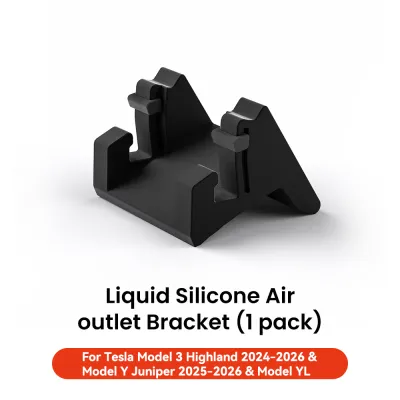

Prices are valid at publication and may change. Please refer to the product page for the latest price.
Additionally, the dominance of the 15-inch central touchscreen eliminates the typical mounting surfaces found in older vehicles. Standard dashboard mounts designed to clip onto center consoles or radio bezels have no purchase points on the Tesla’s smooth, screen-centric layout. Attempting to force a generic clamp onto the screen can pinch the delicate glass edge or block vital software buttons, such as the gear selector status, speed display, or autopilot visualizations.
Finally, the minimalist dashboard offers very few flat, non-porous surfaces suitable for traditional suction cup mounts. The dashboard is wrapped in a textured, soft-touch material or wood trim that prevents suction cups from forming an airtight seal. Placing a heavy suction mount on these sensitive materials can also leave permanent indentations, discoloration, or adhesive residue, compromising the clean look of the cabin.
Mounting Locations That Keep the Touchscreen Clear
To keep the central display completely unobstructed, accessory manufacturers have developed specialized mounts that anchor to specific structural points around the cabin. Evaluating these primary mounting zones allows you to choose a solution that matches your driving habits and ergonomic preferences.

Screen Edge and Left-Side Brackets
Screen-edge mounts utilize custom-molded clamps or brackets that grip the outer bezel of the 15-inch display. These designs typically secure to the left side of the screen, positioning the phone directly between the steering wheel and the center display. This placement is highly ergonomic for drivers in Singapore, as it keeps the phone close to the steering wheel and within the driver’s natural field of view without overlapping any active pixels on the touchscreen.
These brackets usually rely on a tension-based clamping mechanism or a form-fitting sleeve that slides over the corner of the screen housing. Because they anchor directly to the rigid frame of the display, they offer excellent stability and minimize phone shaking. However, it is essential to verify that the clamp features thick, high-quality silicone padding to prevent scratching the screen’s bezel or putting excessive localized pressure on the glass.
While highly convenient, screen-edge mounts do have physical limitations. If you use a heavy phone or a bulky protective case, the added leverage can place minor stress on the screen’s mounting arm over time. Drivers should look for lightweight aluminum or high-strength composite brackets that distribute the weight evenly along the back of the display housing rather than relying on a single pinch point.
Dashboard Top and Above-Screen Mounts
Dashboard mounts sit on the flat upper surface of the dash, often directly behind the central touchscreen or slightly to the driver’s right. These mounts typically secure using non-marking automotive-grade adhesives or custom-fit clips that snap into the seam where the dashboard meets the front windshield defroster grille. By elevating the phone above the screen, these mounts completely separate your device from the vehicle’s primary electronics.
This positioning keeps the phone high up, allowing you to glance at navigation maps with minimal eye movement away from the road. It also ensures that the entire 15-inch touchscreen remains completely clear for passenger use or quick climate adjustments. Because these mounts do not touch the screen bezel, they carry zero risk of causing display damage or screen wobble.
However, dashboard-top mounts are highly exposed to environmental factors, which is a critical consideration in Singapore’s tropical climate. When parked in open-air carparks, the intense sunlight hitting the windshield can cause cabin temperatures to soar, potentially degrading the adhesive backing over time or causing the phone to overheat rapidly. Additionally, a phone mounted high on the dashboard can create distracting reflections on the steeply raked windshield during night driving.
Hidden Air Vent Inserts and Replacements
Hidden vent mounts are engineered specifically to interface with the Model Y’s unique HVAC system. These accessories feature thin, specialized hooks or wedge-shaped inserts that slide directly into the narrow horizontal vent slot running across the dashboard. Once inserted, they lock onto the internal plastic structure of the vent, providing a remarkably clean, low-profile anchor point that looks like an original factory component.
This mounting style keeps the phone positioned lower down, completely out of your forward line of sight through the windshield. It preserves the clean, uncluttered look of the upper dashboard while keeping the phone within easy reach. Because the mount is anchored to the vehicle’s internal dashboard framing, it provides a highly secure hold that resists vibrations on uneven road surfaces.
Despite their clean appearance, vent inserts require careful handling during installation. Forcing a rigid plastic or metal clip into the delicate vent slot can damage the internal directional air vanes, which are costly to repair. Furthermore, because the phone sits directly in front of the vent, it will block a portion of the airflow; while cold air conditioning can help keep your phone cool during heavy use, you must ensure the mount does not completely restrict air circulation to the cabin.
Steering Column and Behind-the-Wheel Mounts
Steering column mounts attach directly to the plastic shroud surrounding the steering wheel shaft. These mounts position the phone directly behind the steering wheel, effectively creating a temporary instrument cluster. This layout is favored by drivers who prefer a traditional dashboard configuration, as it places speedometers or turn-by-turn navigation apps directly in front of their eyes.
These mounts typically use a split-clamp design that wraps around the steering column and secures with tension screws. Because they are completely independent of both the central touchscreen and the dashboard, they offer a highly isolated mounting solution. This position also ensures that the phone is shielded from direct sunlight by the steering wheel itself, reducing the risk of thermal shutdown.
Before choosing a steering column mount, you must carefully verify the physical clearances. The mount must not interfere with the physical scroll wheels on the steering wheel, the turn signal stalk, or the gear selector stalk. Additionally, if you frequently adjust the steering wheel’s height or reach, ensure the mount and its cabling have enough slack to move freely without binding or pulling on the vehicle’s internal wiring.
Essential Features to Verify Before Purchasing
When shopping on online marketplaces or specialty automotive accessory retailers, it is easy to be overwhelmed by options. To ensure you select a mount that is safe, practical, and protective of your Model Y’s interior, verify the following essential features before making a purchase:
- Clearance and Sightlines: Confirm that the physical dimensions of the mount, when holding your specific phone model, do not block your view of the road, the passenger-side wing mirror, or any portion of the driver's forward field of vision. The mount should position the phone close to the screen's edge without overlapping the active display area.
- Interior Protection: The Model Y utilizes sensitive materials, including vegan leather seating, soft-touch dashboard wraps, and delicate screen bezels. Ensure any clamping mechanism features soft silicone, rubber, or high-density foam padding on all contact surfaces. Avoid mounts that rely on harsh, high-tack adhesives that cannot be cleanly removed without damaging the underlying trim.
- Charging Compatibility: If you plan to charge your phone while it is mounted, verify that the bracket design does not block the phone's bottom charging port. For MagSafe-compatible devices, look for mounts with integrated magnetic rings that support wireless charging, ensuring the magnetic connection is strong enough to hold the phone securely over speed bumps.
- Vibration Dampening: Because electric vehicles operate quietly, any mechanical rattling or vibration from a loose phone mount will be highly noticeable inside the cabin. Look for mounts constructed from solid materials like aluminum or reinforced polycarbonate, featuring tight mechanical joints and rubberized ball heads to absorb road vibrations.
Installation and Safety Boundaries
Installing a phone mount in your Model Y is generally a straightforward process, but it must be done with strict adherence to safety boundaries to protect both the vehicle’s systems and its occupants. The most critical safety consideration is avoiding airbag deployment zones. Never route charging cables or position mounts across the passenger dashboard, the steering wheel hub, or the side pillars where curtain airbags are housed, as a deploying airbag can turn a mounted phone or loose cable into a dangerous projectile.
Proper surface preparation is essential for any mount relying on adhesive bases. Before applying an adhesive mount to the dashboard or the back of the screen housing, clean the area thoroughly with an interior-safe, non-greasy automotive cleaner. Avoid using harsh household solvents like acetone or high-concentration rubbing alcohol on the wood trim or vegan leather, as these can strip the protective coatings and cause permanent discoloration. Allow the cleaned surface to dry completely, and if using double-sided tape, apply firm pressure and let the adhesive cure for the manufacturer-recommended period—often 24 hours—before hanging the weight of your phone.
If a mounting solution requires prying dashboard panels, drilling holes, or tapping into the steering column’s electrical wiring, stop immediately and consult your vehicle’s official manual. The Model Y features a complex low-voltage electrical architecture, and splicing into factory wiring can trigger system errors, void your vehicle warranty, or damage sensitive cabin sensors. Stick to non-invasive, reversible mounting solutions that do not alter the physical structure of the cabin.
Finally, ensure that any charging cables are routed neatly and secured out of the way. Loose cables dangling from the dashboard can easily become tangled in the steering wheel or, worse, fall into the driver’s footwell and interfere with the brake or accelerator pedals. Use small, non-marking cable clips to route the wire along the seams of the center console, keeping the driver’s footwell completely clear of obstructions.
Frequently Asked Questions (FAQ)
Can I use a standard suction cup mount on the Tesla Model Y windshield?
While physically possible, using a standard suction cup mount on the windshield is generally not recommended for several reasons. Local traffic regulations in Singapore require that any aftermarket accessory mounted to the glass must not obstruct the driver’s clear view of the road ahead. Because the Model Y has a steeply raked windshield, placing a phone mount on the glass often positions the device directly in your primary line of sight, creating a dangerous blind spot.
Additionally, the intense tropical heat and direct sunlight hitting the windshield can cause the air inside the suction cup to expand, leading to sudden adhesion failure while driving. The heat can also cause the suction cup’s silicone or gel pad to melt slightly, leaving a sticky, difficult-to-clean residue on the glass that can interfere with the cabin camera housing located near the rearview mirror.
Will a screen-mounted bracket damage the Tesla touchscreen?
A high-quality, properly designed screen-mounted bracket will not damage the touchscreen, provided it is installed and used correctly. These brackets are engineered to grip the rigid outer bezel of the display rather than the sensitive glass screen itself. To prevent damage, you must verify that the bracket uses soft silicone or rubber padding on all contact points to distribute the clamping force evenly and prevent metal-on-plastic scratching.
It is also crucial to respect the weight limits of both the mount and the screen housing. Avoid hanging heavy accessories, multiple devices, or large tablets from a single screen-edge bracket. When installing or removing the phone, use gentle, steady pressure rather than pulling or jerking the mount, which can place unnecessary leverage on the screen’s factory mounting arm.
Do I need a specific mount for the refreshed Model Y?
Yes, you must verify the model year and interior trim specifications of your vehicle before purchasing a mount. Tesla periodically updates its vehicle interiors, which can result in subtle changes to the dashboard dimensions, the thickness of the touchscreen bezel, and the design of the hidden HVAC vent slot. A mount designed specifically for an older model year may not fit securely or could damage the trim of a refreshed model.
Always check the accessory manufacturer’s compatibility list to ensure the mount is rated for your specific vehicle year and production region. If you are unsure, measure your screen’s bezel thickness or vent opening and compare it to the product specifications provided by the manufacturer before completing your purchase.

Community discussion
Share your experience or ask a question. Comments are reviewed before publication.