
Finding a secure phone holder for a Mercedes-Benz CLA180 requires balancing interior aesthetics, material preservation, and driving safety. The CLA180 cabin features a distinct design language characterized by sweeping dashboard curves, circular turbine-style air vents, and a prominent central infotainment display. Standard universal mounts often fail to grip these unique surfaces or risk damaging the premium soft-touch materials. To secure your device without compromising your vehicle’s interior or your safety, you must evaluate how different mounting mechanisms interact with the CLA180’s specific layout.
Selecting the right accessory involves understanding the physical limitations of your dashboard and verifying compatibility with your specific vehicle generation. Whether you drive the first-generation CLA (C117) or the second-generation model (C118), the interior geometry dictates which mounting solutions will remain stable over time. By focusing on vehicle-specific designs and proper installation techniques, you can maintain a clear view of the road while keeping your phone securely within reach.
Understanding the Mercedes CLA180 Dashboard Layout
The Mercedes-Benz CLA180 dashboard is engineered with a mix of premium materials and complex geometries that present unique mounting challenges. Depending on the model year and trim package, the dashboard surface is typically finished in textured synthetic materials or upgraded Artico man-made leather. These materials feature a distinct grain or texture designed to minimize windshield glare. However, this textured finish introduces microscopic air gaps that prevent standard suction cups from forming a reliable vacuum, often leading to sudden mount failure during transit.
Products mentioned in this guide
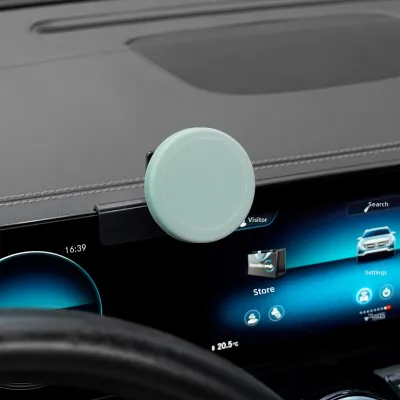
Prices are valid at publication and may change. Please refer to the product page for the latest price.
In addition to surface texture, the pronounced curvature of the CLA180 dashboard limits the placement of flat-base adhesive mounts. The dashboard slopes downward toward the cabin, meaning any mount placed on the upper surface must compensate for this angle to keep the phone screen vertical. Attempting to force a flat adhesive base onto a curved section of the dashboard reduces the contact patch, concentrating stress on a smaller area and increasing the likelihood of the adhesive peeling away under the weight of the phone.
Safety must be your primary consideration when choosing a mounting location. The passenger-side front airbag is integrated directly into the upper dashboard panel, and its deployment zone must remain completely unobstructed. Furthermore, mounting a phone too close to the A-pillars or high on the center of the dashboard can create critical blind spots, obscuring your view of pedestrians or oncoming traffic. Always refer to your Mercedes-Benz owner’s manual to identify the exact boundaries of the airbag deployment zones before selecting a mounting position.
The central infotainment screen and the iconic circular turbine air vents also dictate where a phone holder can be placed. In older CLA180 models, the standalone tablet-style screen sits prominently above the center console, while newer models feature a continuous dual-screen MBUX cockpit. Placing a phone holder too close to these screens can block your view of essential navigation maps or vehicle settings. Below the screen, the circular turbine vents rotate 360 degrees and feature angled, moving slats, making standard rectangular vent clips highly unstable and prone to slipping.
Mounting Mechanisms: What Works on the CLA180 Dashboard
Suction cup mounts are a common choice for vehicle interiors, but their performance on the CLA180 dashboard is highly dependent on material preparation. Standard PVC suction cups require a completely flat, non-porous surface, which is virtually non-existent on the textured CLA180 dash. While some suction mounts utilize a sticky polyurethane gel pad to fill the microscopic gaps in textured surfaces, these pads are sensitive to temperature fluctuations. In warm climates, heat buildup inside a parked vehicle can soften the gel, causing the mount to lose its grip and potentially leaving a sticky residue on the dashboard.

Adhesive mounts offer a low-profile, semi-permanent solution, but they carry a risk of surface damage. High-strength acrylic foam tapes provide excellent shear strength, allowing them to support heavy smartphones even on curved surfaces. However, the bond created by these adhesives can be stronger than the surface coating of the CLA180’s soft-touch dashboard or Artico leather. Removing an adhesive mount improperly can tear or discolor the dashboard material. If you choose an adhesive mount, it is safest to apply it to hard, non-porous plastic trim pieces rather than the padded sections of the dashboard.
Because of the limitations of direct dashboard mounting, many CLA180 owners opt for vent or screen-edge clips. Standard vent mounts that rely on simple spring-loaded clips generally fail on the CLA180’s circular turbine vents because the weight of the phone causes the vent to rotate downward. To address this, specialized Mercedes-specific vent mounts are engineered to clamp securely around the outer bezel of the circular vent housing rather than gripping the delicate inner slats. This design locks the mount in place without interfering with the vent’s airflow or causing rotation.
Screen-edge mounts represent another highly stable alternative that avoids dashboard contact entirely. These mounts feature a custom-molded bracket that clamps securely around the bezel of the central infotainment screen. Because they leverage the rigid structure of the screen housing, they provide a wobble-free platform for your phone. When selecting a screen-edge mount, you must verify whether it is designed for the older standalone screen or the newer widescreen MBUX display, as the bezel dimensions and thicknesses differ significantly between generations.
Magnetic mounting systems offer unmatched convenience for quick, one-handed docking, but they require careful integration. These systems use powerful neodymium magnets to hold the phone, which must be paired with a metal plate attached to the back of your phone or case. While the magnetic connection itself is highly secure, you must ensure the mount’s base is rigidly attached to the vehicle. Additionally, the placement of the metal plate must be carefully planned to avoid blocking your phone’s internal wireless charging coils or interfering with its digital compass.
Key Selection Criteria for a Secure and Safe Fit
To ensure your phone holder remains secure on bumpy roads and during sudden maneuvers, vibration dampening is a critical feature to look for. High-quality mounts incorporate mechanical locking arms or spring-loaded cradles that physically clamp the phone from multiple sides. Mounts that feature a bottom support foot in addition to side clamps provide a three-point retention system that prevents the phone from sliding downward under heavy vibrations. Avoid mounts made entirely of lightweight, thin plastics, as they tend to flex and amplify road vibrations, making the phone screen difficult to read.
Driver convenience and safety demand that a phone holder support easy, one-handed operation. A secure mount should allow you to insert and lock your phone in place, as well as release it, using only one hand. Gravity-linkage mounts, which use the weight of the phone to automatically draw the side arms inward, offer excellent one-handed usability but may rattle when empty. Alternatively, mechanical quick-release mounts feature a button on the back or side that instantly opens the clamps, allowing you to retrieve your phone without distracting your attention from the road.
Adjustability is essential for maintaining a safe line of sight while driving your CLA180. The mount should feature a high-quality, lockable ball joint that allows for 360-degree rotation and precise tilt adjustments. This adjustability enables you to angle the phone screen away from direct sunlight to eliminate glare, while keeping the device positioned just below your hood line. Keeping the phone within your natural peripheral vision reduces the time your eyes are off the road when viewing navigation instructions.
Finally, the material quality of the holder itself plays a vital role in protecting both your phone and your vehicle’s interior. Look for mounts that feature thick, high-density silicone or rubber padding on all contact points, including the inner surfaces of the clamps and the mounting base. This padding serves a dual purpose: it provides a high-friction grip that prevents the phone from slipping, and it acts as a protective barrier that prevents scratches on your phone’s chassis and guards against scuffing the CLA180’s interior trim during installation.
Pre-Purchase Checklist: Protecting Your Interior and Visibility
Before purchasing a phone holder for your Mercedes CLA180, performing a systematic check of your vehicle’s interior and your phone’s specifications will help prevent compatibility issues. Use the following step-by-step checklist to ensure a secure, damage-free installation:
- Identify Your Vehicle Generation: Confirm whether your CLA180 is a C117 model (typically pre-2019) or a C118 model (typically 2019 and newer). This distinction is critical, as custom-fit vent mounts and screen-edge brackets designed for one generation will not fit the other due to changes in vent design and screen dimensions.
- Measure Your Phone and Case: Measure the total width, thickness, and weight of your smartphone, including its protective case. Many heavy-duty or wallet cases exceed the depth capacity of standard mount clamps. Ensure the holder you select is explicitly rated to accommodate your phone's total dimensions and weight.
- Inspect the Intended Mounting Surface: Thoroughly examine the area of the dashboard or console where you plan to install the mount. If you plan to use an adhesive mount, locate a flat, hard plastic trim piece. Avoid placing adhesives on soft-touch vinyl, leather, or stitched areas of the dashboard to prevent permanent surface damage.
- Review Surface Preparation Requirements: Read the manufacturer's instructions regarding surface cleaning. For adhesive or suction gel mounts, the mounting surface must be completely free of dust, oils, and interior detailing sprays. Use a cleaning agent authorized by the vehicle manufacturer that is safe for your specific dashboard material, and allow the surface to dry completely before installation.
- Observe Adhesive Curing Times: If your chosen mount utilizes double-sided adhesive tape, note the required curing time before applying any load. Most high-quality automotive adhesives require at least 24 hours, and up to 72 hours, to achieve full bond strength. Do not mount your phone on the holder during this curing window, as premature loading will cause the adhesive to fail.
- Conduct a Low-Speed Test Drive: Once the mount is fully installed and any adhesives have cured, place your phone in the holder and conduct a brief test drive on a quiet, low-speed road. Observe the mount for any signs of excessive vibration, slipping, or sagging. Verify that the phone does not obstruct your view of the road, the instrument cluster, or the central infotainment screen.
Frequently Asked Questions (FAQ)
Will a dashboard mount leave permanent marks on the CLA180 interior?
Yes, there is a distinct risk that adhesive or suction mounts can leave permanent marks on the CLA180’s soft-touch dashboard materials. The synthetic leather and textured vinyl coatings used in Mercedes-Benz interiors are sensitive to prolonged pressure and chemical migration. Suction cups equipped with sticky polyurethane gel pads can draw plasticizers out of the dashboard material over time, resulting in a permanent dark ring or a sticky spot that cannot be cleaned. Strong chemical adhesives can bond so tightly to the surface that removing the mount can tear the delicate outer layer of the dashboard. To mitigate these risks, always test any adhesive or suction mount in an inconspicuous area first, or opt for mechanical mounts that clamp onto hard plastic trim, vent structures, or the screen bezel.
Can a phone holder interfere with the CLA180's driver assistance sensors?
An improperly placed phone holder can interfere with your vehicle’s driver assistance systems. The CLA180 utilizes cameras and sensors mounted near the rearview mirror assembly to monitor the road ahead for lane-keeping assist and collision prevention systems. While a dashboard-mounted phone holder is unlikely to block these forward-facing external sensors, it can obstruct your view of the instrument cluster or block the interior sensors that monitor driver attentiveness. Additionally, if the phone is mounted too high on the dashboard, it can enter the field of view of the forward-facing cameras, potentially causing system errors. Always ensure your phone and mount are positioned well below the windshield line and do not block any part of the active display screens or safety warning lights.
Are magnetic mounts safe for the phone and the car's electronics?
Generally, magnetic mounts are safe for modern smartphones and the CLA180’s electronic systems, provided they are used correctly. Modern smartphones utilize solid-state storage and are not affected by the compact magnetic fields generated by car mounts. However, extremely strong or poorly shielded magnets can temporarily interfere with your phone’s internal digital compass or GPS calibration. Furthermore, if you place a metal plate directly over your phone’s wireless charging coil, it will block the wireless charging current and can cause the metal plate to heat up rapidly during charging. To avoid this, place the metal plate lower on the phone case, or use a magnetic mount specifically designed to align with your phone’s built-in magnetic charging array. The mount’s magnets will not affect the CLA180’s keyless entry or infotainment systems, provided the mount is kept away from the vehicle’s keyless receiver modules.

Community discussion
Share your experience or ask a question. Comments are reviewed before publication.