
Choosing the right phone mounting style for your Aion V is a balancing act between driver utility and passenger comfort. As a modern electric SUV, the Aion V boasts a minimalist, tech-forward cabin characterized by clean lines, a massive central touchscreen, and a floating center console. While this open layout provides a sense of spaciousness, it also means that any added accessory can quickly disrupt the visual harmony of the interior. Deciding between a dashboard-mounted phone holder and a seat back mount comes down to where you need the screen most and how you prefer to manage the inevitable clutter of charging cables.
Dashboard mounts are designed primarily for the driver, keeping navigation maps and incoming notifications directly within your natural line of sight. However, because the Aion V’s dashboard is already home to a prominent digital instrument cluster and a large infotainment display, adding a phone to this area can crowd your forward field of view. Conversely, seat back mounts shift the digital footprint entirely to the rear of the cabin. This setup is ideal for keeping passengers entertained during long drives, but it leaves the driver without a dedicated mounting point for front-row device interaction. By evaluating your daily driving habits and the physical layout of your vehicle’s cabin, you can select a mounting solution that preserves the clean aesthetic of your electric SUV.
Assessing Your Aion V's Interior Layout and Mounting Surfaces
Before purchasing any mounting accessory, you must inspect the specific materials and physical dimensions of your Aion V’s cabin. The dashboard features a mix of soft-touch synthetic materials, textured polymers, and anti-glare coatings. Standard suction cup mounts rely on a perfectly smooth, non-porous surface to maintain a vacuum seal. Applying these mounts directly to textured or soft-touch dashboard panels often results in a weak hold, and the adhesive gels used on modern suction cups can leave permanent rings or discoloration on sensitive cabin materials. If your trim level features these premium soft-touch surfaces, you may need to look for specialized mounting bases that clip securely into the air vents or attach to the back of the central infotainment screen.
Products mentioned in this guide
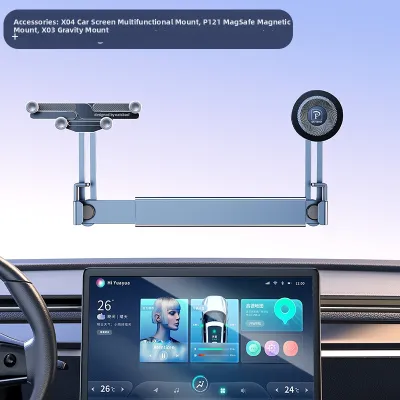
Prices are valid at publication and may change. Please refer to the product page for the latest price.
The seating configuration of your Aion V also dictates which rear mounts are viable. Depending on the model year and trim level, your vehicle may feature either adjustable headrests with exposed metal support poles or integrated, one-piece sports seats. Standard clamp-on seat back mounts require two parallel metal headrest poles to secure the mounting bracket. If your Aion V is equipped with integrated headrests, these rigid clamp-on mounts will not fit. Instead, you will need to seek out strap-based mounting systems that wrap around the entire upper portion of the seat, or specialized brackets designed specifically for one-piece seat frames.
Finally, safety must be your primary consideration when mapping out potential mounting locations. You must identify the deployment zones for all cabin airbags, including the passenger dashboard airbag and the side curtain airbags. A phone holder mounted too close to these zones can become a dangerous projectile if the airbags deploy. Additionally, ensure that any dashboard-mounted device does not physically block your view of the side mirrors, the instrument cluster, or the road ahead. Taking a few minutes to measure clearances and inspect material textures beforehand prevents cosmetic damage and ensures a secure, safe installation.
Dashboard Mounts: Front-Row Focus and Space Optimization
For drivers who rely heavily on mobile navigation apps, real-time traffic updates, or hands-free calling, a dashboard mount is often the most practical choice. Placing the phone high on the dashboard keeps the screen within your peripheral vision, reducing the distance your eyes must travel from the road to check a map. The challenge in the Aion V, however, is finding a mounting position that does not interfere with the vehicle’s existing screens. Because the central infotainment display is already quite large, mounting a phone directly adjacent to it can create a cluttered, screen-heavy environment that distracts from the road.

Cable management is another critical factor when opting for a front-row mount. The Aion V features a floating center console with USB charging ports located in the lower storage tray. Running a charging cable from these lower ports up to a dashboard-mounted phone can create a dangling wire hazard that drapes across the gear selector, blocks access to the cup holders, or tangles with your hands while steering. To maintain an organized cabin, you will need to route the charging cable carefully. Using small, adhesive cable clips to guide the wire along the underside of the dashboard trim can keep the console area clear and prevent the cable from interfering with physical controls.
If you want to avoid permanent modifications or potential cosmetic damage to your dashboard, look for highly reversible installation methods. High-quality vent clips that grip the horizontal louvers of the air vents are a popular alternative to adhesive mounts. However, you must verify that the vent blades in your Aion V are robust enough to support the weight of your specific phone model, especially when driving over uneven road surfaces. Alternatively, some custom-fit brackets are designed to clip onto the bezel of the central infotainment screen, offering a secure hold without placing stress on the air vents or leaving sticky residue on the dashboard leather.
Seat Back Mounts: Rear Utility and Front-Row Decluttering
If your primary goal is to maintain a completely clean, minimalist front cabin, moving phone mounts to the seat backs is an excellent strategy. By routing devices to the rear row, you completely eliminate the visual clutter of extra screens and mounting brackets from the driver’s field of view. This setup is particularly beneficial for families or drivers who frequently transport passengers, as it transforms the rear seats into a dedicated entertainment zone. With the front console free of phone holders, you can fully utilize the Aion V’s built-in storage compartments, wireless charging pads, and open console space for daily essentials like keys, wallets, or sunglasses.
While seat back mounts excel at decluttering the front row, they introduce their own cable management challenges. To charge a phone mounted on a headrest, you must run a cable from a power source to the back of the front seats. The Aion V typically provides USB ports for rear passengers at the back of the center console. If you run a loose cable directly from this port to a seat back mount, it creates a tripping hazard for passengers entering or exiting the rear cabin. To manage this safely, route the charging cable down the side of the center console, under the floor mats, and up along the seat rails or seat piping, securing it with hook-and-loop straps to keep it taut and out of the footwells.
Additionally, you must consider the physical comfort of your rear passengers when installing seat back mounts. The Aion V is celebrated for its generous rear legroom, but a bulky mount protruding from the headrest can still infringe on passenger space or interfere with entry and exit. Choose low-profile mounts that can fold flat against the seat back when not in use. You should also verify that the mounted phone does not block the airflow from the rear air conditioning vents, which are crucial for maintaining a comfortable cabin temperature in warmer climates.
Direct Comparison: Organization, Safety, and Daily Usability
To help you weigh the practical trade-offs between these two mounting styles, it is helpful to compare them across key organizational and safety metrics. Dashboard mounts prioritize driver accessibility but require careful cable routing to avoid cluttering the central console. Seat back mounts offer complete front-row minimalism but require longer cable runs and are completely inaccessible to the driver while on the move.
| Feature | Dashboard Mount | Seat Back Mount |
|---|---|---|
| Primary User | Driver / Front Passenger | Rear Passengers |
| Front-Row Clutter | Moderate (adds screen & visible cable) | None (front cabin remains completely clear) |
| Cable Routing | Short run, but can dangle if not clipped | Long run, must be routed under mats or along seats |
| Installation Effort | Low to Moderate (vent clip or adhesive) | Low (headrest clamp or strap) |
| Driver Accessibility | High (within arm's reach and line of sight) | None (inaccessible while driving) |
| Passenger Entertainment | Low (hard for rear passengers to view) | High (ideal for movies and hands-free viewing) |
From a safety perspective, both mounting styles have strict boundaries that you must respect. A dashboard mount must never be placed in a position that forces you to look away from the road for extended periods, nor should it ever obstruct your view through the windshield. For seat back mounts, the primary safety concern is passenger impact during sudden braking. Ensure the mount is constructed from lightweight, impact-resistant materials and does not have sharp metal edges that could cause injury if a rear passenger leans forward unexpectedly.
How to Choose the Right Mounting Style for Your Needs
Your final decision should align with your typical driving scenarios and the specific passenger makeup of your vehicle. If you primarily drive solo, commute daily, and rely on your phone for real-time navigation and hands-free communication, a dashboard mount is the logical choice. To keep your cabin organized, pair the mount with a short, high-quality charging cable and use discreet cable clips to route the wire along the dashboard seams, keeping the floating console area completely clear.
Conversely, if your Aion V serves as a family vehicle or frequently carries rear passengers, a seat back mount is the superior option for cabin organization. It keeps the front row entirely free of extra screens, allowing you to enjoy the clean, uncluttered design of the electric vehicle’s dashboard. This setup is perfect for keeping children or passengers entertained on longer trips without cluttering your driving environment.
Before making a purchase, always perform a physical check of your Aion V’s interior. Verify whether your front seats have adjustable headrest poles or integrated headrests, as this will immediately narrow down your seat back mounting options. Likewise, inspect the texture of your dashboard and the design of your air vents to ensure your chosen dashboard mount can be installed securely without causing cosmetic wear. By matching the mount to your vehicle’s physical layout and your daily driving needs, you can maintain a highly organized, functional, and safe cabin.
Frequently Asked Questions (FAQ)
Can I use a suction cup mount on the dashboard?
Suction cup mounts can be used on the dashboard of the Aion V, but their effectiveness depends heavily on the mounting surface. Suction cups require a completely smooth, flat, and non-porous surface to create a lasting vacuum seal. If your dashboard features textured plastics or soft-touch synthetic leather, a standard suction cup will likely lose suction and fall off, especially when exposed to direct sunlight and high cabin temperatures. If you must use a suction mount, look for models that include a smooth adhesive mounting disk, which adheres to the dashboard first to provide a flat surface for the suction cup. Always check your vehicle owner’s manual to ensure you do not place the mount over passenger airbag deployment zones.
Will a seat back mount damage the leather or upholstery?
A seat back mount can potentially leave indentations or scratches on your Aion V’s upholstery if it is not designed or installed correctly. To prevent cosmetic damage, choose mounts that feature thick rubber padding, soft silicone contact points, or fabric straps rather than bare plastic or metal clamps. Avoid over-tightening the mounting brackets, as excessive pressure can permanently compress the foam padding inside the headrest or seat back. It is also wise to periodically remove the mount to clean the contact areas. Dust and grit can accumulate between the mount and the seat material over time, and the natural vibrations of driving can grind this debris into the upholstery, causing premature wear.

Community discussion
Share your experience or ask a question. Comments are reviewed before publication.