
Selecting the right phone mount for the BMW iX1 requires balancing daily convenience with the preservation of a premium electric vehicle cabin. The iX1 features a highly sophisticated interior dominated by the BMW Curved Display and soft-touch materials. Standard universal mounts often fail to fit this modern layout or, worse, cause permanent damage to the delicate surfaces. To protect your vehicle’s interior while keeping your device accessible, you must evaluate mounting solutions based on physical compatibility, material safety, and structural stability.
Because the iX1 relies heavily on its digital ecosystem, finding a safe physical mounting point is essential for drivers who still require a dedicated phone screen for specific applications. The goal is to secure the device without compromising the vehicle’s aesthetics, blocking vital safety sensors, or leaving permanent marks on the dashboard. By understanding the physical architecture of the cabin and the mechanical limits of different mounting styles, you can make an informed decision that keeps your dashboard pristine.
Understanding the BMW iX1 Dashboard Layout
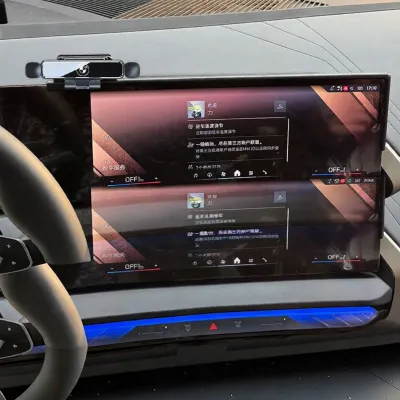
The BMW iX1 cabin features a distinct architectural design that limits where you can safely attach aftermarket accessories. The centerpiece is the BMW Curved Display, a single, continuous glass panel that sweeps across the driver’s line of sight. This display has incredibly tight tolerances and minimal bezel space. Attempting to clamp or stick anything directly to the glass or its immediate plastic housing risks scratching the anti-reflective coating or putting localized mechanical stress on the display panel itself.
Products mentioned in this guide
Prices are valid at publication and may change. Please refer to the product page for the latest price.
Beneath and surrounding this screen are the soft-touch dashboard materials, typically composed of Sensatec (synthetic leather) or textured polymers. These materials are designed for comfort and aesthetics, meaning they are pliable and sensitive to prolonged pressure. Applying heavy clamping force or sticky chemical adhesives to these surfaces can compress the underlying foam permanently or tear the delicate outer finish upon removal.
Air vent design in the iX1 also presents unique challenges. The central and side air vents are slim, integrated units with delicate directional louvers. Unlike older, robust plastic vent grilles, these modern vents are engineered for minimalist styling and precise airflow control. The internal adjustment linkages are fragile and easily damaged by excessive weight or improper clip tension.
Finally, safety must remain your primary concern when positioning any accessory. The iX1 is equipped with a comprehensive airbag system, including passenger-side dashboard airbags and side curtain airbags housed within the A-pillars. Any phone mount positioned in these deployment zones turns into a dangerous projectile in the event of a collision. You must consult your BMW iX1 owner’s manual to identify the exact boundaries of these safety systems before choosing a mounting location.
Mounting Mechanisms to Evaluate for the iX1
To find a compatible solution, you must evaluate how different mounting mechanisms interact with the physical surfaces of the iX1. Each attachment method carries specific trade-offs regarding stability, ease of installation, and the risk of cosmetic or structural damage to your cabin.

Air Vent Clips and Hooks
Air vent mounts are popular due to their simplicity, but they require careful scrutiny before installation in the iX1. The horizontal design of the iX1’s vent blades means that any clip must grip the blade securely without slipping sideways. Traditional spring-loaded tension clips rely on friction alone, which often causes them to slide off during cornering or acceleration, potentially scratching the surrounding trim.
Weight distribution is a critical factor when using vent mounts. Modern smartphones, especially larger models or those with heavy protective cases, can weigh well over 200 grams. When mounted on a delicate vent louver, this weight acts as a lever, putting constant downward pressure on the plastic adjustment mechanism. Over time, this stress can snap the internal linkages, leading to loose vents that can no longer direct airflow properly.
Additionally, placing a phone directly in front of an active vent blocks the cabin climate control. In hot, humid climates like Singapore, cold air blowing directly onto the back of a warm phone can cause localized condensation to form inside the device or on the vent housing. Conversely, running the heater in colder conditions can quickly overheat a phone positioned directly in the path of hot air. If you choose a vent mount, look for designs that use an extendable hook mechanism to clamp onto the rear of the vent blade structure rather than squeezing the delicate front louvers, and ensure the mount allows you to position the phone slightly away from the direct airflow.
Dashboard Gap and Trim Clips
Dashboard gap mounts, often referred to as custom-fit console brackets, are engineered to clip into the tight seams between factory dashboard panels. These mounts are highly stable because they are molded to match the exact contours of the iX1’s interior trim. They do not rely on adhesives or suction, making them an attractive option for preserving the dashboard surface.
However, installing these brackets requires identifying safe trim gaps that can tolerate a temporary separation. The seams around the center console or the lower edge of the dashboard trim are common attachment points. You must verify that inserting the bracket does not permanently deform the trim panels or create gaps that remain visible after the mount is removed. Poorly designed brackets can also rub against adjacent plastic panels, leading to annoying squeaks and rattles while driving.
To prevent physical interference, ensure the bracket and the mounted phone do not contact the curved screen housing or block access to physical controls, such as the hazard light button or volume roller. Always refer to the manufacturer’s installation instructions to confirm compatibility with your specific model year, as minor trim updates can affect how these brackets fit.
Suction Cups and Adhesive Pads
Suction cups and adhesive pads are the most common universal mounting methods, but they pose the highest risk of damage to the iX1’s premium interior. Suction cups require a perfectly smooth, non-porous surface to maintain a vacuum seal. Because the iX1’s dashboard is primarily composed of textured, soft-touch materials, a standard suction cup will struggle to hold, leading to sudden failures and dropping your phone onto the console.
To overcome this, many suction mounts include a smooth adhesive disc that sticks to the dashboard first. This adhesive, along with direct adhesive-backed mounts, poses a severe threat to Sensatec and leatherette finishes. The chemical solvents in automotive-grade adhesives can migrate into the synthetic leather over time, especially when exposed to high cabin temperatures under direct sunlight. This chemical reaction can soften, discolor, or permanently blister the dashboard material.
When you attempt to remove an adhesive mount, the bond is often stronger than the cohesive strength of the soft-touch coating. This can result in the adhesive tearing away the top layer of the dashboard, leaving an unsightly, irreparable patch. For these reasons, direct adhesive application on any soft-touch or textured surface in the iX1 should be avoided entirely.
How to Prevent Interior Damage During Installation
If you decide to install a phone mount, taking precautionary steps during preparation and installation will significantly reduce the risk of damaging your iX1. Proper surface preparation is essential, but it must be done gently. Never use harsh chemical solvents, degreasers, or high-concentration isopropyl alcohol on the soft-touch dashboard or painted trim panels. These chemicals can strip the matte protective coatings, leaving shiny spots or causing the color to fade. Instead, clean the area using a clean microfiber cloth slightly dampened with water or a dedicated, manufacturer-approved interior cleaner.
Cable management is another area where damage can quietly occur. If you run a charging cable from the center console ports to your phone mount, ensure the cable is routed loosely. Avoid pinching the cable inside glovebox seams, fuse box covers, or tight trim panels, as this can damage the wire insulation and deform the plastic trim. Use small, non-marking cable clips on hard plastic surfaces if necessary, and ensure the cable does not rub against painted trim pieces, which can cause scuff marks over time from road vibrations.
If you must remove an old adhesive mount or a stuck suction cup, do not use metal tools, screwdrivers, or sharp plastic pry bars. Instead, apply gentle heat to the area using a hairdryer on its lowest setting, keeping it at a safe distance to avoid overheating the dashboard materials. Once the adhesive softens, use a piece of dental floss or high-strength sewing thread to gently saw through the adhesive layer behind the mount. Any remaining residue should be rolled off slowly with your fingers or cleaned using a mild, surface-safe adhesive remover applied sparingly to a cloth, never sprayed directly onto the dashboard.
Finally, always perform a clearance check after installing your mount. Insert your phone and move it through its full range of motion. Verify that neither the phone nor the mount arms can contact the curved glass screen, the steering wheel, or any sensitive trim panels during tight turns or bumpy road conditions. Even a minor, repetitive rub can wear through plastic coatings over several weeks of driving.
Checklist for Choosing a Compatible Mount
Before purchasing any phone mount for your BMW iX1, use this structured checklist to verify its safety, legality, and physical compatibility:
- Weight and Size Limits: Verify that the mount is rated to handle the exact weight of your phone, including its protective case. For vent mounts, ensure the weight does not exceed the structural limits of the louvers.
- Sightline and Legality: Position the mount to ensure it does not obstruct your forward view of the road or block your side mirrors. In many regions, including Singapore, driving with an obstructed windscreen or view is a traffic offense.
- Airbag Clearance: Cross-reference the mounting position with the airbag deployment diagrams in your BMW iX1 owner's manual. Ensure the phone and mount are completely clear of these zones.
- Material Compatibility: Confirm that the mount's contact points are lined with soft rubber or silicone to prevent scratching the vehicle's trim.
- Return Policy: Because the iX1 has a highly specific interior layout, purchase your mount from a retailer with a flexible return policy. This allows you to test the physical fitment risk-free before committing to a permanent installation.
- Electrical Safety: If you are using a wireless charging mount, ensure it is certified to prevent overheating and electrical interference with the vehicle's onboard systems. Avoid modifying any factory wiring; use standard USB ports or the 12V accessory socket for power.
Frequently Asked Questions (FAQ)
Can I use a magnetic mount on the BMW iX1 curved screen?
You should not attach magnetic mounts directly to the BMW Curved Display or its surrounding bezel. The glass panel is a highly sensitive component engineered to precise tolerances. Applying adhesive magnets to the back of the screen housing or clamping a mount to the thin bezel can introduce localized stress points, potentially cracking the glass or damaging the internal display matrix. Additionally, the heat generated by wireless charging magnetic mounts can negatively affect the display’s performance and longevity.
Will a phone mount block the iX1's driver assistance sensors?
Yes, improper placement of a phone mount can easily block the driver assistance sensors. The BMW iX1 features a driver monitoring camera and various sensors located near the instrument cluster and the top of the steering column. If you position a phone mount too close to the steering wheel or on top of the instrument shroud, you may obstruct the camera’s line of sight. This will trigger system errors and disable safety features like lane-keeping assist or active cruise control. Always mount your phone well to the side of these sensor paths to ensure all driver assistance systems function correctly.

Community discussion
Share your experience or ask a question. Comments are reviewed before publication.