
Choosing between phone navigation secured by a side air vent mount and a built-in car navigation system in Singapore comes down to how you value real-time traffic updates, cabin aesthetics, and device thermal management. Navigating Singapore’s dense road network, dynamic Electronic Road Pricing (ERP) zones, and sudden traffic build-ups requires highly responsive mapping. While a smartphone utilizing a side air vent mount offers unmatched agility with community-driven traffic data and instant route recalculations, a built-in navigation system provides a stable, integrated interface that does not clutter your dashboard or block vital air conditioning flow in our tropical climate.
To make the right choice for your daily commute, you must weigh the immediate convenience of live-updating mobile applications against the seamless, distraction-free experience of factory-installed hardware. Each approach presents distinct trade-offs in terms of upfront costs, long-term maintenance, and physical safety. By examining how these systems perform under local driving conditions, you can select the setup that best aligns with your vehicle’s design and your personal driving habits.
Core Differences in Everyday Convenience and Usability
The daily user experience of navigating Singapore’s expressways and arterial roads depends heavily on how quickly your maps update and how accurately they predict traffic congestion. Smartphone navigation applications excel at providing real-time routing adjustments by crowdsourcing data from thousands of active road users. This allows drivers to bypass sudden bottlenecks on the PIE or KPE before they get trapped. In contrast, built-in car navigation systems often rely on static onboard maps that require manual updates, which may not immediately reflect newly opened roads, temporary diversions, or updated ERP operational hours.
Products mentioned in this guide

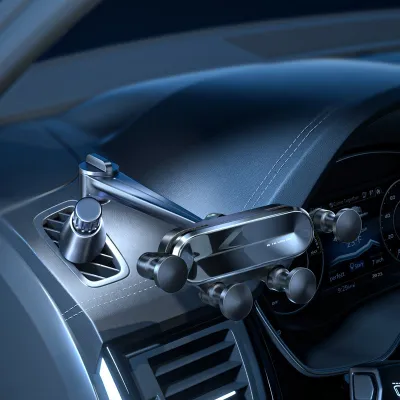
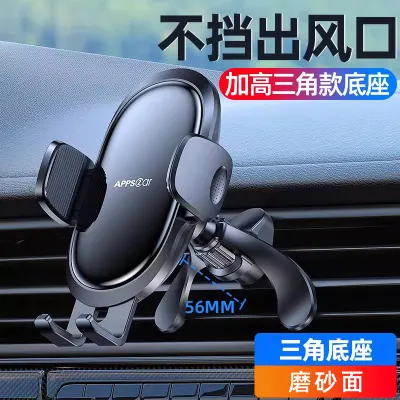


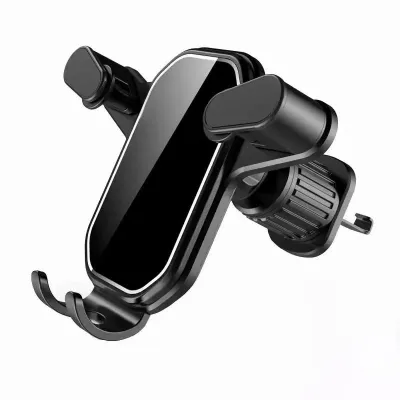
Prices are valid at publication and may change. Please refer to the product page for the latest price.
To ensure your navigation remains reliable, you should verify your specific vehicle manufacturer’s infotainment update policy. Some modern vehicles support over-the-air (OTA) map updates, while older or entry-level trims may require you to download files onto a USB drive or visit an authorized service center to update the system, sometimes for a fee. Smartphone applications, on the other hand, update automatically in the background through your mobile app store, ensuring you always have access to the latest road layouts and point-of-interest data without manual intervention.
Ecosystem integration is another critical differentiator in everyday usability. A smartphone mounted on a side air vent allows you to transition seamlessly from planning a route on your phone at home to driving on the road. It also integrates directly with your preferred music streaming services, messaging apps, and calendar events. Built-in systems, unless equipped with modern smartphone mirroring software, operate in an isolated environment, requiring you to manually input destinations using proprietary interfaces that can feel clunky or outdated.
Screen responsiveness and voice command reliability also vary significantly based on your hardware. High-end smartphones generally feature highly responsive capacitive touchscreens and advanced voice recognition engines that easily comprehend local street names and natural speech patterns. Built-in systems, particularly in older car trims, may use older resistive touchscreens that require firmer presses and feature voice command systems with limited vocabularies, making destination entry a slow and sometimes frustrating process while driving.
Cost and Value Breakdown
Evaluating the financial impact of your navigation setup involves comparing a minor accessory purchase against the substantial premium of factory-installed technology packages. A high-quality side air vent mount is an exceptionally cost-effective solution, typically retailing for a modest sum of S$15 to S$50 on various online marketplaces or at local automotive accessory shops. This minimal investment allows you to leverage the powerful hardware and software you already own, making it an attractive option for budget-conscious drivers or those operating older vehicles.

Conversely, built-in navigation systems are often bundled into higher-tier vehicle trim levels or sold as expensive optional add-ons when purchasing a new car. These packages can add thousands of dollars to the initial purchase price of the vehicle. While this cost is amortized over the period of car ownership, it represents a significant upfront commitment for a system that may become technologically obsolete long before the vehicle reaches the end of its Certificate of Entitlement (COE) lifespan.
Ongoing operational costs also warrant careful consideration. Phone navigation relies on continuous mobile data transmission to download map tiles and stream real-time traffic updates. While modern navigation apps are relatively efficient, heavy daily use can consume several gigabytes of data over a month. You should check your local telecommunications plan limits, especially if you are on a budget SIM-only plan, to ensure you have sufficient data overhead to avoid costly overage charges during long periods of driving.
Built-in navigation systems do not typically consume your personal mobile data, but they are not always free of ongoing costs. Many car manufacturers require proprietary map update subscriptions after an initial complimentary period, which can range from one to three years. If you choose not to renew these subscriptions, your onboard maps will gradually become outdated, forcing you to rely on obsolete road data or eventually transition to a smartphone-based solution anyway.
Safety, Visibility, and Cabin Integration
Physical safety and cabin ergonomics are paramount when deciding where to position your navigation display. A side air vent mount places your smartphone within your peripheral vision, allowing you to glance at directions without completely taking your eyes off the road. However, you must carefully check the physical placement of the mount to ensure it does not obstruct your view of the side mirrors, block critical instrument cluster gauges, or interfere with the deployment zones of your vehicle’s passenger or side airbags.
The impact of mounting a phone directly in front of an air vent is a double-edged sword, particularly in Singapore’s hot and humid climate. Running intensive GPS navigation while simultaneously charging your phone generates substantial internal heat, which can cause the device to thermal throttle, dim its screen, or shut down entirely to protect the battery. While placing the phone in front of an active air conditioning vent helps keep it cool, completely blocking the vent restricts airflow to the cabin, making it harder to maintain a comfortable temperature on warm afternoons.
You must also monitor your device’s temperature if you choose to run the heater during rare chilly, rainy days, as blowing hot air directly onto the back of a mounted phone can accelerate battery degradation or trigger thermal safety shutoffs. Built-in navigation screens avoid these thermal and airflow compromises entirely. They are integrated directly into the dashboard architecture, leaving all air vents fully functional and ensuring the screen remains highly visible under direct sunlight without succumbing to overheating issues.
Ergonomic viewing angles also differ between the two setups. A fixed built-in screen is designed by automotive engineers to minimize glare and sit at an optimal distance from the driver’s line of sight, though it may require you to look slightly downward depending on the dashboard design. An adjustable side air vent mount offers greater flexibility, allowing you to tilt and rotate your phone to achieve the perfect viewing angle, though the mount’s stability depends heavily on the tightness of its joint mechanism and the stiffness of your car’s suspension.
Decision Framework: Which Setup Matches Your Driving Profile?
To determine which navigation method best suits your daily driving routine, consider the following conditional checklist based on your vehicle’s design and your personal preferences:
Choose phone navigation with a side air vent mount if:
- You rely heavily on real-time community traffic alerts to navigate peak-hour congestion and dynamic ERP pricing zones.
- You drive an older vehicle model that lacks modern infotainment features or built-in navigation capabilities.
- You prefer using familiar smartphone applications that update automatically and integrate seamlessly with your personal digital ecosystem.
- Your vehicle's dashboard features sturdy, accessible air vent louvers that can safely support the weight of a mounted phone.
Choose built-in car navigation if:
- You prefer a clean, seamless original equipment manufacturer (OEM) look without exposed cables or aftermarket accessories cluttering your dashboard.
- Your vehicle's side air vents are uniquely shaped, fragile, or positioned in a way that makes mounting a phone impractical or unsafe.
- You want to keep your air conditioning vents completely unobstructed to maximize cabin airflow in hot weather.
- You frequently drive through areas with poor mobile reception, such as underground expressways or multi-story car parks, where offline GPS reliability is crucial.
Before purchasing any side air vent mount, perform these critical verification steps:
- Measure the thickness and depth of your car's vent louvers to ensure the mount's clip mechanism can grip them securely without slipping.
- Verify the weight capacity of the mount against the weight of your smartphone, especially if you use a heavy protective case.
- Check that the mount's clamping arms do not press against the physical power or volume buttons on the side of your phone.
- Inspect the clip's contact points for soft silicone or rubber padding to prevent scratching or cracking your car's plastic vent blades during installation and removal.
Frequently Asked Questions (FAQ)
Will a side air vent mount damage my car's air conditioning louvers?
A side air vent mount can potentially damage your car’s air conditioning louvers if it is overloaded or installed incorrectly. To prevent damage, you must check the louver material and ensure it is sturdy enough to support the combined weight of the mount and your phone. Always choose a mount with padded, rubberized clips that distribute pressure evenly, and avoid pulling or adjusting the mount forcefully while it is clamped to the vent. If your vehicle features fragile, thin, or circular vent blades, you should consider alternative mounting solutions to avoid costly repairs to your dashboard assembly.
Can I use built-in navigation without an active data subscription?
Yes, most built-in car navigation systems can perform basic GPS routing without an active data subscription because they rely on pre-loaded map data stored on the vehicle’s internal hard drive or an SD card. However, without an active data connection, you will lose access to real-time traffic updates, live road closure alerts, and dynamic routing adjustments. To understand the exact offline capabilities of your vehicle’s system, consult your vehicle owner’s manual to distinguish between standard offline GPS functions and premium connected features that require an active subscription or a paired mobile hotspot.

Community discussion
Share your experience or ask a question. Comments are reviewed before publication.