
Selecting a suitable phone mount for your BYD Sealion 7 requires a clear understanding of the vehicle’s modern, high-tech cabin layout. Unlike traditional vehicles with static center consoles, this electric SUV features a signature rotating central touchscreen that demands careful clearance planning. A poorly chosen accessory can block your view, scratch premium interior surfaces, or even interfere with the motorized rotation of the screen. To find a mount that works seamlessly, you must evaluate how different mounting mechanisms interact with the Sealion 7’s specific dashboard geometry, materials, and safety systems.
The key to a successful installation lies in choosing a mounting position that keeps your smartphone secure and accessible without compromising the vehicle’s built-in technology. Whether you prefer a mount that clips onto the air vents, adheres to the dashboard, or attaches directly to the back of the rotating display, each option presents distinct physical and operational trade-offs. By focusing on precise measurements, material compatibility, and safety boundaries, you can confidently select a phone holder that enhances your daily commute while preserving the clean, minimalist aesthetic of your cabin.
Key Fitment Challenges for the Sealion 7 Dashboard
The BYD Sealion 7 presents several unique interior design elements that directly impact how and where you can install aftermarket accessories. The most prominent feature is the large, central infotainment screen, which rotates between portrait and landscape orientations at the touch of a button. Any phone mount positioned near this display must account for the full sweep of its rotational path. If a mount or the attached phone extends even slightly into this clearance zone, the rotating motor could experience resistance, potentially leading to mechanical strain or surface scratches on both the screen bezel and your mobile device.
Products mentioned in this guide
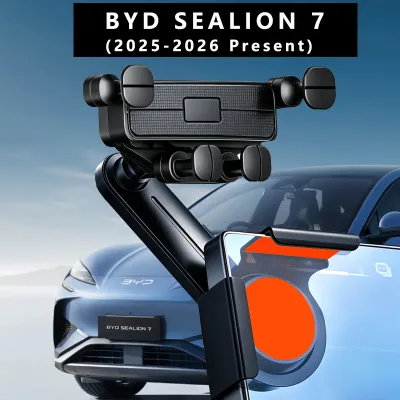
Prices are valid at publication and may change. Please refer to the product page for the latest price.
Beyond the rotating screen, the dashboard itself features a sculpted, multi-tiered design with varying surface textures. The upper dashboard is wrapped in soft-touch materials and synthetic leather, which are highly sensitive to aggressive adhesives and high-suction cups. Applying a standard suction mount to these textured, pliable surfaces often results in a poor seal, leading to frequent drops, and can leave permanent indentations or discoloration on the premium upholstery. Additionally, the subtle curves of the dashboard mean that finding a completely flat, rigid surface for adhesive bases is exceptionally difficult.
The air vents in the Sealion 7 also require close inspection before choosing a clip-on mount. The horizontal louvers are designed with a specific thickness and depth, and they are integrated into a sleek, minimalist housing. Because these vents are engineered to direct airflow efficiently rather than support heavy external loads, attaching a heavy smartphone via a standard spring-loaded clip can put excessive leverage on the delicate plastic blades. Over time, the constant vibration from driving over uneven road surfaces can loosen the clip or, in worse cases, crack the internal louver mechanism.
Evaluating Mount Types by Installation Position
When exploring the market for sealion7 accessories, you will encounter three primary mounting positions, each with its own set of structural requirements and operational risks. Screen-mounted phone holders have become increasingly popular for modern electric vehicles, as they typically clamp onto the outer edge of the central display or adhere to its rear housing. While this position keeps your phone close to your line of sight, you must verify the weight limits and rotational load implications. The motorized swivel mechanism of the Sealion 7 screen is calibrated for the weight of the display panel alone; adding the weight of a heavy mount and a large smartphone increases the torque required to rotate the screen, which could affect the longevity of the internal motor or void related warranty coverages.

Air vent clips offer a highly accessible, tool-free installation method, but they introduce environmental factors that can affect your device’s performance. In tropical climates like Singapore, where air conditioning is constantly running, placing a phone directly in front of an active vent can cause condensation to form on the device when you step out of the car. Conversely, if you use the vehicle’s heating functions in cooler conditions, the continuous flow of hot air directly onto the back of your phone can lead to rapid overheating, causing the battery to degrade or the phone to shut down unexpectedly. If you choose a vent mount, look for designs with extended arms that position the phone away from the direct path of the airflow, and ensure the clip mechanism features soft rubber padding to protect the delicate plastic louvers from scratches.
Dashboard top or crevice mounts provide a highly stable alternative, but they require strict adherence to safety boundaries. These mounts typically use a weighted base, a non-slip silicone mat, or a specialized bracket that fits into the panel gaps of the dashboard. While a non-slip mat on the flat portion of the dash is easy to install and remove, its stability depends heavily on the cleanliness of both the mat and the dashboard surface. Dust and cabin heat can quickly degrade the grip of silicone mats, causing them to slide during sudden braking or sharp turns. Furthermore, any mount placed on top of the dashboard must be carefully positioned to avoid blocking your forward visibility or interfering with the passenger-side airbag deployment zones.
Safety and Visibility Checks Before Installation
Before finalizing any accessory purchase or installing a new mount in your vehicle, conducting a thorough safety and visibility audit is essential. Start by sitting in your normal driving position and adjusting the steering wheel and seat to your preferred height. Hold your phone in the proposed mounting location to verify that it does not obstruct your clear line of sight through the windshield or block your view of the digital instrument cluster. A mount that forces you to divert your eyes too far from the road ahead poses a significant safety hazard, especially when navigating busy urban traffic or complex expressways.
The next critical step is identifying the exact locations of the vehicle’s safety systems, particularly the airbag deployment zones. The passenger-side front airbag is housed within the upper dashboard panel, and side-curtain airbags deploy along the A-pillars. Consult your BYD Sealion 7 owner’s manual to locate these deployment paths precisely. Under no circumstances should a phone mount, cable, or the phone itself be placed within or directly adjacent to these zones. In the event of a collision, an object positioned in the path of a deploying airbag can be projected into the cabin at high speed, causing severe injury to the occupants.
Additionally, review the manufacturer’s guidelines regarding aftermarket cabin modifications and electrical attachments. If you plan to use a wireless charging mount, ensure that the power cable is routed safely away from the steering column, gear selector, and foot pedals. Loose, hanging cables can easily catch on your hands or feet while driving, creating an immediate distraction or physical hazard. Use adhesive cable clips designed for automotive interiors to secure the wire along the seams of the center console, ensuring it does not interfere with any physical buttons or the rotating screen’s path of travel.
How to Build Your Shortlist of Sealion 7 Accessories
To build a reliable shortlist of compatible phone mounts on online marketplaces, you must look past generic marketing claims and focus on verifiable specifications. Begin by using highly specific search terms, such as “BYD Sealion 7 custom phone mount” or “Sealion 7 screen bracket,” rather than broad categories like “universal car phone holder.” Custom-engineered accessories are often designed to clip securely around the specific bezel dimensions of the Sealion 7’s rotating screen or snap into the precise panel gaps of the dashboard, offering a much more secure and integrated fit than universal options.
Once you identify potential candidates, carefully examine the product specifications, labels, and user manuals provided by the seller. Pay close attention to the maximum weight capacity of the mount and compare it to the weight of your smartphone, including its protective case. If you use a heavy rugged case or a magnetic wallet attachment, ensure the mount’s clamping or magnetic force is rated to handle that specific load under driving vibrations. For magnetic mounts, verify whether they use standard magnets or are compatible with specific magnetic alignment systems, as this affects both holding strength and wireless charging efficiency.
Finally, prioritize sellers and manufacturers that offer clear return policies and detailed instructions for damage-free removal. Because the Sealion 7 features premium interior finishes, you want to avoid any accessory that requires permanent modification, drilling, or high-strength industrial adhesives that cannot be cleanly removed. Look for mounts that utilize high-quality, residue-free adhesive tapes or mechanical clamping systems that can be uninstalled without leaving marks. Reading customer feedback specifically regarding the ease of removal and the long-term impact on dashboard materials will help you avoid costly cosmetic damage to your vehicle’s cabin, which could easily exceed the cost of a premium mount priced between S$20 and S$50.
Frequently Asked Questions (FAQ)
Will a screen-mounted phone holder void the BYD warranty?
Installing a screen-mounted phone holder does not automatically void your entire vehicle warranty, but it can impact coverage for specific components if damage occurs. If the weight of the mount or the physical restriction of its placement causes the screen’s rotating motor to burn out, or if the clamping mechanism scratches the display glass, BYD may deny warranty claims related to the infotainment system. To protect your coverage, always consult the official warranty booklet provided with your vehicle and check for clauses regarding aftermarket modifications. If you choose to use a screen-mounted accessory, ensure it is lightweight, does not restrict the screen’s motorized movement, and can be easily removed before taking the vehicle in for official servicing.
Can I use a suction cup mount on the Sealion 7 dashboard?
Using a standard suction cup mount directly on the soft-touch, textured surfaces of the Sealion 7 dashboard is generally not recommended. The pliable, textured materials prevent the suction cup from forming an airtight seal, which often leads to the mount falling off unexpectedly while driving. Furthermore, the strong suction force and chemical plasticizers found in some adhesive gel pads can leave permanent rings, indentations, or discoloration on the dashboard upholstery. If you prefer a suction-style mount, it is best to attach it directly to the windshield glass, where it can achieve a secure, airtight seal without risking damage to the interior cabin materials. Alternatively, look for mounts that utilize specialized mechanical brackets designed to fit securely into the existing panel gaps of the dashboard.

Community discussion
Share your experience or ask a question. Comments are reviewed before publication.