
Selecting the right phone mount for the Mercedes-Benz GLB 180 requires a careful understanding of its distinct cabin architecture. The prominent dual-screen Mercedes-Benz User Experience (MBUX) layout and the signature turbine-style air vents leave very little traditional flat dashboard space. To secure your device without blocking critical displays, interfering with safety systems, or damaging premium interior materials, you must select a mounting solution tailored to these unique design elements.
While generic mounts are widely available, many fail to accommodate the specific contours of the GLB 180 dashboard. A poorly chosen mount can lead to loose fittings, obstructed views, or even permanent cosmetic damage to the soft-touch surfaces. By evaluating the physical layout of your vehicle and understanding how different mounting mechanisms interact with the cabin, you can find a secure, non-destructive solution that keeps your device accessible and your driving experience safe.
Core Selection Criteria for the GLB 180 Interior
To find a phone mount that functions seamlessly within the Mercedes-Benz GLB 180, you must first analyze the physical and functional requirements of the cabin. The interior of this compact luxury SUV blends high-tech digital displays with premium, textured materials, creating a unique environment that demands specialized accessories.
Products mentioned in this guide
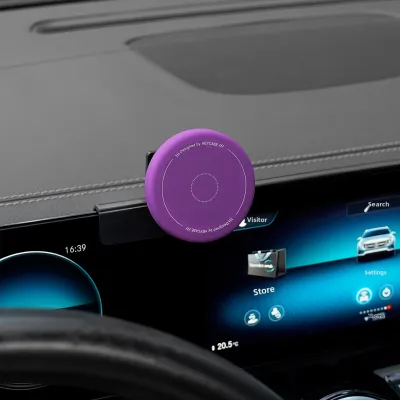
Prices are valid at publication and may change. Please refer to the product page for the latest price.
Dashboard Contour and Material Compatibility
The upper dashboard of the GLB 180 is primarily composed of soft-touch synthetic materials, vinyl, or optional leather stitching. These materials are designed for comfort and aesthetics, but they are highly sensitive to pressure, heat, and chemical adhesives. Applying high-tack adhesive pads or high-pressure suction cups directly to these surfaces can cause permanent indentation, discoloration, or peeling, especially when exposed to intense sunlight and high cabin temperatures. Any mount interacting with these zones must use non-destructive friction fits, gentle silicone padding, or be restricted to the hard plastic trim pieces located lower on the console.
MBUX Screen Dimensions and Bezel Depth
The MBUX widescreen display is a central feature of the GLB 180 dashboard. Depending on the specific model year and trim package, the bezel thickness and rear clearance of this housing can vary. Mounts that clamp onto the screen’s outer frame must match these dimensions precisely. Excessive clamping force on the bezel can put localized pressure on the LCD panel, leading to screen discoloration, touch-sensitivity issues, or structural stress on the screen’s rear mounting brackets. Additionally, there must be sufficient clearance behind the screen to allow the mount’s bracket to sit flush without pinching any factory wiring harnesses.
Weight Capacity and Vibration Stability
Singapore’s urban environment presents unique driving conditions, from navigating steep multi-storey carpark ramps to crossing prominent speed humps in residential estates. A phone mount must offer high vibration stability to prevent your device from rattling or slipping during sudden elevation changes. The mount’s joint mechanisms—whether ball-and-socket or magnetic—must support the weight of modern, large-format smartphones without drooping. Look for mounts featuring reinforced steel cores or high-grade polycarbonate structures that resist flexing under load.
Ease of One-Handed Operation
Road safety regulations in Singapore strictly prohibit holding a mobile device while operating a vehicle. Therefore, the phone mount must facilitate effortless, one-handed mounting and retrieval. Quick-release buttons, gravity-fed cradles, or strong magnetic interfaces (such as MagSafe-compatible systems) allow you to secure or remove your phone in a single motion. This ensures your focus remains entirely on the road, minimizing distractions when adjusting navigation or hands-free communication settings.
Comparing Mount Mechanisms for the Dashboard and Console
Different mounting mechanisms offer distinct advantages and trade-offs when installed in the GLB 180. Understanding how each type interacts with the vehicle’s physical layout is essential for making an informed decision.

Screen-Back and Bezel Clip Mounts
These mounts are engineered to clip directly onto the frame of the MBUX display. By utilizing the rigid structure of the screen housing, they position the phone at an optimal eye-level viewing angle, close to the driver’s natural line of sight. However, because they rely on clamping pressure, you must verify that the contact points are lined with high-density silicone to distribute the load evenly. Avoid models that use rigid plastic clamps without padding, as these can scratch the bezel or crack the outer casing of the display over time.
Custom-Fit Dashboard Bases
Custom-fit bases are molded specifically to snap into the factory panel gaps of the GLB 180 dashboard, such as the seams surrounding the hazard light button or the trim pieces between the central air vents. These bases provide an exceptionally secure, rattle-free foundation without the use of adhesives or suction cups. Because they are tailored to the exact geometry of the vehicle, they do not damage the interior and can be removed cleanly. The primary limitation is compatibility; a base designed for a pre-facelift model may not fit a newer facelifted GLB 180 due to subtle changes in dashboard trim dimensions.
Air Vent Clips
The GLB 180 features distinctive, circular turbine-style air vents. Standard straight-blade vent clips are generally incompatible with these rotating, angled blades, as they cannot grip the circular structure securely and will slide or fall off during cornering. Specialized circular vent mounts are available, but they must be used with caution. The internal directional fins of the turbine vents are delicate; hanging a heavy smartphone from them can strain the plastic mechanism, potentially causing the vent to sag or break. Furthermore, mounting a phone directly in front of the vent blocks climate control airflow and exposes your device to extreme hot or cold air, which can lead to battery condensation or overheating.
Suction Cup and Adhesive Dashboard Mounts
Traditional suction cups and adhesive mounts are highly versatile but pose the greatest risk to the GLB 180’s premium interior. Suction cups require a perfectly smooth, non-porous surface to maintain a vacuum, which is rarely found on the textured dashboard. While they can be mounted on the windshield, this can obstruct your forward view. Adhesive mounts utilizing chemical tapes provide a semi-permanent bond but can leave stubborn residue or strip the finish off soft-touch plastics upon removal. If you choose an adhesive mount, restrict its placement to the hard, smooth plastic trim panels on the lower center console.
| Mount Type | Installation Effort | Stability | Pros | Cons |
|---|---|---|---|---|
| Screen-Back / Bezel Clip | Low (Clamps onto screen frame) | High | Eye-level positioning; no adhesive required | Puts physical stress on the MBUX housing |
| Custom-Fit Base | Medium (Snaps into panel seams) | Very High | Extremely secure; zero damage to interior | Highly model-year specific; harder to source |
| Air Vent Clip | Low (Attaches to vent blades) | Moderate to Low | Easy to install and move between vehicles | Can damage delicate turbine fins; blocks airflow |
| Suction / Adhesive | Low (Sticks to surface) | Variable | Highly adjustable; widely available | High risk of damaging soft-touch dashboard materials |
Safety Boundaries, Visibility, and MBUX Clearance
Installing a phone mount must never compromise the primary safety systems of your Mercedes-Benz GLB 180 or your ability to operate the vehicle defensively.
Driver Sightline Analysis
When positioning your phone mount, you must maintain an unobstructed view of both the road and the vehicle’s primary instrument cluster. The phone should not block your view of the side mirrors, the forward A-pillars, or the digital instrument screen behind the steering wheel. Ideally, the phone should be positioned slightly to the left of the steering wheel, level with or just below the top edge of the MBUX screen. This placement allows you to glance at navigation instructions using your peripheral vision without taking your eyes off the road.
MBUX Touchscreen and Console Accessibility
The GLB 180’s central console houses critical physical controls, including the climate control toggle switches, the hazard light button, and the MBUX touchpad. Your chosen phone mount must not physically block access to these controls or obscure the driver’s view of the central touchscreen. If a mount forces you to reach around your phone to adjust the air conditioning or press the hazard lights, it constitutes a safety hazard and should be repositioned.
Airbag Deployment Zones
This is a critical safety boundary. The GLB 180 is equipped with a comprehensive airbag system, including front passenger airbags, side curtain airbags along the A-pillars, and a driver’s knee airbag. You must consult your vehicle’s owner’s manual to identify the exact deployment zones for these safety systems. Never mount a phone, bracket, or routing cable across or near an airbag cover. In the event of a collision, a mount placed in a deployment zone can be projected into the cabin at high speed, causing severe injury.
Cable Management and Routing
If you use a wired charger, the charging cable must be routed systematically to prevent it from tangling with the steering column, the paddle shifters, or the center console gear selector. Loose, dangling cables can snag on your hands while steering or operating console controls. Use small, adhesive-backed cable clips restricted to hard plastic surfaces to route the cable neatly along the side of the center console, keeping the driver’s footwell completely clear of any obstructions.
Pre-Purchase Verification and Installation Checklist
Before purchasing a phone mount for your GLB 180, perform this structured verification process to ensure a perfect fit and prevent damage to your vehicle.
- Verify Vehicle Model Year and Trim: Double-check the mount manufacturer's compatibility list. Ensure it explicitly states support for your specific GLB 180 model year, as mid-cycle refreshes (facelifts) often introduce subtle changes to dashboard trim, vent designs, and screen bezels.
- Measure the MBUX Bezel: If you are purchasing a screen-back or bezel-clamping mount, use a digital caliper or ruler to measure the thickness of your screen's outer frame. Compare this measurement with the mount's maximum clamp opening to ensure a secure fit without excessive tension.
- Review the Retailer's Return Policy: Because dashboard contours are highly precise, some mounts may not fit as securely as advertised. Ensure the retailer offers a flexible return or exchange policy so you can return the product if it causes rattles or fails to mount securely during a test fit.
- Perform a Non-Destructive Test Fit: When the mount arrives, do not immediately peel off any adhesive backings or apply full clamping force. Place the mount in its intended position and check for physical interference with the steering wheel, wiper stalks, and MBUX screen. Inspect the contact points for any sharp plastic edges that could scratch the interior.
- Check for Screen Pressure Marks: If using a screen-clamp mount, gently tighten it and turn on the MBUX display. Look closely at the edges of the screen near the clamp. If you notice any localized color shifting, flickering, or distortion (pressure marks), loosen the clamp immediately and discontinue use to prevent permanent LCD damage.
- Consult a Professional for Hardwiring: If you plan to install a dedicated wireless charging mount that requires hardwiring into the vehicle's electrical system, always consult a qualified automotive technician. Improper DIY electrical modifications can interfere with the vehicle's complex CAN bus system, trigger warning lights, or void your manufacturer warranty.
Frequently Asked Questions (FAQ)
Will a dashboard mount damage the GLB 180's soft-touch surfaces?
Yes, certain types of mounts can cause permanent damage to the GLB 180’s soft-touch dashboard. High-tack chemical adhesives can chemically react with the synthetic vinyl or leather coatings, leading to peeling, discoloration, or sticky residue upon removal. Similarly, heavy-duty suction cups can leave permanent circular indentations in the pliable foam backing of the dashboard, especially when subjected to high cabin temperatures under the sun. To prevent cosmetic damage, opt for custom-fit bases that clip into existing panel gaps, or restrict adhesive mounts to the hard, non-porous plastic trim panels on the lower console. If you must remove adhesive residue, use only manufacturer-approved, interior-safe automotive cleaners, testing them on an inconspicuous area first.
Can I mount my phone directly above the MBUX screen?
Mounting a phone directly on top of or above the MBUX screen is not recommended. The upper housing of the MBUX screen is not designed to bear structural loads, and placing a heavy device there can strain the screen’s mounting brackets, leading to dashboard rattles over time. Furthermore, positioning a phone in this high zone blocks your forward line of sight through the windshield, creating a dangerous blind spot and potentially violating local road safety laws regarding driver visibility. Additionally, placing your phone directly under the windshield exposes it to intense, direct sunlight, which can cause the device to overheat rapidly and degrade its battery life. For optimal safety and device longevity, position your phone lower down, level with the center console or the middle section of the MBUX display.

Community discussion
Share your experience or ask a question. Comments are reviewed before publication.