
Selecting the ideal phone mounting solution for your vehicle requires a careful balance of driver visibility, dashboard material compatibility, and device security. The Octobuddy, known for its distinctive array of miniature silicone suction cups, presents a unique mounting profile compared to traditional mechanical cradles. To determine which configuration is best for your car dashboard, you must evaluate how these suction cups or their associated adhesive adapters interact with your vehicle’s interior surfaces, local climate conditions, and safety regulations.
In Singapore’s tropical climate, interior cabin temperatures can escalate rapidly when parked in open-air lots. This heat directly impacts the performance of adhesives and suction mounts alike. Finding the right setup is not merely about choosing a product; it is about assessing your dashboard’s physical layout, understanding the weight distribution of your mobile device, and ensuring your installation remains fully compliant with local road safety standards.
Assessing Your Car Dashboard Layout
Before purchasing any mounting accessory, a thorough inspection of your vehicle’s dashboard is essential. Modern automotive interiors utilize a wide variety of materials, including textured vinyl, soft-touch polyurethane, genuine leather, polished wood veneers, and hard plastics. Each of these materials reacts differently to mounting mechanisms. Silicone suction cups, such as those featured on Octobuddy holders, rely on creating a vacuum seal. This seal can only be maintained on completely smooth, non-porous surfaces. If your dashboard features a textured or grained pattern, the microscopic gaps in the texture will allow air to enter, causing the suction cups to fail almost immediately.
Products mentioned in this guide

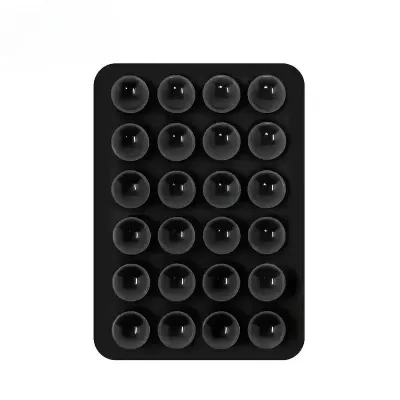
Prices are valid at publication and may change. Please refer to the product page for the latest price.
In addition to texture, the physical geometry of your dashboard plays a critical role. You must identify a sufficiently flat area that matches the footprint of the mount. Curved surfaces prevent the entire suction array or adhesive pad from making full contact, leading to uneven stress distribution and eventual detachment. Use a straight edge, such as a plastic card, to check for flat spots along your console or dashboard trim before deciding on a mounting location.
Safety must remain your primary concern when selecting a mounting location. You must locate all passenger and driver airbag deployment zones, which are typically marked with embossed lettering such as “SRS Airbag” in your vehicle’s cabin. Never place a phone holder, mount, or cable within the deployment path of an airbag. During a collision, an airbag inflates with extreme force, and any object placed in its path can become a dangerous projectile. Furthermore, ensure the mount does not obstruct your view of the instrument cluster, the infotainment screen, or any essential physical controls like the hazard light switch and climate control dials. Always verify your vehicle’s official documentation to confirm safe mounting zones.
Matching the Holder to Your Phone Size and Case
A secure mount depends heavily on the physical relationship between the holder and your specific mobile device. To prevent your phone from detaching during transit, you must calculate the total weight and physical dimensions of your device, including its protective case. Heavy-duty, rugged, or battery-integrated cases significantly increase both the overall weight and the thickness of the phone, which shifts the center of gravity further away from the mounting surface.

This shift in the center of gravity increases the leverage exerted on the suction cups or adhesive base, especially when driving over speed bumps, uneven road surfaces, or during sudden braking. Before finalizing your setup, verify the manufacturer’s specified weight limits for the particular Octobuddy model or adapter you plan to use. If your phone exceeds these recommendations, the vacuum seal or adhesive bond may fail under dynamic loads.
Furthermore, consider how a larger phone might overhang when mounted. A device with a large screen diagonal can easily block adjacent dashboard elements. For example, if the mount is positioned near the center console, a large phone might obstruct air conditioning vents, reducing airflow to the cabin, or block the driver’s line of sight to the side mirrors. Measure the clearance around your proposed mounting spot to ensure your phone can be oriented in both portrait and landscape modes without striking the dashboard or steering column.
Comparing Octobuddy Mounting Mechanisms
Understanding the differences between various mounting styles allows you to choose the most reliable option for your daily commute. The standard Octobuddy design features a double-sided suction pad, which is highly effective when one side is attached to a smooth phone case and the other is pressed against a smooth, non-porous surface. However, because car dashboards are rarely made of polished glass or high-gloss plastic, you will likely need to compare different mounting configurations or use supplementary adapters.
Adhesive pad mounts utilize a semi-permanent double-sided tape to bond a smooth mounting disk to the dashboard, providing a flat surface for the suction cups to grip. While these adhesive pads offer excellent stability on slightly textured plastics, they require a meticulous installation process and a designated curing period. Additionally, prolonged exposure to high cabin temperatures can weaken the adhesive bond over time, and removing the pad later may leave a sticky residue or, in some cases, discolor sensitive dashboard materials.
Magnetic mounting systems offer a highly convenient, quick-release alternative. These setups typically involve a magnetic base attached to the dashboard and a thin metal plate adhered to the back of your phone or slipped inside your case. While magnetic mounts allow for rapid, one-handed docking, you must ensure the magnetic force is strong enough to support your phone’s weight on bumpy roads. You must also verify that the metal plate does not interfere with your phone’s internal components or wireless charging capabilities.
Mechanical clip or vent mounts bypass the need for adhesives or suction cups entirely by securing directly to the louvers of your air conditioning vents or clamping onto dashboard lips. This style protects your dashboard surfaces from potential adhesive damage and keeps the phone within easy reach. However, vent mounts can restrict airflow, and the weight of a heavy phone may cause the vent slats to droop or, over time, suffer structural damage from constant vibration.
Safety, Visibility, and Legal Compliance in Singapore
Operating a motor vehicle in Singapore requires strict adherence to local traffic laws and safety guidelines. The Land Transport Authority (LTA) and the Traffic Police place a high priority on maintaining clear driver visibility. According to local regulations, any accessory mounted on the windscreen or dashboard must not obstruct the driver’s primary field of vision. This means your phone holder should be positioned low enough on the dashboard so that it does not block your view of the road ahead, pedestrian crossings, or side junctions.
When planning your installation, ensure the phone and mount do not interfere with your physical operation of the steering wheel, gear selector, or wiper and indicator stalks. A poorly placed mount that requires you to stretch or look away from the road to view navigation instructions poses a significant safety hazard. The optimal position is typically within your peripheral vision, allowing you to glance at navigation prompts without fully diverting your attention from traffic.
Additionally, consider the impact of Singapore’s intense sunlight. Mounting a phone directly on top of the dashboard or against the windscreen exposes the device to direct solar radiation, which can cause modern smartphones to overheat rapidly and shut down. Positioning the mount slightly lower, perhaps partially in front of an air conditioning vent, can help regulate the device’s temperature during long daytime drives, provided it does not block essential controls or violate visibility laws.
Installation, Removal, and Dashboard Care
Proper installation and maintenance are vital to ensuring your phone holder remains secure without causing permanent damage to your vehicle’s interior. Before applying any adhesive mount or suction adapter, you must thoroughly clean the target surface. Dust, oils, and dashboard dressings (such as silicone-based protectants) will severely compromise the bond. Clean the area using a mild, non-abrasive cleaning solution authorized by your vehicle manufacturer. Avoid using harsh household chemicals or high-concentration isopropyl alcohol on genuine leather or delicate soft-touch plastics, as these can strip protective coatings and cause permanent discoloration.
Once the surface is clean and completely dry, apply the adhesive pad or suction mount firmly. If you are using an adhesive-backed mounting disk, apply steady pressure for at least thirty seconds to ensure complete contact. It is critical to allow the adhesive to cure fully before subjecting it to any load. Refer to the product label for the recommended curing time, which is typically 24 hours. Loading the mount prematurely is the most common cause of adhesive failure.
When the time comes to remove or reposition the mount, proceed with caution to protect your dashboard. Applying gentle heat from a hairdryer can help soften the adhesive bond, making it easier to peel away. You can then use a piece of dental floss or a soft plastic pry tool to gently saw through the softened adhesive layer. For any remaining residue, use an automotive-approved adhesive remover that is explicitly labeled as safe for your specific dashboard material. Never use sharp metal tools, abrasive scrubbing pads, or aggressive solvents, as these will scratch, tear, or dissolve your dashboard’s surface.
Frequently Asked Questions (FAQ)
Can I use an adhesive Octobuddy mount on a textured or leather dashboard?
Adhesive mounts generally struggle to form a secure, long-lasting bond on textured, porous, or heavily contoured surfaces like leather and grained vinyl. The uneven surface prevents the adhesive from making 100% contact, while leather’s natural oils and texture can cause the bond to fail prematurely. If your dashboard is made of these materials, it is highly recommended to check the product label for specific surface exclusions. In many cases, utilizing a mechanical clip mount that attaches to the air vents or securing the mount to a smooth, non-porous trim piece is a much safer and more reliable alternative.
Will a magnetic mount affect my phone's wireless charging or internal sensors?
A magnetic mount itself typically does not damage a smartphone’s internal electronics, but the metal plate required for the system can interfere with wireless charging. If the metal plate is placed directly over the phone’s internal charging coils, it can block the energy transfer, cause the phone to overheat, or prevent charging entirely. To avoid this, you must verify the alignment of your wireless charging coils and place the metal plate outside of this zone, or use a compatible magnetic case designed specifically for wireless charging. Additionally, consult your phone manufacturer’s official guidelines regarding the placement of magnetic accessories near internal compasses or sensors.
How do I safely remove an adhesive mount without damaging the dashboard?
To safely remove an adhesive mount, start by applying gentle heat to the base using a hairdryer to soften the adhesive backing. Once the adhesive is warm and pliable, slide a piece of dental floss or a plastic trim removal tool underneath the base to slowly slice through the bond. Avoid pulling the mount straight up with excessive force, as this can tear leather or peel soft-touch coatings off plastic dashboards. Any leftover sticky residue should be treated with a mild, automotive-approved adhesive remover. Always test the remover on an inconspicuous area first, and strictly follow the manufacturer’s instructions to ensure it does not discolor or damage your vehicle’s interior.

Community discussion
Share your experience or ask a question. Comments are reviewed before publication.