
Selecting the right phone holder among various car accessories interior options requires matching three critical variables: your dashboard’s surface texture, your phone’s physical dimensions, and your preferred mounting mechanism. In Singapore’s tropical climate, where cabin temperatures can soar when parked under the sun, choosing the wrong mount can lead to adhesive failure, damaged dashboard materials, or a phone that falls mid-drive. By evaluating your vehicle’s interior layout and your device’s specifications, you can find a secure, hands-free setup that ensures both road safety and convenience.
Every vehicle dashboard presents a unique combination of curves, textures, and materials. Finding a mount that remains stable during sudden stops or sharp turns requires a systematic approach to compatibility. Rather than relying on generic product claims, drivers must analyze how different mounting technologies interact with their specific vehicle cabin and smartphone configuration.
Assess Your Dashboard Surface and Mounting Options
Before purchasing any interior accessory, you must closely examine the material and physical layout of your dashboard. Suction cup mounts rely on a perfect vacuum seal to remain attached. They require smooth, non-porous, and completely flat surfaces to function effectively. On textured, stitched, or soft-touch dashboards, microscopic air gaps allow air to slowly seep under the silicone gel pad, causing the vacuum seal to fail and the mount to drop unexpectedly.
Products mentioned in this guide
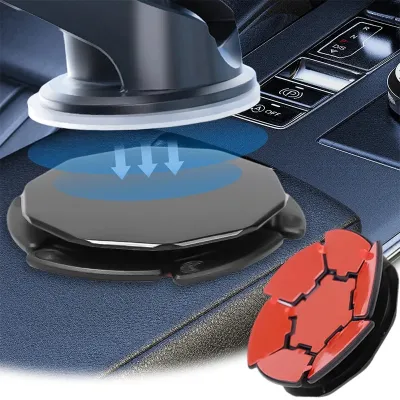
Prices are valid at publication and may change. Please refer to the product page for the latest price.
Adhesive pads offer an alternative for slightly textured or curved surfaces. These mounts typically use high-bond acrylic foam tapes to conform to minor surface irregularities. However, semi-permanent adhesives are highly sensitive to environmental conditions. Under intense sunlight and high cabin temperatures, the adhesive polymers can soften, reducing their shear strength and causing the mount to sag or detach. Furthermore, removing these adhesives from delicate materials like leather or soft-touch plastics can result in permanent surface tearing or discoloration.
Dashboard clips and tension-based mounts bypass adhesives and suction cups by gripping physical edges, such as the instrument cluster hood or dashboard overhangs. When considering a clip-on mount, you must measure the front lip depth of the dashboard and verify the clearance between the mounting edge and the windshield glass. If the angle of the windshield is too shallow, there may not be enough physical space to accommodate both the clip and the phone.
If your dashboard lacks flat, non-porous surfaces or is wrapped in delicate materials that cannot tolerate adhesives, you should pivot to alternative mounting zones. Windshield suction mounts provide a highly reliable glass-to-gel seal, though they can partially obstruct forward visibility. Air vent clips and CD-slot mounts utilize existing cabin structures, keeping the dashboard completely clear, though they require checking the strength and shape of your vehicle’s vent blades or the accessibility of the CD player slot.
Match the Holder to Your Phone Size and Weight
Once you have identified a viable mounting location, you must ensure the holder’s physical cradle can accommodate your specific smartphone. Mechanical cradles feature side arms and bottom feet that clamp the device in place. You must verify the maximum width, depth, and side-grip limits of the cradle against your phone’s dimensions. Thick protective cases, integrated kickstands, or prominent rear camera bumps can prevent a phone from sitting flush against the backplate, reducing the effectiveness of the side clamps.

Device weight is another critical factor that affects long-term stability. Modern smartphones, especially larger models with metal frames and glass backs, exert significant leverage on a mount’s joints. Over time, road vibrations and speed bumps can cause weak ball joints or telescopic arms to droop, forcing you to constantly readjust the viewing angle. Check the manufacturer’s specified weight capacity and look for mounts featuring reinforced locking collars or heavy-duty aluminum support arms.
Case materials can also interfere with the mounting mechanism’s grip. Rugged, highly textured, or fabric cases reduce the friction between the phone and the holder’s rubber pads, making the device more likely to slip out during sudden movements. For magnetic mounting systems, a thick case increases the distance between the magnetic head and the internal metal plate, exponentially reducing the magnetic pull strength. Always verify whether your specific case style requires a specialized mounting adapter or a direct metal-to-magnet connection.
Evaluate Mounting Mechanisms for Driving Safety
Magnetic mounts are highly favored for their minimalist design and effortless, one-handed operation. They allow you to snap the phone into place instantly and rotate it between portrait and landscape modes without adjusting physical clamps. However, they require a steel plate to be attached to the back of your phone or case. If you use wireless charging, you must position this metal plate carefully to avoid blocking the internal charging coils, as metal plates can overheat when exposed to wireless charging fields.
Gravity mounts utilize a mechanical linkage system where the weight of the phone automatically pulls the bottom support downward, which in turn draws the side arms inward to grip the device. While highly convenient for quick docking, gravity mounts require a strict vertical orientation to maintain their grip. If you prefer to mount your phone horizontally for navigation, a gravity mount will not function. Additionally, because they rely on gravity, these mounts can rattle when empty or momentarily release their grip when driving over severe speed bumps.
Mechanical clamps provide the most secure physical grip, utilizing spring-loaded arms or manual ratcheting systems to lock the phone in place. Some premium models feature electronic auto-clamping arms that close automatically when an infrared sensor detects the phone. While highly secure, electronic clamps require a continuous USB power connection to operate. If you choose an electronic model, ensure it includes a built-in capacitor or backup battery so you can release your phone after turning off the car engine.
Condition-Based Selection Matrix: Finding Your Ideal Setup
To simplify your decision-making process, match your vehicle’s specific dashboard characteristics and your device type to the most compatible mount category. This structured approach ensures you select a system that balances physical stability with interior preservation.
- Scenario A (Smooth dashboard + heavy phone): A heavy-duty suction cup mount paired with a robust mechanical clamp offers the most stable configuration. The non-porous surface ensures a long-lasting vacuum seal, while the mechanical clamp prevents a heavy device from slipping out on uneven roads.
- Scenario B (Textured or curved dashboard + standard phone): An adhesive-based mount with a flexible, conforming base and a magnetic or low-profile cradle is ideal. The flexible base adapts to the dashboard's curvature, and the lightweight phone minimizes the shear stress placed on the adhesive bond.
- Scenario C (No viable dashboard space): If your dashboard is fully leather-wrapped, highly angled, or lacks flat areas, transition to a windshield suction mount or a sturdy air vent clip. This preserves your interior materials while keeping the phone within your line of sight.
| Mount Category | Ideal Dashboard Condition | Compatible Phone Type | Primary Limitation |
|---|---|---|---|
| Suction Cup | Smooth, flat, non-porous surfaces | Heavy or large devices | Fails on textured, curved, or leather surfaces |
| Adhesive Mount | Slightly textured, flat surfaces | Standard weight devices | High cabin heat can degrade the adhesive bond over time |
| Vent Clip | No dashboard space required | Light to medium devices | Blocks cabin airflow; depends on vent blade strength |
| CD-Slot Mount | Unused CD slot available | Standard weight devices | May block center console screens or climate controls |
Installation, Positioning, and Safety Checks
Proper installation is essential to ensure your phone holder does not become a safety hazard. When positioning the mount, prioritize your line of sight. The phone should be placed within your peripheral vision so you can glance at navigation maps without lowering your chin or taking your eyes off the road. Avoid mounting the device in areas that block your view of the instrument cluster, the speedometer, or the forward road surface through the windshield.
Airbag clearance is a critical safety boundary that must never be compromised. Refer to your vehicle’s owner manual to identify the exact deployment zones for the steering wheel, passenger dashboard, and side curtain airbags. Never install a phone mount, route charging cables, or place a smartphone directly on or within the deployment path of these safety systems. An inflating airbag can launch a mounted device into the cabin with extreme force, posing a severe injury risk.
Cable management is equally important for maintaining control of your vehicle. Route your USB charging cables neatly along the seams of the center console, using adhesive cable clips to keep them secure. Ensure the cable has enough slack to allow full steering wheel rotation and does not drape over the gear shifter, handbrake, or foot pedals. A loose cable can easily snag on your hands or feet during emergency maneuvers.
Before driving, perform a pre-drive stress test on the newly installed mount. With your phone docked, apply firm manual pressure to the mount in multiple directions to simulate sudden braking, sharp cornering, and road vibrations. If the mount wobbles, sags, or slips, adjust the locking collars or reposition the base. Regularly inspect the mounting interface—especially after your car has been parked in direct sunlight—to ensure the suction vacuum or adhesive bond remains secure.
Frequently Asked Questions (FAQ)
Will a dashboard mount damage my car's interior?
Adhesive mounts carry a risk of leaving stubborn residue or tearing soft-touch and leather-wrapped dashboards, especially when exposed to intense UV rays and high cabin heat. Suction cups can also leave circular marks due to plasticizer migration over time. To prevent damage, use safe removal techniques such as gently warming the adhesive with a hairdryer on a low setting, sliding dental floss underneath, or applying a label-authorized adhesive remover suitable for your specific dashboard material.
Are magnetic phone holders safe for modern smartphones?
The compact magnets used in car mounts do not damage modern solid-state storage, cellular antennas, or GPS chips. However, they can temporarily affect internal digital compasses or optical image stabilization (OIS) systems if placed directly over the camera module. Additionally, the metal plates required for magnetic mounts can block wireless charging coils, so position the plate carefully or use compatible magnetic cases to avoid interference.

Community discussion
Share your experience or ask a question. Comments are reviewed before publication.