
Singapore’s tropical climate is famous for its relentless sunshine and high humidity, conditions that can take a heavy toll on any vehicle parked outdoors. While modern automotive electronics are designed to endure a wide range of environmental conditions, prolonged exposure to direct sunlight and extreme cabin heat can accelerate the wear and tear of dashboard-mounted devices. Among these devices is the On-Board Unit (OBU), which remains permanently positioned on your windscreen or dashboard, directly in the path of incoming solar radiation.
To safeguard these essential toll-collection units, many drivers are turning to protective accessories like an OBU cover. While a cover is not a magical cure-all, it serves as a practical, low-cost barrier against direct ultraviolet (UV) rays and localized thermal buildup. Understanding how extreme heat affects your vehicle’s interior electronics can help you make an informed decision about whether a protective cover is necessary for your daily commute and parking habits.
How Intense Sunlight and Cabin Heat Affect Dashboard Electronics
When a vehicle is parked under the direct midday sun in Singapore, the interior acts like a greenhouse, trapping solar energy and rapidly raising the cabin temperature. The dashboard and windscreen areas bear the brunt of this exposure, with surface temperatures often climbing significantly higher than the ambient outdoor air. This localized heat creates a harsh operating environment for any mounted electronic devices, exposing them to continuous thermal stress that can degrade internal components over time.
Products mentioned in this guide
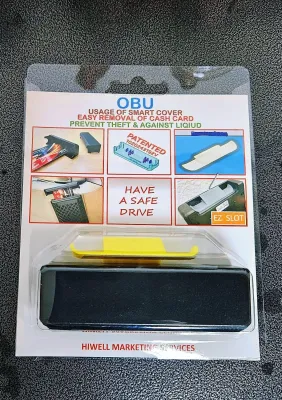
Prices are valid at publication and may change. Please refer to the product page for the latest price.
One of the primary physical consequences of this heat is the cycle of thermal expansion and contraction. As the cabin heats up during the day, the plastic casings, metal brackets, and internal circuit boards of your dashboard devices expand at slightly different rates. When you turn on the air conditioning or park in a shaded area, these materials contract. Over months and years, this constant mechanical flexing can weaken internal solder joints, potentially leading to intermittent electrical connections or premature device failure.
Continuous exposure to ultraviolet (UV) radiation also poses a threat to display screens and outer housings. High UV levels can degrade the liquid crystal layers in digital screens, leading to polarization failure, permanent discoloration, or faded displays that are difficult to read in bright daylight. Furthermore, prolonged UV exposure can break down the chemical bonds in standard plastics, making the outer casing of your devices brittle, prone to cracking, or susceptible to color fading.
Observable Signs of Heat Stress on Your OBU
Identifying the early warning signs of heat damage can prevent sudden device failure while you are on the road. Regularly inspecting your dashboard-mounted unit is a simple way to monitor its physical condition. Start by checking the outer plastic casing for any visible warping, bowing, or melting along the seams, which indicates that the material has reached its thermal limit.

Another common area of failure is the mounting bracket and its adhesive backing. High cabin temperatures can soften standard automotive adhesives, causing the mounting bracket to sag, wobble, or peel away from the windscreen. If you notice sticky residue pooling around the base of the mount or find that the unit vibrates excessively while driving, the adhesive bond has likely been compromised by heat.
Screen anomalies are also clear indicators of environmental stress. Look out for dead pixels, persistent dark spots, or touchscreens that become sluggish or entirely unresponsive to input. If your unit begins to exhibit erratic behavior, such as unexpected reboots, failure to read cards, or physical swelling of the casing, establish a clear safety boundary: stop using the device immediately and consult the manufacturer or an authorized service center to prevent further damage or safety hazards.
Do You Actually Need an OBU Cover? A Decision Guide
Deciding whether to purchase an OBU cover depends largely on your daily routine and where your vehicle spends most of its time. If you primarily park in sheltered multi-storey car parks, basement lots, or covered residential garages, your dashboard is naturally shielded from the harshest hours of direct sunlight. In such cases, the risk of severe heat damage is relatively low, and a cover may be a secondary consideration.
Conversely, if your daily routine involves parking in open-air estates, industrial zones, or outdoor commercial lots, your vehicle is exposed to hours of uninterrupted solar radiation. Under these conditions, the dashboard temperature can easily exceed safe operating thresholds. For outdoor parkers, a heat-resistant cover provides a highly practical shield that blocks direct UV rays from striking the device’s sensitive screen and casing.
The mounting angle of your windscreen also plays a significant role in heat accumulation. Vehicles with steeply raked windscreens allow more direct sunlight to penetrate deep into the dashboard area, intensifying the thermal load on mounted electronics. Weighing the modest upfront cost of a protective cover—typically ranging from S$10 to S$30 on local online marketplaces—against the inconvenience of scheduling a replacement appointment makes a cover a highly sensible preventive measure for many drivers.
Safety and Compatibility Checks Before Choosing an OBU Cover
Before purchasing any aftermarket accessory for your vehicle’s interior, safety and compatibility must be your top priorities. Any cover you install must not obstruct your clear view of the road or interfere with the safe operation of your vehicle. Refer to your vehicle’s original documentation to ensure that neither the OBU nor its cover is positioned within the deployment zone of your dashboard or passenger-side airbags, as unsecured objects can become dangerous projectiles during an accident.
Compatibility with the device’s built-in features is equally critical. When selecting a cover, verify that its design matches your specific OBU model and leaves essential components completely unblocked. The cover must feature precise cutouts for solar charging panels, optical sensors, status indicator lights, and internal antennas. Blocking these areas can lead to transaction failures at toll gantries or prevent the unit from receiving necessary wireless updates.
Material quality is another factor that should not be overlooked. Avoid low-grade, generic plastic or silicone covers that do not specify their temperature tolerances, as poor-quality materials can melt or release sticky chemical residues onto your device when heated. Opt for high-grade, heat-resistant silicone, polycarbonate, or specialized fabric covers designed specifically for automotive environments, ensuring they do not trap moisture against the device’s casing.
Alternative Ways to Reduce Heat Exposure for Your OBU
While a protective cover is an effective localized solution, combining it with broader cabin-cooling strategies yields the best results. Deploying a high-quality, reflective windshield sun shade whenever you park outdoors is one of the simplest and most effective ways to lower the overall temperature of your dashboard. These shades block solar energy before it can penetrate the cabin, protecting your steering wheel, seats, and mounted electronics simultaneously.
Another highly effective long-term investment is the installation of professionally applied, legally compliant solar control window films. High-performance films are engineered to reject a significant portion of infrared heat and UV radiation. When choosing a window film, always ensure it complies with local Land Transport Authority (LTA) regulations regarding light transmittance to maintain road legality while protecting your vehicle’s interior.
Finally, maintaining a clean dashboard environment can help preserve the integrity of your mounted devices. Dust, grease, and airborne grime can accumulate around the OBU’s mounting bracket, and under high heat, this mixture can bake onto the surfaces, weakening the adhesive bond. Periodically wiping down the surrounding area with a clean, dry microfiber cloth prevents buildup and ensures that the mounting bracket remains securely attached to your windscreen.
Frequently Asked Questions (FAQ)
Can an OBU cover cause the device to overheat?
Yes, if the cover is poorly designed or lacks proper ventilation, it can trap ambient heat around the device. While a cover is highly effective at blocking direct UV rays, it must allow adequate airflow to prevent heat buildup. When choosing a cover, look for designs that feature ventilation slots or open backings, and always refer to the device’s official operating guidelines to ensure it remains within safe temperature limits.
Will using a third-party OBU cover void my warranty?
Generally, using a non-destructive, removable protective cover that does not require physical modifications or permanent adhesives will not void your device’s warranty. However, it is always wise to review the official warranty terms provided by the manufacturer or authorized distributor. Avoid any aftermarket accessories that require you to disassemble the unit, apply permanent glues, or alter the original mounting hardware.
How do I clean my OBU screen safely in hot weather?
Never attempt to clean the screen while the device is hot from sitting in the sun, as sudden temperature changes or moisture can damage the display. Allow the vehicle’s cabin to cool down naturally in a shaded area or with the air conditioning running before cleaning. Gently wipe the screen using a dry, clean microfiber cloth, and strictly avoid using harsh chemical cleaners, alcohol wipes, or household detergents that could strip the screen’s protective coatings.

Community discussion
Share your experience or ask a question. Comments are reviewed before publication.