
Selecting a phone mount for the Xpeng G6 requires a clear understanding of the vehicle’s modern, minimalist cabin architecture. Because the G6 features a prominent central touchscreen, slim air vents, and soft-touch dashboard materials, standard universal mounts often fail to provide a secure fit or risk damaging the interior. The most effective mounting solutions are those designed to integrate seamlessly with the specific contours of the G6’s dashboard or display bezel, ensuring your device remains stable and visible without obstructing your line of sight or interfering with vehicle controls.
Understanding the Xpeng G6 Dashboard Layout
The interior of the Xpeng G6 is characterized by its clean, driver-centric design, which presents unique challenges for traditional phone mounting hardware. The centerpiece of the dashboard is a large, floating infotainment screen that projects outward from the main console. Placing a standard suction cup mount on the windshield or the upper dashboard surface behind this screen can severely limit your forward visibility or force you to stretch awkwardly to reach your phone. Furthermore, the dashboard’s upper surface is finished with textured, soft-touch materials that do not easily form an airtight seal with generic suction cups, leading to frequent drops when driving over uneven surfaces.
Temperature is another critical factor when evaluating the G6’s dashboard environment. In tropical climates like Singapore, vehicles parked in open-air carparks experience intense cabin heat, with dashboard temperatures rising significantly under direct sunlight. This extreme heat can cause the adhesive backings of generic mounts to melt, slide, or lose structural integrity, potentially leaving a sticky, difficult-to-clean residue on the premium synthetic leather or soft-touch plastics.
Products mentioned in this guide
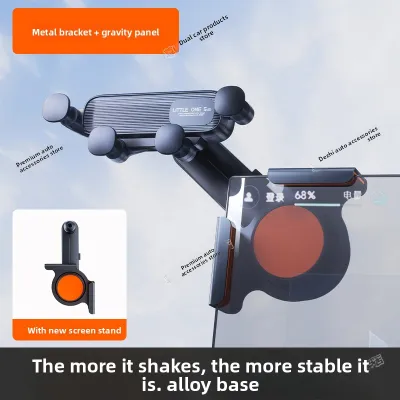
Prices are valid at publication and may change. Please refer to the product page for the latest price.
The air vents in the Xpeng G6 are also highly specialized. Unlike older vehicles with thick, robust plastic grilles, the G6 utilizes slim, low-profile horizontal vents designed to blend into the dashboard’s minimalist aesthetic. These vents feature delicate internal louvers and directional adjusters. Attaching a heavy smartphone using a generic, spring-loaded vent clip can place excessive mechanical stress on these thin blades, risking permanent misalignment or structural breakage of the vent assembly.
Evaluating Phone Mount Types for the Xpeng G6
To find a secure mounting solution that preserves the integrity of your vehicle’s interior, it is essential to compare the mechanical designs of different mount categories. Each type offers distinct advantages and trade-offs depending on your driving habits and aesthetic preferences.

Screen-Mounted or Side-Cling Mounts
Screen-mounted brackets are designed to clamp directly onto the outer bezel of the Xpeng G6’s central infotainment display. These mounts typically use a tension-based screw or a custom-molded clip that wraps around the top or side edge of the screen frame. The primary advantage of this design is that it positions your smartphone at eye level, making it easy to reference navigation apps without looking down. However, you must verify that the clamp features thick, high-quality silicone or rubber padding on all contact points to prevent scratching or denting the display’s bezel. Additionally, ensure the mount does not block any portion of the active touchscreen area or put excessive pressure on the glass panel itself.
Air Vent Clips
Air vent mounts remain popular due to their simplicity and low profile, but they require careful selection for the Xpeng G6. Standard gravity-fed or spring-loaded clips that rely on a simple rubber prong often slide off the G6’s slim vent blades. If you prefer a vent mount, look for designs that feature a mechanical hook or a screw-tightening clamp mechanism. These designs hook behind the vent blade and tighten securely, distributing the weight of the phone more evenly. Keep in mind that mounting a phone directly in front of the vent will block airflow, which can cool your phone during hot days but may restrict cabin cooling efficiency.
Dashboard Suction or Adhesive Mounts
Adhesive and suction mounts offer flexibility in placement, allowing you to position the phone on the flat areas of the dashboard console. If you choose an adhesive mount, it is critical to select one that uses high-grade, heat-resistant acrylic foam tape rather than cheap double-sided tape. In Singapore’s humid and hot climate, standard adhesives degrade rapidly, causing the mount to sag or detach. Suction mounts with sticky gel pads can adhere to textured surfaces, but they must be checked periodically to ensure the vacuum seal has not been compromised by temperature fluctuations.
Dedicated Custom-Fit Bases
Custom-fit bases are engineered specifically for the Xpeng G6’s interior geometry. These bases typically snap into the gaps between the dashboard panels or wrap around the hazard light button area without the need for permanent adhesives or screws. Once the custom base is securely snapped into place, you can attach a standard ball-joint phone holder or a magnetic charging pad. While these custom-molded bases are generally more expensive—often ranging from S$30 to S$60—they offer the cleanest integration, maximum stability, and the lowest risk of damaging the vehicle’s original surfaces.
Safety and Ergonomic Considerations
When installing any accessory in your Xpeng G6, driving safety must remain your primary concern. A poorly positioned phone mount can create dangerous blind spots or interfere with your physical control of the vehicle.
First, verify that the mount and your smartphone do not obstruct your view of the road or the vehicle’s essential displays. The G6 features a compact digital instrument cluster directly behind the steering wheel; your phone should never block this screen or your view of the side mirrors. Ideally, the phone should be positioned within your peripheral vision, allowing you to glance at navigation instructions without taking your eyes off the road for more than a split second.
Second, you must strictly avoid placing any mounting hardware within the deployment zones of the vehicle’s airbags. The passenger-side dashboard airbag and the side curtain airbags deploy with immense force during a collision. If a phone mount or charging cable is positioned in these zones, it can be launched into the cabin as a dangerous projectile. Consult your Xpeng G6 owner’s manual to identify the exact locations of all airbag modules before finalizing your mount’s position.
Finally, consider cable management. If you use a wired connection or a wireless charging mount, the power cable must be routed neatly. Avoid letting cables drape across the steering column, the center console controls, or the wireless charging pad area. Loose cables can snag on your hands while steering or operating the gear selector, creating a sudden and hazardous distraction. Use small adhesive cable clips to route the wire along the seams of the center console to keep the cabin tidy and safe.
How to Verify Compatibility Before Purchasing
The market for electric vehicle accessories is flooded with generic products that claim to fit “all modern SUVs” or “all electric vehicles.” To avoid the hassle of returning incompatible items, follow a structured verification process before making a purchase.
Begin by searching for listings that explicitly name the Xpeng G6 and specify the correct model year. Because car manufacturers occasionally update interior trims, dashboard materials, or vent dimensions during mid-cycle refreshes, a mount designed for an older or different model may not fit your vehicle perfectly. Avoid relying on broad category descriptions; instead, look for technical drawings or product specifications that detail the exact dimensions of the mounting bracket.
Next, leverage user-generated content on online marketplaces and automotive forums. Look closely at customer reviews that include real-world photos or videos of the mount installed inside an Xpeng G6. These images provide invaluable insight into how the mount actually fits the dashboard contours, whether it wobbles during driving, and if it blocks any portion of the central screen or instrument cluster. Pay attention to feedback from drivers living in warm climates, as they often report on how well the adhesives or suction cups hold up under high cabin temperatures.
Lastly, check the return and exchange policies of the retailer, whether you are buying from a local automotive shop in Singapore or an online marketplace. Ensure that the seller offers a hassle-free return window if the mount does not fit as described or if the installation process feels insecure. This precaution is especially important for custom-molded bases, which rely on precise millimeter-level tolerances to snap into the dashboard panels.
Installation Best Practices and Interior Care
Proper installation is key to ensuring your phone mount remains secure while protecting the premium surfaces of your Xpeng G6. Taking a few extra minutes during the setup process can prevent costly damage to your dashboard or vents.
Before applying any adhesive, suction cup, or clamp, thoroughly clean the target area. Dust, oils from your skin, and interior dressing sprays can prevent adhesives and suction cups from bonding correctly. Use a clean microfiber cloth dampened with water or a mild, manufacturer-approved interior cleaner to wipe down the surface. Avoid using harsh chemical solvents, high-concentration isopropyl alcohol, or abrasive scrubbers, as these can permanently strip the protective coating or discolor the soft-touch plastics and synthetic leather of the G6’s dashboard. Allow the area to dry completely before proceeding.
Once the surface is clean, install the mount according to the manufacturer’s instructions. If you are using an adhesive mount, apply firm, even pressure for at least 30 to 60 seconds. Crucially, allow the adhesive to cure fully—typically for 24 hours—before attaching your smartphone or subjecting the mount to any weight. For vent mounts, gently tighten the clamp or hook until it is snug; do not over-tighten, as excessive force can crack the delicate plastic louvers.
To test the mechanical stability of the mount, gently wiggle the bracket without your phone attached. If you observe any excessive flexing of the vent blades or dashboard panels, remove the mount and adjust its position. When it comes time to remove an adhesive mount, do not pull it off forcefully. Instead, use a piece of dental floss or high-strength fishing line to gently saw through the adhesive backing. You can also apply mild heat from a hairdryer to soften the glue, making it easier to peel away without tearing the underlying dashboard material.
Frequently Asked Questions (FAQ)
Can I use a generic suction cup mount on the Xpeng G6 dashboard?
While you can physically place a generic suction cup mount on the Xpeng G6 dashboard, it is generally not recommended. The G6’s dashboard features a textured, soft-touch surface that prevents standard suction cups from creating a perfect, airtight vacuum seal. Over time, especially when exposed to direct sunlight and high cabin temperatures, air will seep under the suction pad, causing the mount and your phone to fall. Additionally, some generic suction cups use strong adhesive gel pads that can react chemically with the dashboard’s synthetic materials, leaving permanent rings, discoloration, or sticky residue. If you must use a suction mount, attach it to the windshield or use a dedicated adhesive mounting disk designed for textured surfaces.
Will a standard vent clip damage the Xpeng G6's air conditioning louvers?
Yes, there is a significant risk of damage if you use a standard, spring-loaded vent clip on the Xpeng G6. The G6’s air conditioning vents are designed with slim, delicate horizontal louvers that are not built to support the weight of modern, heavy smartphones. A basic clip that pinches the blade can easily bend, scratch, or snap the plastic components, leading to expensive repairs. If you prefer a vent-mounted solution, look specifically for mounts that feature an adjustable support arm or a hook mechanism that anchors deep behind the vent structure, transferring the weight of the phone away from the delicate louvers and onto the surrounding dashboard frame.
Are there dedicated wireless charging mounts specifically molded for the Xpeng G6?
Yes, several aftermarket manufacturers produce wireless charging mounts with custom-molded bases designed specifically for the Xpeng G6’s interior layout. These custom mounts typically snap securely into the panel gaps around the central screen or the center console, providing a highly stable platform. When choosing a wireless charging mount, always verify the exact model year compatibility in the product description to ensure a perfect fit. Additionally, check the mount’s electrical specifications against your vehicle’s power output. The G6’s USB and Type-C ports provide specific power outputs; ensure the wireless charging mount’s input requirements match these specifications to achieve optimal charging speeds without overloading the circuit or causing the charger to overheat.

Community discussion
Share your experience or ask a question. Comments are reviewed before publication.