
To find a phone holder that fits the Aion V dashboard without blocking the screen or vents, you must carefully evaluate the vehicle’s unique interior geometry. The Aion V features a highly digitalized cockpit where a large, floating central infotainment screen and integrated air conditioning vents occupy prime real estate. Standard universal mounts often fail because they either block your line of sight to these essential displays or put excessive physical strain on the delicate vent louvers. By understanding the specific layout of the Aion V’s center console and matching it with the correct mounting mechanism, you can keep your smartphone secure, accessible, and completely out of the way of your driving view.
Understanding the Aion V Dashboard Layout
The dashboard of the Aion V is designed with a modern, minimalist aesthetic that prioritizes screen visibility and clean lines. The central infotainment display is a prominent, floating touchscreen that rises above the main dashboard line. This positioning is excellent for driver navigation but leaves very little room directly above or around the screen for traditional clip-on or suction mounts without creating a significant blind spot. Placing a phone too close to this display can also block your view of critical vehicle settings, climate controls, or the reversing camera feed.
Directly below the infotainment screen are the air conditioning vents. In the Aion V, these vents are integrated into the horizontal trim of the dashboard. The louvers are designed to be sleek and low-profile, which means they have limited depth and a specific blade thickness. Because these vents are positioned to deliver airflow directly to the cabin occupants, mounting a phone here not only blocks the cool air—a major drawback during hot afternoons—but also subjects the phone to constant temperature fluctuations.
Products mentioned in this guide
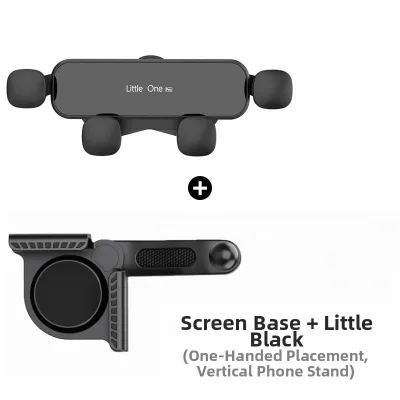
Prices are valid at publication and may change. Please refer to the product page for the latest price.
Furthermore, the materials used across the Aion V’s dashboard present a challenge for adhesive and suction-based holders. The upper surface consists of textured, soft-touch materials designed to reduce glare and provide a premium feel. This textured finish prevents standard suction cups from creating the airtight vacuum seal necessary to hold a heavy smartphone. The lower sections of the console feature curved plastics and decorative trim pieces that offer very few flat, rigid surfaces for adhesive pads to bond with securely.
Mounting Types and Compatibility Checks
Selecting the right phone holder requires analyzing how different mounting mechanisms interact with the Aion V’s specific interior surfaces. Not all mounts are created equal, and a design that works perfectly in a traditional cabin may fail or cause damage in a modern electric vehicle layout. To make an informed decision, you must evaluate the physical compatibility of vent clips, suction cups, adhesive bases, and specialized screen-back or gap-wedge mounts against the vehicle’s structural constraints.

Vent Clips
Vent-clip mounts are a popular and highly portable option, but their compatibility with the Aion V depends heavily on the design of the clip and the structure of the vent louvers. The horizontal blades of the Aion V’s air vents are relatively thin and designed primarily for directing airflow, not for supporting external weight. Before purchasing a vent mount, you must verify that the clip mechanism is adjustable and features a soft, rubberized grip to prevent scratching or cracking the plastic blades.
A major risk with vent mounts in this vehicle is the load-bearing capacity of the louvers. Modern smartphones, especially larger models or those with heavy protective cases, can weigh upwards of 200 grams. When you drive over speed bumps, uneven road surfaces, or carpark ramps, the downward force exerted on the vent blade is multiplied. This constant leverage can cause the vent louvers to sag permanently, loosen, or even snap, requiring an expensive replacement of the entire vent assembly.
Additionally, you must consider the practical impact on cabin comfort and device health. In a tropical climate, blocking even one air vent can noticeably reduce the cooling efficiency of the air conditioning system. Conversely, running the heater in colder conditions while a phone is mounted directly in front of the vent can cause the device to overheat rapidly. If you do choose a vent mount, look for designs with extended arms that position the phone slightly away from the direct path of the airflow.
Dashboard Suction and Adhesive Mounts
Suction cup and adhesive mounts offer more flexibility in positioning, but they require careful surface evaluation to ensure they do not fail or damage the interior. Standard suction cups rely on a perfect vacuum, which is nearly impossible to achieve on the textured, soft-touch synthetic materials covering the Aion V’s upper dashboard. Over time, microscopic air gaps will cause the suction to fail, potentially dropping your phone while the vehicle is in motion.
Adhesive mounts use double-sided tape to bond with the dashboard surface. While these can provide a very secure hold, they are highly sensitive to cabin temperatures. When parked under direct sunlight, interior temperatures can rise significantly, softening the adhesive gel and causing the mount to slide or peel off. Furthermore, some strong adhesives can react chemically with the soft-touch coatings or synthetic leather of the dashboard, leaving permanent discoloration, sticky residue, or even tearing the material when removed.
To use a suction or adhesive mount safely on the Aion V, you should look for products that include a dedicated, semi-permanent dashboard pad. This pad features a strong, surface-safe adhesive on one side that bonds to textured surfaces, and a smooth, flat plastic top on the other side that provides an ideal surface for a suction cup. Always verify that the adhesive used is rated for high-temperature automotive environments and is labeled as clean-removing to protect your vehicle’s resale value.
Screen-Back and Gap Wedges
Screen-back mounts and gap-wedge brackets are specialized solutions designed specifically for modern vehicles with floating infotainment displays. A screen-back mount clamps securely onto the rigid rear frame of the Aion V’s central screen, using an adjustable arm to position the phone to the side of the display. This setup keeps the phone at eye level without blocking the screen itself or obstructing any air vents.
Before choosing this type of mount, you must measure the clearance behind the infotainment screen to ensure there is enough space between the screen housing and the windshield. The mounting clamp must have a soft, non-slip silicone lining to grip the screen frame tightly without scratching the plastic or putting undue pressure on the display panel itself. You should also check that the mount does not block any cooling vents on the back of the screen, as trapping heat can lead to display flickering or premature component failure.
Gap-wedge mounts, on the other hand, are designed to clip into the tight seams between different dashboard panels or around the center console. These provide an incredibly stable, mechanical connection without adhesives or suction. However, you must verify that the wedge is designed specifically for the Aion V’s panel gaps, as forcing a generic wedge into a tight seam can permanently deform the dashboard trim or damage internal clips.
Key Selection Criteria for Safe and Unobstructed Driving
When filtering through potential phone holders for your Aion V, safety must be your primary consideration. The ideal mount should position your phone within your peripheral vision so you can glance at navigation instructions without taking your eyes off the road. It must not block your view through the windshield, obscure the digital instrument cluster behind the steering wheel, or interfere with your line of sight to the passenger-side wing mirror.
Ease of operation is another critical factor for daily driving. A high-quality phone holder should support single-handed operation, allowing you to dock or release your phone with a simple, fluid motion. Gravity-locking cradles, spring-loaded one-touch clamps, and magnetic mounts are excellent choices for this. Avoid mounts that require you to manually adjust screw clamps or use two hands to secure the device, as these are highly distracting and unsafe to operate while driving.
Vibration dampening is essential for maintaining readability and preventing driver distraction. A mount with a long, flexible gooseneck arm might seem convenient, but it is highly susceptible to shaking on uneven roads or when crossing speed humps. Look for mounts with short, rigid arms and robust ball joints that can be locked tightly into place. This ensures your phone remains perfectly still, reducing eye strain when you need to make a quick glance at your map.
Finally, you must strictly avoid placing any mount or phone within the vehicle’s safety system deployment zones. The Aion V is equipped with advanced airbag systems, including passenger dashboard airbags and side curtain airbags. Placing a mount on the passenger side of the dashboard or routing charging cables across these areas can turn your phone into a dangerous projectile if the airbags deploy. Always consult the Aion V owner’s manual to identify the exact boundaries of these deployment zones and keep your mounting setup completely clear of them.
Step-by-Step Installation and Verification Guide
Proper installation is key to ensuring your phone holder remains secure and does not damage your Aion V’s interior. Begin by selecting a cool, shaded area to perform the installation, as high temperatures can interfere with the bonding process of adhesives. Gather a mild, surface-safe cleaner—such as an isopropyl alcohol wipe or a dedicated interior detailer authorized by the vehicle manufacturer—and a clean microfiber cloth.
First, thoroughly clean the chosen mounting surface to remove all dust, finger oils, and interior dressings. Many car owners use silicone-based protectants on their dashboards, which create a slick barrier that completely prevents adhesives and suction cups from sticking. Wipe the area clean, then dry it completely with the microfiber cloth. If you are using an adhesive mount or a dashboard pad, peel the backing and press the base firmly onto the surface for at least 30 seconds, ensuring even pressure across the entire contact patch. Allow the adhesive to cure fully for 24 hours before attaching the phone or applying any load.
Once the mount is installed and cured, perform a physical stability test. Gently shake the mount’s arm to check for any play or looseness at the base. If the mount wobbles or the dashboard panel flexes excessively, the mounting position may not be structurally sound. Next, place your phone in the cradle and simulate road vibrations by gently tapping the device. The mount should hold the phone securely without slipping, sliding, or rattling.
Sit in your normal driving position and adjust the viewing angle of the phone. Verify that you have an unobstructed view of the entire digital instrument cluster, the central infotainment screen, and the road ahead. The phone should be angled slightly toward your line of sight to minimize glare from the side windows. Finally, establish clear stop-use conditions: if you notice the adhesive beginning to peel, the suction cup losing vacuum, or the vent clip slipping, remove the mount immediately to prevent a sudden distraction or physical hazard while driving.
Frequently Asked Questions (FAQ)
Can I use a magnetic phone mount on the Aion V dashboard?
Yes, you can use a magnetic phone mount on the Aion V, but you must ensure the mounting base is securely attached to the vehicle. Because the dashboard is constructed from non-magnetic materials like plastics and synthetic leather, a magnetic mount cannot stick directly to the console without an adhesive base or a vent clip adapter. When using a magnetic system, you must attach a thin metal plate to the back of your phone or inside its case. Ensure this plate is positioned correctly so it does not interfere with your phone’s wireless charging capabilities or any internal compass sensors. Additionally, verify that the mount uses high-strength magnets to prevent your phone from detaching during sudden braking or sharp turns.
Will a suction cup mount damage the Aion V soft-touch dashboard?
Directly applying a strong suction cup to the soft-touch, textured surfaces of the Aion V dashboard can potentially cause cosmetic damage. The combination of strong vacuum pressure, adhesive gel pads, and high cabin temperatures under the sun can stretch the synthetic material, leaving a permanent circular indentation or causing the soft-touch coating to peel. To protect your dashboard, avoid mounting suction cups directly onto soft, padded areas. Instead, use a rigid, adhesive-backed dashboard disc to distribute the pressure, or mount the suction cup directly onto the smooth glass of the windshield. If you must remove a suction cup, do so gently by pulling the release tab slowly to let air break the vacuum, rather than yanking the mount off the surface.

Community discussion
Share your experience or ask a question. Comments are reviewed before publication.