
Quick Answer: Car Display Screen or Phone Navigation?
Choosing between a dedicated car display screen and smartphone navigation is not about finding a single superior tool. Instead, the right choice depends on your daily driving habits, budget, and how much you value seamless vehicle integration over instant, crowd-sourced traffic data. A dedicated built-in navigation system offers an uncluttered dashboard, superior GPS stability in challenging environments, and physical integration with your vehicle’s controls. Conversely, smartphone navigation provides a completely free, highly dynamic ecosystem with real-time traffic updates, though it requires a secure mount and can expose your phone to high thermal stress.
For many drivers, the modern compromise lies in smartphone projection systems like Apple CarPlay and Android Auto. These platforms bridge the gap by displaying your phone’s navigation apps directly onto the vehicle’s larger car display screen. This hybrid approach combines the robust hardware of your car’s dashboard with the constantly updated cloud databases of your phone. If your current vehicle lacks this integration, evaluating the hardware, software, and real-world performance of both standalone methods will help you decide whether to invest in an aftermarket screen upgrade or stick to a reliable phone mount.
Hardware and Software: How They Actually Differ
Display Quality and Thermal Resilience
Dedicated car display screens are engineered specifically for the harsh environment of a vehicle cabin. These screens feature specialized anti-glare coatings and high-contrast backlighting designed to remain highly legible even under direct, harsh sunlight. Furthermore, because they are integrated directly into the dashboard, they are shielded from the extreme heat buildup that occurs near the windshield.
Products mentioned in this guide
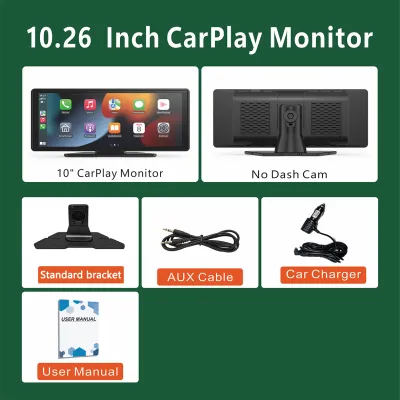
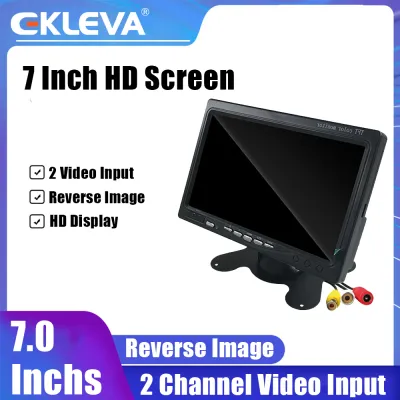
![[SG Local Seller] 7 Inch/7inch TFT LED LCD Screen Monitor Digital 800W*RGB*480H for Vehicle Reverse Car Monitor with 2 AV/RCA/BNC Inputs (Support:9-36Voltage)](https://img.lazcdn.com/g/p/c79cf59ff2ee38559992820210650948.png_400x400q80.png_.webp)
Prices are valid at publication and may change. Please refer to the product page for the latest price.

Smartphones, on the other hand, are general-purpose devices not built to withstand prolonged exposure to direct sunlight behind a windshield. In tropical climates, a phone mounted on the glass or dashboard can rapidly overheat. When a smartphone’s internal temperature rises too high, the device automatically dims its screen to protect the battery, slows down processing speeds, or shuts down entirely, leaving you without navigation mid-journey.
Controls, Ergonomics, and Driver Safety
Driver distraction is a critical safety concern, and the user interface plays a massive role in minimizing eyes-off-the-road time. Built-in car display screen systems are designed to interface directly with the vehicle’s physical controls, including steering wheel buttons, rotary dials, and factory voice control systems. This allows you to adjust volume, mute prompts, or zoom in on maps without taking your hands off the steering wheel.
Using a smartphone on a mount forces you to rely entirely on a relatively small touchscreen interface. This requires precise finger taps, which can be difficult and dangerous while navigating bumpy roads or heavy traffic. It is also important to note that operating a handheld mobile phone while driving is a serious traffic offense; while using a mounted phone is legally permissible, physical interaction should still be minimized to avoid cognitive distraction.
Positioning Accuracy and Signal Stability
Dedicated navigation systems typically connect to an external GPS antenna mounted on the vehicle’s roof or hidden inside the dashboard. More importantly, high-end built-in systems often tap into the vehicle’s internal sensors, such as wheel speed sensors and gyroscopes. This technology, known as dead reckoning, allows the system to calculate your precise position and heading even when GPS satellite signals are completely blocked.
Smartphones rely on internal, highly compact GPS chips and cellular tower triangulation. While highly advanced, these internal chips struggle when physical barriers block the line of sight to satellites. Without auxiliary vehicle data, a smartphone navigation app can easily lose its orientation, lag, or drift, leading to delayed instructions when you need them most.
Software Ecosystems and Map Updates
Proprietary car display systems run on closed software platforms managed by the vehicle manufacturer or aftermarket brand. These systems offer highly stable, distraction-free interfaces, but updating their map databases often requires downloading files onto a USB drive or purchasing proprietary SD cards. If these updates are neglected, the system will eventually fail to recognize new roads, housing estates, or altered traffic configurations.
Smartphones excel in software agility. Apps like Google Maps, Waze, and Apple Maps receive silent, automatic updates over cellular networks. These platforms continuously update their maps with new points of interest, road closures, and localized traffic flow changes without requiring any manual effort or financial investment from the user.
Side-by-Side Feature Comparison
Evaluating the practical strengths of each navigation method requires a direct comparison across key operational dimensions. The table below outlines how dedicated car display screens, standalone smartphones, and hybrid smartphone projection systems perform in daily use.
| Feature | Dedicated Car Display Screen | Standalone Smartphone | Hybrid Projection (CarPlay/Android Auto) |
|---|---|---|---|
| Display Visibility | High; anti-glare coating, optimized for daylight. | Variable; prone to glare and thermal dimming. | High; utilizes the vehicle's integrated screen. |
| GPS & Signal Stability | Excellent; utilizes external antennas and vehicle sensors. | Moderate; prone to drift in high-density areas. | Moderate to High; uses phone GPS, sometimes aided by car antenna. |
| Traffic & Rerouting | Slow; relies on periodic broadcast updates or mobile hotspots. | Instant; continuous crowd-sourced cloud data. | Instant; continuous crowd-sourced cloud data. |
| Offline Capability | High; pre-loaded regional maps stored locally. | Moderate; requires manual pre-downloading of map areas. | Moderate; requires manual pre-downloading of map areas. |
| Upfront Cost | Moderate to High; built-in or aftermarket hardware fees. | Low; assumes existing phone and a secure mount. | Variable; depends on existing vehicle compatibility. |
| Safety & Ergonomics | Excellent; integrated steering wheel and physical controls. | Poor; requires touchscreen interaction on a small mount. | Excellent; integrated steering wheel and voice controls. |
While dedicated car display screens offer unmatched physical stability and offline reliability, they lag behind in dynamic routing. Smartphone applications leverage real-time data from millions of active users, allowing them to detect sudden congestion, accidents, or road hazards within minutes. Standalone smartphones deliver this data instantly but suffer from physical limitations, making the hybrid smartphone projection system the most balanced operational setup for modern drivers.
Real-World Driving Scenarios
Urban Navigation and Multi-Story Car Parks
Navigating high-density urban zones presents a significant challenge for GPS receivers. In areas crowded with high-rise commercial buildings, satellite signals bounce off concrete and glass structures, creating a phenomenon known as multipath interference. This interference causes smartphone GPS locations to drift wildly, sometimes showing your vehicle on an adjacent street or pointing in the wrong direction.
This issue is particularly noticeable when exiting multi-story car parks or underground basements. A smartphone can take several minutes to re-acquire a stable satellite lock, during which you may miss an immediate turn. A dedicated car display screen equipped with dead-reckoning sensors uses physical tire rotation and vehicle heading data to track your movement through the basement, ensuring your map orientation is perfectly accurate the moment you drive out onto the street.
Expressways and Dynamic Traffic Updates
On major expressways, traffic conditions can shift from free-flowing to a complete standstill in a matter of minutes due to sudden bottlenecks or accidents. For daily commuters, receiving early warnings about these delays is crucial for planning alternative routes and avoiding peak-hour congestion.
Smartphone navigation apps are highly effective in these scenarios because they collect real-time speed data from other drivers on the same route. If an accident occurs on an expressway, apps like Waze or Google Maps will detect the sudden drop in average speed and automatically calculate a faster detour. Traditional dedicated car screens without active cellular connections cannot update quickly enough to save you from getting stuck in unexpected gridlock.
Cross-Border Driving
Taking a road trip across the border introduces additional variables, such as cellular network handovers and data roaming charges. When crossing checkpoints, mobile phone signals often drop temporarily as your device switches from local telecommunications networks to regional providers. If your smartphone navigation app is actively routing and loses its connection without cached data, the map may fail to load, leaving you navigating unfamiliar highway interchanges blindly.
Dedicated car display screens with pre-loaded regional maps store all geographical data locally on internal storage. Because these systems do not rely on cellular networks to render maps, they continue to provide uninterrupted turn-by-turn guidance regardless of network availability or roaming status. This offline reliability makes dedicated systems highly dependable for long-distance driving where cellular coverage is inconsistent.
Upfront Costs and Long-Term Value
Smartphone Navigation Costs
Using a smartphone for navigation is highly cost-effective because it leverages hardware you already own. The only immediate upfront cost is a high-quality, secure phone mount, which typically ranges from S$20 to S$50. Map updates, traffic data, and routing services are entirely free, though you must account for the minor cellular data usage incurred during live navigation.
However, there are hidden long-term costs associated with using a phone as a primary navigation tool. The combination of continuous screen backlighting, active GPS tracking, cellular data processing, and exposure to dashboard heat places immense stress on a smartphone’s lithium-ion battery. Over time, this thermal load accelerates battery degradation, which can lead to reduced battery health and the need for premature device replacement.
Aftermarket Car Display Screens
Upgrading to an aftermarket car display screen involves a more significant financial commitment. High-quality double-DIN head units from reputable brands generally cost between S$300 and S$1,200, depending on screen size, display technology, and whether they support wireless smartphone projection.
Aftermarket Head Unit Cost:  S$300 - S$1,200
Professional Installation:    S$100 - S$250
--------------------------------------------
Total Estimated Investment:   S$400 - S$1,450
In addition to the hardware, professional installation is strongly recommended and typically costs between S$100 and S$250. Attempting to install an aftermarket display screen yourself carries significant risks. Modern vehicle dashboards house complex electrical harnesses, data buses, and safety components like passenger airbags.
Before undertaking any installation or modification, always consult your vehicle’s original manufacturer instructions and the aftermarket product documentation to verify interface, mounting, and electrical compatibility. Improper wiring can damage your car’s electrical systems, drain the battery, or void your vehicle’s warranty. Working with a qualified automotive technician ensures that steering wheel controls, reverse cameras, and factory microphones are safely and correctly integrated.
Maintenance and Map Updates
When evaluating long-term value, consider the ongoing maintenance requirements of both systems. Smartphone apps require zero maintenance fees and update automatically. Older or proprietary built-in car navigation systems may require paid map subscription packages or one-time fees to update their internal databases, which can become an annoying recurring expense.
Before investing in a brand-new aftermarket head unit, check if your current factory-installed screen already supports smartphone projection via a wired connection. Many drivers are unaware that their existing system is compatible, meaning they can enjoy the benefits of integrated navigation simply by plugging in a compatible USB cable, saving hundreds of dollars in hardware upgrades.
Final Verdict: Which Setup Fits Your Driving Needs?
To make an informed decision, evaluate your driving habits against the following practical framework:
- Choose a dedicated car display screen if: You prioritize a clean, integrated dashboard aesthetic, frequently drive through areas with poor cellular reception, require reliable offline navigation, and want to avoid mounting devices on your windshield. This setup is ideal for drivers who value hardware durability and consistent GPS performance above all else.
- Choose standalone phone navigation if: You want to avoid any upfront hardware or installation costs, prefer dynamic, crowd-sourced traffic alerts, and primarily drive short distances in urban areas with strong cellular coverage. This is the most practical choice for budget-conscious drivers who do not mind using a physical phone mount.
- Choose a hybrid smartphone projection system if: You want the best of both worlds. If your vehicle supports Apple CarPlay or Android Auto, you can leverage the high-visibility, integrated dashboard screen and physical steering wheel controls of your car while running the highly dynamic, real-time navigation apps from your phone.
Before purchasing any aftermarket car display screen, verify the exact product specifications to ensure it supports wireless projection, matches your vehicle’s dashboard dimensions, and is compatible with your existing steering wheel control adapters. Checking these details beforehand protects your investment and ensures a seamless, safe driving experience.
Frequently Asked Questions (FAQ)
Can I use both my car display and phone navigation at the same time?
Yes, many modern infotainment systems support multi-tasking and split-screen configurations. This setup allows you to display the vehicle’s native interface—such as radio controls, climate settings, or a reverse camera feed—on the main car display screen while your smartphone mounted nearby handles turn-by-turn navigation. Alternatively, when using smartphone projection, you can route navigation audio prompts through your car’s speaker system while displaying a different app on your phone screen. Always refer to your specific head unit’s user manual to understand its multi-tasking limits and audio routing options.
Do aftermarket car display screens support wireless Apple CarPlay and Android Auto?
Many modern aftermarket car display screens do support wireless smartphone projection, but this feature is not universal across all models. Lower-priced or entry-level aftermarket units often require a physical USB cable connection to launch CarPlay or Android Auto. Before purchasing an aftermarket unit, carefully inspect the product specifications to confirm whether wireless connectivity is built-in. If you own an older head unit that only supports wired connections, you can often purchase an authorized external wireless dongle to enable wireless functionality without replacing the entire screen.

Community discussion
Share your experience or ask a question. Comments are reviewed before publication.