
Quick Answer: Built-In GPS vs Phone Navigation
Choosing between a factory-installed built-in car GPS and phone navigation paired with a reliable car phone holder depends on how you balance physical integration against software agility. There is no single superior option for every driver. Built-in systems offer an uncluttered dashboard, stable satellite tracking in covered areas, and deep integration with your vehicle’s instrument clusters. On the other hand, phone-based navigation provides superior real-time traffic data, crowd-sourced road alerts, and zero long-term subscription costs. For many modern drivers, smartphone projection systems like Apple CarPlay and Android Auto offer the ideal compromise by displaying your phone’s live mapping applications directly on the vehicle’s integrated dashboard screen.
Core Comparison: Built-In GPS vs Phone Navigation
Display Quality, Visibility, and Ergonomics
Built-in navigation screens are engineered specifically for the automotive cabin environment. Manufacturers design these displays with optimized matte finishes to minimize glare under direct sunlight, ensuring high visibility throughout the day. Furthermore, these screens are strategically integrated into the upper dashboard or center console, aligning closely with your natural driving line of sight. This ergonomic placement minimizes eye strain and allows you to check directions with a quick glance, keeping your primary focus on the road ahead.

In contrast, relying on a smartphone for navigation introduces several display and positioning challenges. Smartphone screens are typically smaller and feature glossy glass surfaces that are highly susceptible to reflections and glare. To achieve safe viewing angles, you must mount the device using a dedicated car phone holder. The placement of this holder is critical; a poorly positioned mount can obstruct your forward view through the windshield or force you to look too far down from the road, creating a significant safety hazard.
Products mentioned in this guide
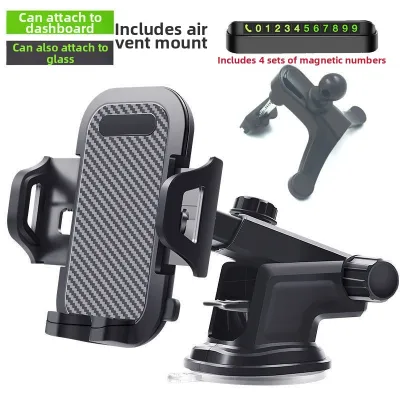
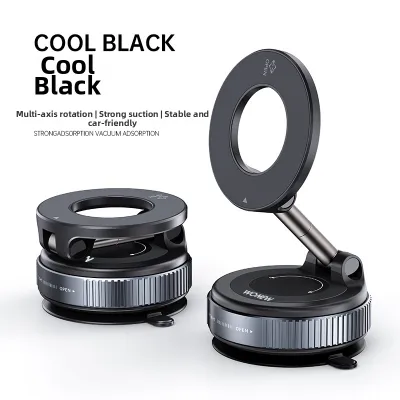
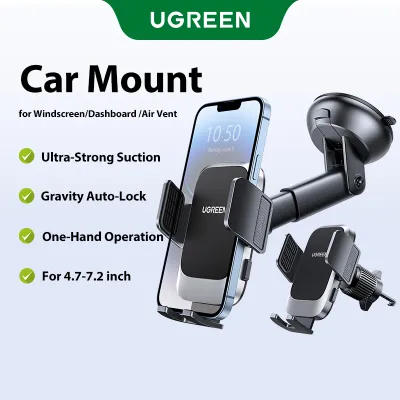
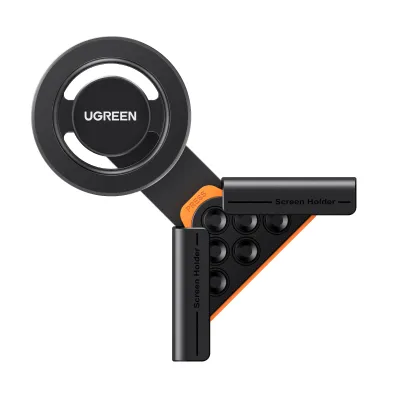


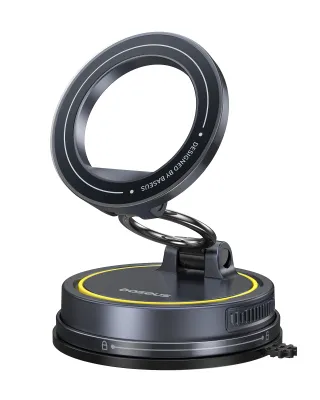

Prices are valid at publication and may change. Please refer to the product page for the latest price.
Map Accuracy, Real-Time Traffic, and Routing
Smartphone navigation applications leverage continuous cellular connectivity and massive, active user networks to deliver highly accurate, real-time traffic data. These platforms can instantly detect sudden slowdowns, accidents, speed cameras, and road hazards. They offer dynamic rerouting options that can save significant travel time during peak hours, automatically guiding you away from congested expressways.
Traditional built-in GPS units often rely on static map databases stored on local hard drives or memory cards. Updating these systems typically requires downloading new map files onto a USB drive or visiting a dealership, which can be inconvenient and sometimes expensive. Without regular updates, built-in systems may fail to recognize new roads, modified traffic directions, or permanent closures. However, modern infotainment systems equipped with smartphone projection bridge this gap completely, allowing you to run live phone navigation apps directly on the larger, integrated vehicle display.
Vehicle Integration and Audio Control
Built-in navigation systems are deeply integrated with your car’s electronic architecture, allowing them to communicate directly with other onboard hardware. For example, navigation prompts can be mirrored on the digital instrument cluster or projected onto a head-up display (HUD) directly in your line of sight. This integration ensures that you receive guidance without needing to look away from your driving path.
Audio management is similarly seamless. When a voice prompt is active, the built-in system automatically lowers or mutes the volume of your music or radio, ensuring you never miss a turn. Phone navigation relies on Bluetooth or auxiliary cable connections to route audio through the car’s speakers. This setup can sometimes suffer from minor audio lag, causing the first few words of a direction to be cut off. Additionally, unless you are actively streaming audio from your phone, some car systems will not play phone navigation prompts over the radio, forcing you to rely on the phone’s built-in speaker.
Upfront Costs, Subscriptions, and Long-Term Value
The financial commitment for built-in navigation is usually substantial, as it is often bundled into higher vehicle trim levels or sold as an expensive optional package during purchase. Furthermore, some manufacturers require ongoing subscription fees or one-off payments to unlock map updates after the initial warranty period expires.
Phone navigation is incredibly cost-effective, utilizing the mobile data plan and smartphone you already own. The only additional expense is the one-time purchase of a durable car phone holder and a high-quality charging cable, which typically costs between S$15 and S$60 depending on the mounting style and charging capabilities. This minimal investment offers exceptional long-term value, as mobile apps receive continuous, free software updates that improve performance and add features without any added subscription costs.
Driving in Singapore: Climate and Local Road Factors
Navigating ERP Gantries and Local Road Changes
Singapore’s urban landscape is characterized by rapid infrastructure developments, frequent road works, and the Electronic Road Pricing (ERP) system. Navigating these dynamic elements requires highly responsive mapping software that updates in real time.
Mobile navigation apps excel in this environment, offering up-to-the-minute alerts for active ERP gantries, current toll rates, and temporary lane closures. This allows drivers to make informed decisions about whether to take an alternative route to avoid ERP charges during peak hours.
Traditional built-in GPS systems, unless connected to a live telematics service, struggle to keep pace with these frequent local changes. A map database that is even a few months out of date may fail to warn you of a new ERP zone or a modified expressway exit, potentially leading to unexpected toll fees or missed turns.
Cabin Heat, Sunlight, and Phone Mount Stability
The tropical climate of Singapore presents unique physical challenges for hardware mounted inside a vehicle. Intense sunlight and high ambient temperatures can rapidly heat up a car’s cabin, especially when parked in open-air lots.
Smartphones mounted on the windshield or dashboard are highly vulnerable to solar radiation and heat buildup. When a phone overheats while running resource-intensive navigation apps, it may trigger thermal throttling, dim its screen brightness to unreadable levels, or shut down entirely to protect the battery.
To mitigate this risk, choosing the right mounting position for your car phone holder is essential. Opting for an air-con vent mount helps keep the device cool by utilizing the vehicle’s air conditioning system to dissipate heat. If you prefer a dashboard or windshield mount, look for designs that position the phone away from direct sunlight or feature built-in cooling mechanisms.
Quick Comparison Table
To help you quickly weigh your options, the table below compares the key operational differences between a built-in car GPS and a phone-based navigation setup.
| Feature | Built-In Car GPS | Phone with Car Phone Holder |
|---|---|---|
| Real-Time Traffic Data | Often limited or requires paid subscription | Highly accurate, crowd-sourced, and free |
| Hardware Integration | High (HUD, instrument cluster, steering wheel) | Low (requires Bluetooth or cable connection) |
| Upfront & Long-Term Costs | High initial cost; potential update fees | Low (cost of mount and cable only) |
| Map Update Frequency | Infrequent (requires manual or dealer updates) | Continuous, automatic, and instant |
| Screen Size & Flexibility | Large, fixed, optimized matte screen | Variable size; highly portable with mount |
| Thermal Management | Excellent (integrated into vehicle dashboard) | Moderate (prone to overheating in direct sunlight) |
Decision Framework: Which Setup Should You Choose?
To determine the best navigation setup for your daily driving needs, consider the following decision guidelines based on your vehicle’s capabilities and your personal preferences.
Choose Built-In GPS if:
- You prefer a clean, wire-free dashboard: If you dislike cables running across your console or accessories attached to your vents, a built-in system keeps your cabin looking pristine.
- You value deep vehicle integration: If your car features a head-up display or a digital instrument cluster that displays turn-by-turn directions, a built-in system offers a superior, unified driving experience.
- You drive through areas with weak cellular reception: Built-in systems utilize dedicated external GPS antennas that maintain tracking even in deep tunnels, underground car parks, or remote driving routes.
- You own a luxury vehicle with an active telematics subscription: If your manufacturer provides complimentary real-time traffic updates and over-the-air map downloads, the convenience of a built-in system is hard to beat.
Choose Phone Navigation with a Car Phone Holder if:
- You prioritize up-to-the-minute traffic alerts: If your daily commute involves navigating peak-hour congestion, real-time crowd-sourced data is essential for avoiding gridlock.
- You want to avoid ongoing subscription fees: If you prefer a completely free navigation solution that updates automatically in the background without any maintenance hassle.
- You drive multiple cars or use car-sharing services: A portable phone mount allows you to bring your preferred navigation setup and saved destinations to any vehicle instantly.
- You prefer familiar mobile interfaces: If you are already accustomed to the search functionality, voice controls, and layout of your favorite smartphone mapping applications.
Verify First if:
- Your vehicle supports smartphone projection: Before investing in a physical mount or committing to a built-in system, check if your car's infotainment unit supports wireless or wired Apple CarPlay or Android Auto. If it does, you can display your phone's live navigation maps directly on the vehicle's integrated screen, giving you the best of both worlds. However, you may still want to keep a reliable car phone holder on hand to hold your device securely while charging or when using vehicles without projection capabilities.
How to Choose a Safe and Stable Car Phone Holder
If you decide that phone navigation is the right choice for your driving style, selecting the correct mounting hardware is crucial for safety and stability. Before purchasing or installing any aftermarket accessory, always consult your vehicle’s owner manual for guidelines regarding dashboard materials, airbag deployment zones, and mounting restrictions. Never place a mount directly over or near an airbag cover, as this can cause severe injury during deployment.
When shopping for a car phone holder, you will encounter several common mounting designs, each with its own set of advantages and limitations:
- Air Vent Mounts: These clip directly onto your vehicle's air conditioning louvers. They are highly popular in tropical climates because the cool airflow directly dissipates heat from your smartphone, preventing thermal throttling. However, you must verify that your vent slats are sturdy enough to support the weight of your device, and avoid forcing clips onto delicate or uniquely shaped vents to prevent damage.
- Dashboard and Windshield Suction Mounts: These use a suction cup or adhesive pad to attach to smooth surfaces. They offer flexible positioning and keep the phone closer to your natural line of sight. However, intense UV exposure and high cabin heat can degrade the adhesive or suction seal over time, potentially causing the mount to fall while driving. Ensure the adhesive is rated for automotive use to avoid leaving permanent residue or damaging soft-touch dashboard plastics.
- CD Slot Mounts: These insert into the CD player slot, offering a highly stable mounting point. However, they are only suitable if your car has a legacy CD player and the placement does not block essential dashboard controls or screens.
In addition to the mounting style, evaluate the grip mechanism of the holder. Gravity and auto-clamping mounts use the weight of the phone or electronic sensors to automatically close the side arms around your device, providing a secure physical hold over speed bumps. Magnetic mounts offer unmatched convenience but require a high-quality magnetic connection and a compatible phone case to prevent the device from slipping during sudden braking.
Frequently Asked Questions (FAQ)
Can I use my phone's GPS without a mobile data connection?
Yes, most popular mobile navigation apps allow you to pre-download offline maps for specific regions. This is highly useful when driving in areas with poor cellular coverage or when traveling across the border. However, keep in mind that offline mode disables real-time traffic updates, live ERP alerts, and dynamic rerouting, relying solely on static map data.
Will a windshield phone mount block my view or violate traffic rules?
In Singapore, any accessory mounted on the windshield must not obstruct the driver’s clear line of sight of the road ahead. To ensure compliance and safety, position your mount low on the windshield, close to the dashboard corner, or use an air-vent mount instead. Always verify that your driving view remains completely unobstructed before starting your journey.
Does using phone navigation drain my car's battery?
Running continuous GPS tracking and keeping the screen active drains your smartphone’s battery, not your car’s battery. To prevent your phone from running out of power, connect it to a high-quality car charger or use a wireless charging car phone holder plugged into your vehicle’s USB port or 12V accessory outlet.
Community discussion
Share your experience or ask a question. Comments are reviewed before publication.