
Upgrading your car’s audio system with a Carlink multimedia unit requires balancing your vehicle’s physical and electrical layout with your personal entertainment goals. Rather than choosing a model based solely on screen size or software features, a successful installation depends on verifying compatibility with your dashboard, existing wiring, and factory safety systems. By systematically assessing your car’s specifications and mapping them to the available Carlink form factors, you can select an upgrade that integrates seamlessly into your daily drive.
Before purchasing any aftermarket electronics, it is essential to understand that vehicle compatibility is highly specific to your car’s make, model, production year, and trim level. A unit that works perfectly in one model year may not fit or function in the next due to mid-cycle refreshes or changes in the vehicle’s internal communication networks. Taking the time to research your vehicle’s specific requirements beforehand prevents costly installation errors and ensures that your new multimedia system operates safely and reliably.
Assess Your Vehicle's Dashboard and Compatibility
The first step in selecting a Carlink unit is to evaluate the physical space available in your dashboard. Traditional car stereos follow standardized sizes known as DIN standards. A single-DIN slot measures approximately 50 millimeters tall by 180 millimeters wide, while a double-DIN slot is twice as tall at 100 millimeters. Many modern vehicles, however, do not use these standard rectangular slots; instead, they feature integrated, uniquely shaped infotainment screens or curved dashboard panels. For these vehicles, you will need to determine if a custom-fascia trim kit is available to adapt the dashboard opening to a standard double-DIN or floating-screen Carlink unit without leaving gaps or compromising structural integrity.
Products mentioned in this guide
![[ SG ] CarlinKit Ai Box Wireless Carplay Adapter Android 13 8-Core 8+128G Built-in GPS Wireless Android Auto Apple Carplay Dongle Car Link Kit Tbox LED 车连易](https://img.lazcdn.com/g/ff/kf/S46cdc75f9378480db20ee29af4e8e255s.jpg_400x400q80.jpg_.webp)
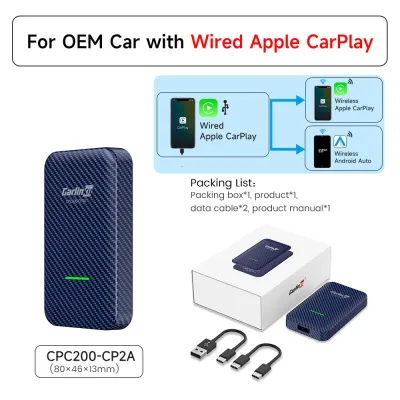
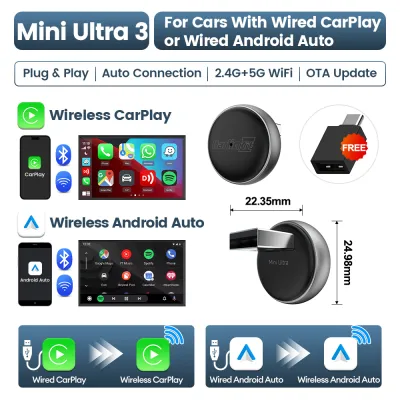
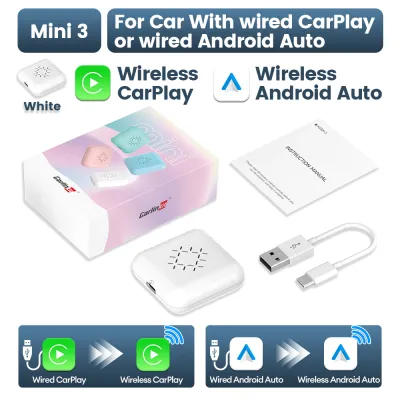
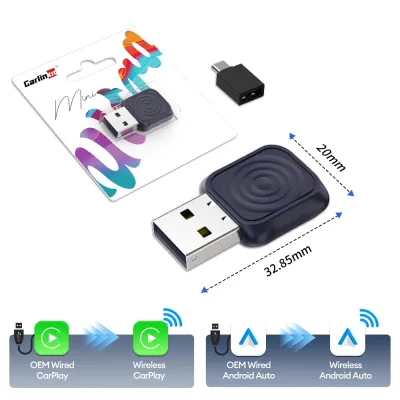
Prices are valid at publication and may change. Please refer to the product page for the latest price.
Beyond physical dimensions, you must analyze the electrical architecture of your vehicle. Modern cars rely on complex communication networks, such as the Controller Area Network (CAN bus), to transmit signals between different electronic control units. In these systems, functions like steering wheel controls, reverse gear signals, illumination dimming, and vehicle status displays are sent as digital data rather than simple analog voltages. To integrate a Carlink unit successfully, you must identify whether your vehicle requires a specialized CAN bus decoder interface or a standard wiring harness adapter. Using the wrong interface can lead to malfunctioning controls, battery drain, or communication errors across your vehicle’s network.
Finally, consider how an aftermarket screen might interact with your vehicle’s integrated safety and climate systems. In many contemporary cars, the factory head unit serves as the primary display for climate control settings, tire pressure monitoring, driver assistance alerts, and reversing cameras. Replacing this unit with an aftermarket screen can sometimes obstruct or completely disable these critical displays. Before making a purchase, consult your vehicle’s owner manual or a professional installer to identify any integrated displays that might be lost. You must verify whether the specific Carlink model you are considering supports the retention of these factory features through compatible integration modules.
Define Your Audio and Multimedia Upgrade Goals
Clarifying what you want to achieve with your audio upgrade will help you narrow down the technical specifications required for your Carlink unit. The most basic upgrade goal is simply adding reliable Bluetooth audio streaming and hands-free calling to an older vehicle. However, if you want a more modern driving experience, you should decide between wireless smartphone integration—such as Apple CarPlay or Android Auto—and a standalone multimedia operating system. Smartphone integration mirrors your phone’s interface onto the dashboard screen, relying on your phone’s processor and data connection. A standalone operating system, usually based on Android, runs applications directly on the head unit itself, which may require a dedicated SIM card or a mobile Wi-Fi hotspot to access online navigation and streaming services.

Your audio performance expectations should also dictate your choice of hardware. If you plan to retain your factory speakers and do not require high-volume output, a Carlink unit with standard built-in amplification will generally suffice. However, if you are planning a comprehensive audio overhaul that includes upgrading your speakers, adding external amplifiers, or installing a subwoofer, you must look for units equipped with advanced digital signal processing (DSP) and multiple pre-amp outputs. A built-in DSP allows you to fine-tune the audio output using precise equalization, time alignment, and crossover controls to overcome the acoustic challenges of a car cabin. Multiple pre-amp outputs (typically front, rear, and subwoofer channels) are necessary to send clean, low-voltage audio signals to external amplifiers without distortion.
Screen preferences and user interface design are equally important for daily usability and driving safety. Touchscreen responsiveness is critical; capacitive touchscreens offer the same smooth, multi-touch responsiveness as modern smartphones, whereas older or budget-friendly resistive screens require physical pressure and can feel sluggish. Anti-glare and anti-reflective screen coatings are highly beneficial, particularly in bright driving environments like Singapore, where intense sunlight can wash out the display and make navigation maps difficult to read. Additionally, consider whether you prefer physical volume and tuning knobs for quick, eyes-free adjustments while driving, or if you are comfortable relying entirely on touch-sensitive panels and steering wheel controls.
Navigate the Carlink Product Lineup
The Carlink product lineup can be categorized into three primary form factors, each designed for different installation scenarios and user preferences. The first category consists of universal aftermarket head units, which are designed to fit standard single-DIN or double-DIN dashboard openings. These units offer the greatest flexibility in terms of features and screen sizes, often featuring large, floating displays that adjust for angle and height. The second category comprises vehicle-specific fitments, which are engineered to match the exact dashboard shape, mounting brackets, and wiring connectors of specific car makes and models. These units provide a seamless, factory-like appearance but are limited to the specific vehicles for which they were designed.
The third category includes plug-and-play smart interface boxes, often referred to as multimedia AI boxes. These devices do not replace your physical dashboard screen; instead, they connect to your vehicle’s existing factory infotainment system via a USB port. They are designed specifically for vehicles that already have wired Apple CarPlay or Android Auto from the factory, converting that wired connection into a wireless one or adding a full standalone Android operating system to the factory screen. This option is ideal for drivers who want to upgrade their multimedia capabilities without disassembling their dashboard or altering their vehicle’s original electrical wiring.
When comparing different models within these categories, always refer to the manufacturer’s official documentation to verify key specifications. Pay close attention to screen resolution (such as 1280×720 or higher for clear legibility), the specific operating system version, RAM and internal storage capacities, and the number of audio output channels. Avoid relying on generic online product descriptions or forum posts, as hardware specifications can vary between regional product variants and production batches. To ensure compatibility, use the manufacturer’s official compatibility checker or product labels to match the unit to your specific car make, model, and production year rather than relying on broad category descriptions.
Evaluate Installation Complexity and Safety Boundaries
Working on a vehicle’s electrical system carries inherent safety risks, including the potential for electrical short circuits, damage to sensitive electronic control units, and accidental airbag deployment. Therefore, establishing clear safety boundaries is essential before beginning any installation work. The most critical safety rule for any automotive electrical modification is to disconnect the vehicle’s negative battery terminal before touching any wiring or removing factory components. This simple step eliminates the flow of electricity through the vehicle, protecting both you and the car’s delicate onboard computers from accidental short circuits.
While some basic plug-and-play installations can be completed by a patient DIY enthusiast, many tasks require professional tools and specialized expertise. For example, routing cables through tight dashboard cavities, mounting external GPS or Wi-Fi antennas, and integrating reversing cameras require a solid understanding of automotive trim removal and wire routing. More complex tasks, such as decoding steering wheel controls, integrating factory fiber optic audio systems (common in premium European vehicles), or configuring CAN bus decoders, require specialized diagnostic tools and technical knowledge. Splicing wires using improper methods, such as twisting them together and wrapping them in electrical tape, is a common cause of failure; professional installations utilize proper crimping tools, solder, and heat-shrink tubing to ensure secure, vibration-resistant connections.
You must establish a clear threshold for when to stop a DIY installation and seek professional assistance. If you encounter any discrepancy between the Carlink unit’s wiring diagram and your vehicle’s factory wiring harness, do not attempt to guess the correct connections. Splicing the wrong wires can permanently damage your vehicle’s electrical system or the new head unit. Furthermore, if any warning lights—such as the airbag or supplemental restraint system (SRS) light—illuminate on your instrument cluster during or after the installation, stop operating the vehicle immediately. Consult a qualified automotive electrician or a professional car audio installer to diagnose the issue and ensure that all safety systems are fully functional and road-legal.
Purchasing Channels and Warranty Verification in Singapore
When purchasing a Carlink unit in Singapore, sourcing your equipment from authorized dealers or official brand stores is the most reliable way to ensure you receive a genuine product. While purchasing from unverified third-party sellers on general online marketplaces may offer lower upfront costs, it carries significant risks. Grey-market units may be designed for different regional markets, meaning they might lack local radio frequency compatibility, have incompatible pre-loaded maps, or run firmware that cannot be updated locally. Furthermore, counterfeit units often use substandard internal components that compromise audio quality, screen responsiveness, and overall durability.
Verifying the local warranty terms and after-sales support is a crucial part of the purchasing process. A genuine local warranty provides peace of mind, ensuring that you can easily obtain technical support, firmware updates, or replacement parts if the unit experiences a hardware failure. Before finalizing your purchase, ask the seller to clarify the duration of the warranty, what specific components are covered, and whether the warranty service is handled locally in Singapore or requires shipping the unit back to an overseas manufacturer. Reliable sellers will also offer post-installation technical support to help you troubleshoot any software configuration or compatibility issues that may arise.
Finally, always verify the package contents against the official packing list before leaving the retail store or immediately upon receiving a delivery. A complete Carlink kit should include the main head unit, the appropriate main wiring harness, mounting brackets or screws, a GPS antenna, a Wi-Fi or cellular antenna (if applicable), an external microphone, and any necessary USB extension cables. Missing components can halt your installation progress and can be difficult and expensive to source individually. Ensuring that all parts are present and undamaged before you begin disassembly will save time and prevent unnecessary frustration during the upgrade process.
Frequently Asked Questions (FAQ)
Will installing a Carlink head unit void my car's factory warranty?
Installing an aftermarket Carlink head unit does not automatically void your entire vehicle’s factory warranty, but it can affect warranty claims related to the electrical system. Generally, consumer protection principles dictate that a vehicle manufacturer cannot deny a warranty claim unless they can prove that the aftermarket modification directly caused the failure in question. For example, if your car experiences an engine mechanical issue, the dealership cannot legally refuse to cover it under warranty simply because you upgraded your radio. However, if the aftermarket unit is wired incorrectly and causes a short circuit that damages the vehicle’s main wiring harness or body control module, that specific damage will not be covered under the factory warranty.
To minimize warranty risks, it is highly recommended to perform a completely reversible installation. Use vehicle-specific plug-and-play wiring adapters that plug directly into your car’s factory connectors without cutting, splicing, or pinning the original wires. This allows you to easily reinstall the factory head unit if you need to return the vehicle to the dealership for warranty service. Before proceeding with any modification, always consult your vehicle’s warranty booklet or speak with your dealership’s service advisor to understand their specific policies regarding aftermarket electronic installations.
Can I retain my factory steering wheel controls with a Carlink system?
Yes, in most cases you can retain your factory steering wheel controls, but this capability depends on the specific Carlink model you select and the integration accessories used. Many Carlink units feature built-in steering wheel control (SWC) decoding capabilities that can interpret analog resistive signals directly from older vehicles. For modern vehicles that use digital CAN bus networks to transmit steering wheel button presses, you will need a compatible CAN bus decoder interface. This interface translates the digital signals from your car’s network into commands that the Carlink unit can understand, allowing you to control volume, track selection, and source switching just as you did with the factory radio.
Before purchasing, you must check the product specifications and compatibility lists to verify that the Carlink unit and the required integration harness are compatible with your exact vehicle make, model, and year. It is also important to note that while primary functions like volume and track skipping are almost always retainable, some advanced factory functions may not be supported. These can include dedicated voice command buttons, phone call answer/end buttons, or buttons that control proprietary menus in your vehicle’s instrument cluster display. Checking with a professional installer or reviewing user documentation for your specific vehicle model can help manage expectations regarding which buttons will remain functional.
Community discussion
Share your experience or ask a question. Comments are reviewed before publication.