
Deciding between a dedicated navigation unit like the VSYS CS5 and a smartphone navigation app for your daily commute in Singapore depends on how you balance real-time traffic responsiveness against hardware reliability. Smartphone apps excel at delivering live, crowd-sourced traffic updates, making them highly effective for navigating dynamic urban congestion and avoiding sudden bottlenecks. On the other hand, a dedicated car navigation system offers a permanent, stable display that operates independently of your phone, keeping your mobile device free for calls and reducing battery wear. By evaluating how each option handles the unique driving conditions of Singapore, you can determine which setup best fits your daily routine.
To make an informed choice, you must look beyond basic convenience and examine how these systems perform under the tropical sun, inside dense high-rise corridors, and through underground tunnels. Both solutions have distinct advantages, but they also require different levels of commitment regarding installation, maintenance, and upfront costs. Understanding these trade-offs will help you establish a reliable, stress-free navigation setup for your daily drives.
Hardware Setup and Daily Convenience
Installing a dedicated navigation unit requires a more permanent approach compared to simply mounting a smartphone. Dedicated systems typically offer mounting options such as dashboard integration or windshield suction mounts. When planning your installation, you must verify your vehicle’s model, year, interface, dimensions, mounting position, road legality, and safety impact from the specific product and vehicle documentation; never infer compatibility from a category term alone. Furthermore, because these units often require a continuous power supply, you must decide between using a standard cigarette lighter adapter or hardwiring the device directly into your vehicle’s fuse box.
Products mentioned in this guide
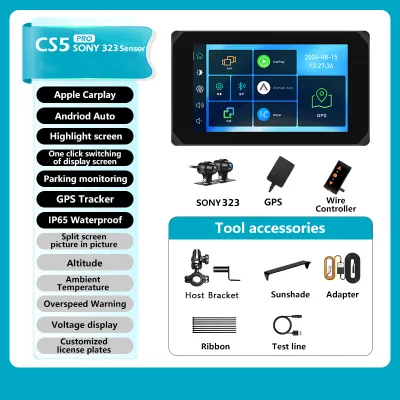
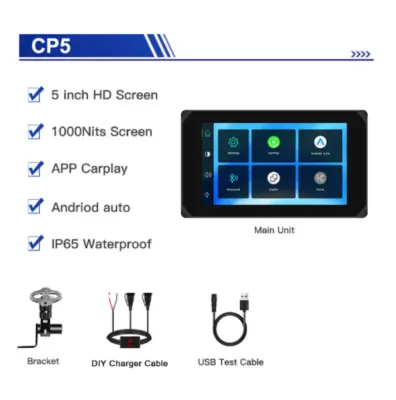
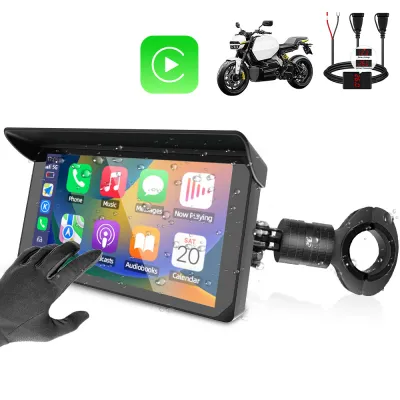
Prices are valid at publication and may change. Please refer to the product page for the latest price.
If you choose to hardwire the unit to your vehicle’s electrical system, be aware of the safety boundaries involved in automotive electrical work. Always consult your original-vehicle instructions and manufacturer documentation before proceeding. To prevent electrical faults, short circuits, or battery drain, seek qualified professional installation before purchasing or operating the system. Once properly installed, a hardwired dedicated unit offers excellent daily convenience, booting up automatically the moment you turn on the ignition so you can drive off without delay.
In contrast, smartphone navigation relies on adjustable mounts, such as air vent clips, dashboard pads, or windshield suction holders. While highly portable, these mounts can loosen over time due to vibrations or intense cabin heat. Powering a smartphone typically requires a USB cable connected to an in-car port or a cigarette lighter adapter, which can lead to cluttered cables draping across your console. Additionally, you must manually mount your phone, plug in the cable, and launch your preferred navigation app every time you enter the car, adding small but repetitive steps to your daily routine.
GPS Accuracy and Live Traffic Handling
Singapore’s dense urban landscape, characterized by towering high-rises in the Central Business District (CBD) and extensive underground tunnel networks like the KPE and MCE, presents a challenging environment for GPS receivers. Dedicated navigation units often utilize external GPS antennas that can be positioned closer to the windshield or even outside the cabin. This physical separation can improve signal retention and reduce the time it takes to reacquire a satellite connection when exiting a tunnel. To maximize performance, you should verify the recommended mounting position for the external antenna in the product documentation.

Smartphones rely on internal GPS receivers, which have become highly sophisticated but can still struggle with signal drift when surrounded by massive concrete structures. However, smartphones hold a significant advantage when it comes to live traffic handling. Because they are constantly connected to mobile data networks, smartphone apps can provide real-time updates on traffic congestion, road closures, and active Electronic Road Pricing (ERP) gantry rates. This allows the app to dynamically reroute you to save time and avoid unnecessary toll charges.
For a dedicated unit to match this level of responsiveness, it must either connect to your phone’s mobile hotspot or rely on its own cellular connection, which may require an additional data plan. If you frequently drive in areas with spotty mobile coverage, verifying the offline map capabilities of your navigation system is crucial. Smartphone apps allow you to download offline map regions, but these require manual updates or periodic internet access to remain current. Dedicated systems often store maps locally on an SD card or internal storage, but you must check the manufacturer’s guidelines regarding how often map updates are released and whether they require a manual download via a computer.
Screen Visibility and In-Car Ergonomics
Driving under the intense, direct sunlight of Singapore requires a display with excellent visibility and minimal glare. Dedicated navigation units are specifically engineered for in-car environments, often featuring larger screen sizes, robust anti-glare coatings, and high maximum brightness levels designed to combat harsh daylight. This makes it easier to read complex lane guidance instructions at a glance. The user interface of a dedicated unit is typically simplified, featuring large touch targets and sometimes physical buttons or knobs that allow you to make adjustments without taking your eyes off the road for too long.
Smartphones offer incredibly sharp displays with high resolutions, but their glossy screens are highly reflective and can become difficult to read under direct sunlight. Furthermore, prolonged exposure to direct sunlight through the windshield, combined with the heat generated by running GPS and charging simultaneously, can cause a smartphone to overheat. When a phone overheats, it may automatically dim its screen, throttle performance, or shut down entirely to protect the battery, leaving you without navigation mid-journey.
From an ergonomic perspective, using a dedicated screen mounted at eye level reduces driver distraction. It allows you to keep your phone safely tucked away, eliminating the temptation to check incoming notifications while driving. Smartphone navigation, while highly responsive and familiar, can introduce distractions if notifications are not properly managed. Glancing at a small phone screen to read detailed street names can also strain your eyes, making a larger, dedicated display a more comfortable option for daily driving.
Upfront Costs and Long-Term Value
When evaluating the financial aspect of both options, the upfront costs and long-term value propositions differ significantly. Utilizing a smartphone you already own for navigation incurs virtually zero initial hardware cost, requiring only the purchase of a reliable car mount and a charging cable, which typically cost under S$50. However, you must consider the indirect costs, such as mobile data consumption from continuous map streaming and the potential acceleration of your phone’s battery degradation. The combination of continuous charging, high screen brightness, and tropical heat can significantly shorten your smartphone’s battery lifespan over a year or two.
A dedicated navigation unit like the VSYS CS5 requires a dedicated upfront investment, which can range from a couple of hundred dollars to more depending on the specific model and installation fees. You must also factor in potential long-term costs, such as fees for map updates or subscription services if the manufacturer does not offer free lifetime updates. However, this investment preserves your smartphone’s battery health and frees up your phone’s screen for other hands-free tasks, such as managing music playback or handling hands-free calls via your car’s Bluetooth system.
To determine the true value, weigh the upfront cost of a dedicated unit against the convenience of a permanent, heat-resistant device that does not wear down your primary phone. If you drive long hours daily, such as for commercial purposes or extensive commuting, protecting your smartphone from constant thermal stress can offset the initial purchase price of a dedicated system over time.
Which Navigation Setup Fits Your Driving Style?
Choosing the right navigation setup ultimately comes down to your personal driving habits and vehicle configuration. A dedicated unit like the VSYS CS5 is highly suitable if you prefer a permanent, distraction-free display that is always ready to go when you start your car. This setup is ideal for drivers who want to preserve their smartphone’s battery life, avoid cable clutter, and value the reliability of offline maps that do not depend on cellular signal strength. It provides a consistent, stable navigation experience tailored specifically for the automotive environment.
Conversely, smartphone navigation is the more practical choice if you prioritize real-time, crowd-sourced traffic alerts to navigate Singapore’s peak-hour congestion and dynamic ERP changes. It is also the best option if you prefer not to install extra hardware in your vehicle and want a system that integrates seamlessly with your existing digital ecosystem, updating its maps automatically in the background.
Before making a final decision, verify whether your vehicle’s existing head unit supports smartphone projection systems like Apple CarPlay or Android Auto. These systems offer an excellent middle ground, allowing you to project your phone’s real-time navigation apps directly onto your car’s built-in dashboard screen. This setup combines the superior real-time routing of smartphone apps with the ergonomic benefits and larger display of a dedicated in-car screen, provided your vehicle and phone are compatible.
Frequently Asked Questions (FAQ)
Can I use a dedicated unit and my phone navigation at the same time?
Yes, you can run both systems simultaneously, but doing so requires careful management to avoid driver distraction. Having two screens displaying different routes can be confusing, and overlapping audio prompts from both devices can create unnecessary noise in the cabin. If you choose to use both, consider muting one device and using it purely for visual reference while relying on the other for voice guidance. You should also verify how your phone’s Bluetooth connection interacts with your car’s audio system to prevent audio routing conflicts.
Does the dedicated unit support voice commands like smartphone apps?
Voice command capabilities vary significantly depending on the specific model of your dedicated navigation unit. While some high-end dedicated systems feature built-in voice recognition for basic destination input, they generally do not match the advanced natural language processing found in modern smartphone assistants. Before purchasing, check the manufacturer’s specifications to verify if the unit supports hands-free voice control and how it compares to the voice assistant you currently use on your phone.
How do map updates work for dedicated units compared to phone apps?
Smartphone navigation apps update their map data automatically in the background over cellular networks or Wi-Fi, ensuring you always have the latest road layouts and points of interest without manual intervention. In contrast, dedicated navigation units typically require a more manual update process. Depending on the model, you may need to download map files onto a computer and transfer them to the unit via an SD card, or connect the device to a home Wi-Fi network. Always check the manufacturer’s instructions to understand the update procedure and any associated costs.
Community discussion
Share your experience or ask a question. Comments are reviewed before publication.