
Choosing the right auto charger depends on your vehicle’s built-in ports, the devices you carry, and whether you prioritize rapid charging speeds or a clutter-free dashboard. Modern drivers often find themselves choosing between traditional USB-A ports, high-speed USB-C connections, and convenient wireless charging mounts. Each option serves a distinct purpose, and the ideal setup frequently involves a combination of these technologies to keep your navigation, dashcams, and personal devices powered throughout your commute.
While USB-C represents the modern standard for rapid power delivery, USB-A remains a practical choice for legacy accessories, and wireless chargers offer convenient cable-free operation for short trips. Understanding how these technologies interact with your vehicle’s electrical system is the first step toward building an efficient, safe, and reliable charging setup.
Assessing Your Vehicle's Power and Port Setup
Before purchasing any aftermarket auto charger, you must inspect your vehicle’s existing dashboard and console layout. Many modern vehicles come equipped with built-in USB ports, but these are often limited in their power output. Older models typically rely entirely on the classic 12V auxiliary power outlet, commonly known as the cigarette lighter socket. Identifying what your vehicle natively offers determines whether you need a simple replacement cable or a dedicated multi-port adapter.
Products mentioned in this guide
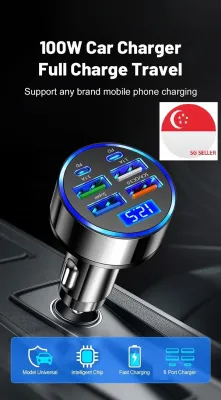
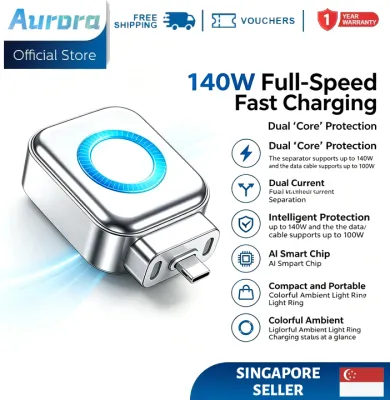
![[SG In Stock]140W USB-C Auto Pop-Up Charger Adapter Smart Auto Disconnect Fast Charging Dual Current Mode Battery Protection](https://img.lazcdn.com/g/p/e5ddf1295daaed0c57601af6492ae311.jpg_400x400q80.jpg_.webp)
![[SG]140W USB-C Auto Pop-Up Charger Adapter Smart Auto Disconnect Fast Charging Dual Current Mode Battery Protection](https://img.lazcdn.com/g/p/3e2ef742cb9a5015f6da680eca2fe1ab.png_400x400q80.png_.webp)


Prices are valid at publication and may change. Please refer to the product page for the latest price.
The electrical system of a vehicle has strict limitations that you must respect to avoid electrical issues. Built-in USB-A ports in older cars are frequently designed for low-amperage data transfer, such as connecting a phone to the media system, rather than fast charging. Attempting to draw too much power from these ports can result in extremely slow charging times or even temporary system shutdowns. A dedicated 12V socket adapter bypasses these low-power built-in ports, drawing directly from the vehicle’s primary electrical circuit to deliver higher wattage safely.
When planning your setup, decide whether to utilize direct cable connections to your dashboard ports or to install a high-output 12V adapter. If your car only has older USB-A ports, adding a modern 12V adapter is often the most practical way to access fast-charging capabilities without modifying your vehicle’s wiring. This approach allows you to preserve your built-in ports for media integration while dedicating the high-output adapter solely to keeping power-hungry devices charged.
USB-A Auto Chargers: Compatibility and Limitations
USB-A auto chargers have been the industry standard for decades, making them highly compatible with a vast range of legacy devices. If your primary goal is to power older smartphones, basic GPS units, or low-draw accessories like standard dashcams and Bluetooth receivers, a USB-A charger is a highly practical and cost-effective choice. These chargers utilize the familiar rectangular connector that remains common in many household and automotive accessories.

However, USB-A technology has clear physical and electrical limitations when compared to modern charging standards. The maximum power delivery of a standard USB-A port is typically capped at a much lower wattage than its USB-C counterparts. This means that while a USB-A charger can easily maintain the battery level of a phone running navigation apps, it will struggle to rapidly replenish a depleted battery during a short commute. Modern smartphones with large battery capacities will charge at a noticeably slower pace when connected to a traditional USB-A port.
It is also essential to verify the specific function of any built-in USB-A port in your vehicle. Some of these ports are wired strictly for slow, low-amperage charging, while others support basic data transfer for systems like Apple CarPlay or Android Auto. If you plug a high-draw device into a data-only port, you may experience sluggish device performance or a battery that continues to drain despite being plugged in. For reliable power delivery, dedicated charging-only adapters remain the preferred solution.
USB-C Auto Chargers: Speed and Modern Device Support
USB-C auto chargers represent the current and future standard for mobile power, offering significantly faster charging speeds and support for modern electronics. The primary advantage of USB-C lies in its integration of Power Delivery (PD) protocols. This technology allows the charger and the connected device to communicate dynamically, negotiating the optimal voltage and current required to charge the device as quickly and safely as possible. With a PD-compatible USB-C charger, you can rapidly power up modern smartphones, tablets, and even lightweight laptops while on the road.
To fully leverage the benefits of USB-C, you must ensure that both your device and your charging cable are compatible with high-wattage power delivery. Using an older or low-quality cable with a high-output USB-C charger can bottleneck the charging speed, reverting the system to standard, slower rates. Checking the specifications of your devices and matching them with a certified, high-quality USB-C cable ensures that your auto charger can deliver its maximum rated power without restriction.
Investing in USB-C technology is also a highly effective way to future-proof your vehicle’s cabin. As universal device standards continue to phase out older connector types, almost all new smartphones, wireless earbuds, and portable electronics rely on USB-C. Choosing a USB-C auto charger ensures that your vehicle remains fully compatible with any new devices you or your passengers bring into the car for years to come.
Wireless Car Chargers: Convenience and Trade-offs
Wireless car chargers, which typically utilize Qi-based technology, offer a highly convenient, cable-free experience for drivers who value a clean dashboard. The primary appeal of these chargers is the “drop-and-go” functionality, allowing you to place your phone onto a motorized mount or a charging pad without fumbling with physical cables. This is particularly useful for short commutes where plugging and unplugging a cable repeatedly can become tedious.
Despite their convenience, wireless chargers come with distinct practical trade-offs that you must consider. Because wireless charging relies on electromagnetic induction, precise alignment between the phone’s internal coil and the charger’s coil is necessary. Bumpy roads, sharp turns, or sudden braking can shift the phone out of alignment, interrupting the charging process. Additionally, wireless charging is inherently less efficient than a direct wired connection, meaning a significant portion of the energy is lost as heat.
This heat generation is a critical factor to monitor, especially during extended drives or in warm climates like Singapore. Excessive heat can prompt your smartphone to automatically throttle its charging speed or shut down entirely to protect its battery health. Furthermore, it is important to remember that wireless car chargers are not truly wireless; the charging pad or mount itself must still be connected via a physical cable to a USB port or a 12V adapter, meaning some cable management is still required behind the scenes.
Decision Matrix: Matching Charger Type to Your Needs
To determine the most suitable auto charger setup for your daily driving habits, it helps to evaluate your specific device inventory and vehicle layout. A USB-A charger is a logical choice if you primarily power older devices, run low-draw accessories like basic dashcams, or drive an older vehicle where high-speed charging is not a priority. It offers a reliable, low-cost solution for keeping basic electronics powered without unnecessary complexity.
If you prioritize rapid charging, frequently take longer road trips, or need to power demanding devices like tablets and modern smartphones, a USB-C charger is a highly effective option. The high-wattage output of USB-C ensures that your devices can gain substantial battery life even during short drives, making it a practical choice for busy professionals and families who rely heavily on their mobile electronics.
For drivers who prioritize a clutter-free cabin and make frequent short stops, a wireless car charger offers excellent convenience. This setup is highly suitable if your phone supports Qi-based wireless charging and you prefer to keep your dashboard free of loose cables. However, before committing to a wireless mount, you must verify that your phone case thickness, magnetic attachments, or the physical design of the mount do not interfere with the wireless connection, as thick cases can severely reduce charging efficiency.
Safety, Heat Management, and Installation Checks
When installing any aftermarket auto charger, safety must be your primary consideration to protect both your vehicle’s electrical system and your expensive devices. Always look for chargers that feature built-in protection mechanisms, such as safeguards against overcurrent, overvoltage, and overheating. These safety features prevent electrical surges from damaging your phone or tripping your vehicle’s internal fuses.
Proper installation and cable routing are equally vital for safe driving. Ensure that any charging cables are neatly routed and secured so they do not interfere with your steering wheel, gear shifter, pedals, or any airbag deployment zones. Loose cables dangling across the dashboard can pose a serious distraction or physical hazard while driving.
Finally, establish clear stop conditions for your charging equipment. If you ever notice excessive heat radiating from the charger, loose physical connections in the 12V socket, melting plastic odors, or a device connection that constantly flickers on and off, cease using the charger immediately. In such cases, disconnect the adapter and consult a qualified automotive professional to inspect your vehicle’s electrical ports before attempting to use another charger.
Frequently Asked Questions (FAQ)
Can I use a USB-C to USB-A adapter in my older car?
Yes, you can physically connect a USB-C cable to an older USB-A port using a physical adapter, but this will not upgrade the underlying power output of the port. The charging speed will still be limited by the maximum amperage of your vehicle’s original USB-A port, which is typically much lower than modern USB-C Power Delivery standards. Before using an adapter, check your vehicle owner’s manual to verify the specific amperage limits of your built-in ports to ensure you do not overload the circuit or trip a fuse.
Will a wireless car charger drain my car battery when the engine is off?
Whether an auto charger drains your battery depends entirely on how your vehicle’s 12V auxiliary socket behaves when the ignition is turned off. In some vehicle models, the 12V socket cuts power automatically when the engine stops, preventing any battery drain. In other vehicles, the socket remains continuously live, meaning a connected wireless charger or adapter will continue to draw a small amount of power even when the car is parked. To prevent unexpected battery depletion, it is highly recommended to test your socket’s behavior or simply unplug the charger when parking your vehicle for extended periods.

Community discussion
Share your experience or ask a question. Comments are reviewed before publication.