
If you are searching for a baseus carplay solution to upgrade an older vehicle that lacks a dashboard screen, you will quickly encounter a fundamental hardware limitation. Standard wireless CarPlay adapters are designed to convert an existing, wired CarPlay system into a wireless one; they cannot generate or display the CarPlay interface on their own. For a vehicle with a traditional radio head unit and no digital display, a standard adapter has no screen to output its video signal to, rendering it unusable for its primary purpose.
To upgrade a screenless car, you must choose between two practical pathways. The first is an audio-only Bluetooth integration using a high-quality Baseus audio adapter, which routes your smartphone’s navigation prompts, music, and hands-free calls directly through the car’s existing speakers. The second is a complete hardware upgrade, which involves installing an aftermarket physical screen or a dedicated head unit that supports the full visual CarPlay interface. Selecting the right path depends on your budget, your vehicle’s existing ports, and whether you require a visual map display while driving.
This guide breaks down the technical realities of standard adapters, evaluates the best Baseus Bluetooth hardware for audio-only upgrades, and outlines the steps required to achieve a full visual CarPlay experience in an older vehicle.
Products mentioned in this guide
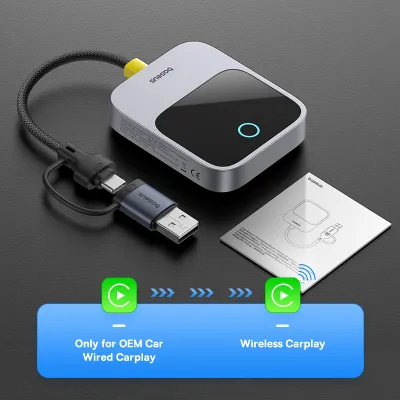
Prices are valid at publication and may change. Please refer to the product page for the latest price.
The Display Rule: Why Standard Baseus CarPlay Adapters Need a Built-In Screen
A standard wireless CarPlay adapter functions as a data bridge rather than an independent computer. When you plug a wireless adapter into a car’s USB port, the adapter uses a combination of Bluetooth and Wi-Fi to establish a connection with your iPhone. Once connected, it acts as a translator, packaging the CarPlay video and control data from your phone and sending it to the vehicle’s factory head unit via the USB interface. The car’s factory screen and onboard processor are responsible for decoding this video stream, rendering the touch-responsive user interface, and registering your physical inputs.
Without a factory-installed screen and a compatible infotainment system, this data loop is broken. A screenless dashboard lacks the necessary display panel, the video decoding hardware, and the underlying software operating system required to communicate with a CarPlay adapter. Plugging a wireless adapter into a basic USB charging port or an older, non-smart stereo unit will result in no response, as the stereo cannot recognize the CarPlay data protocols.
For drivers of older vehicles who want a simple, non-invasive upgrade, shifting focus to a Baseus Bluetooth audio receiver is the most practical solution. These compact devices bypass the need for a visual screen entirely by focusing on high-fidelity audio transmission. By pairing your smartphone directly with a Bluetooth receiver connected to your car’s auxiliary (AUX) port or FM radio, you can still access the core audio benefits of CarPlay—such as spoken turn-by-turn navigation, streaming podcasts, and voice-activated phone calls—using your phone mounted safely on a dashboard cradle.
Best Baseus Bluetooth Adapters for Audio-Only Upgrades
When upgrading a screenless vehicle for audio-only playback, your primary goal is to establish a stable, low-latency wireless connection between your smartphone and the car’s existing sound system. Baseus designs a variety of Bluetooth receivers and transmitters tailored to different vehicle configurations. While these devices do not project a visual interface, they support advanced audio profiles like A2DP (Advanced Audio Distribution Profile) for music streaming and HFP (Hands-Free Profile) for clear voice calls.

To choose the correct model, you must evaluate your vehicle’s available physical interfaces, power delivery methods, and the local driving environment. Modern Baseus adapters utilize Bluetooth 5.3 or 5.4 protocols, which offer significantly faster pairing times, lower power consumption, and reduced audio lag compared to older Bluetooth versions. This is particularly important when listening to navigation instructions, where even a one-second delay can cause you to miss a critical turn on busy roads.
Power delivery is another key factor. Some Baseus adapters draw power directly from a standard USB port, while others feature integrated rechargeable batteries or plug into a 12V cigarette lighter socket. Choosing the right form factor ensures your dashboard remains organized, clutter-free, and safe to operate.
Direct AUX Bluetooth Receivers for Clean Sound
If your older vehicle features a functional 3.5mm auxiliary input port, a direct AUX Bluetooth receiver is the superior choice for audio fidelity. These devices establish a direct physical connection to your car’s amplifier, bypassing the wireless interference and audio degradation common with radio-based transmitters. Baseus offers compact, plug-and-play AUX receivers that feature a 3.5mm gold-plated jack on one end and a USB connector on the other to draw power from any nearby USB port or dual-port car charger.
When evaluating these receivers, prioritize models with high-quality coiled cables. A coiled design stretches easily to reach your ports while preventing excess wire from dangling around your gear shifter or climate controls. Additionally, look for adapters that support automatic reconnection. This feature ensures that the moment you start your engine and power is restored to the USB port, the adapter automatically pairs with your smartphone, allowing your music or navigation to resume without manual intervention.
Before purchasing, inspect the physical condition of your car’s AUX port. Over time, dust, moisture, and physical wear can degrade the internal contacts of a 3.5mm jack, leading to static noise, channel dropouts, or a loose fit. Cleaning the port gently with compressed air or a dedicated electronic contact cleaner can resolve minor connection issues and ensure optimal sound quality.
Bluetooth FM Transmitters for Cars Lacking an AUX Port
For classic cars or older utility vehicles that lack both a USB port and a 3.5mm AUX input, a Bluetooth FM transmitter is the most viable wireless audio solution. These devices plug directly into the vehicle’s 12V cigarette lighter socket, draw power from the car’s electrical system, and modulate your phone’s Bluetooth audio signal into an analog FM radio wave. You then tune your car’s factory radio to the corresponding FM frequency to hear your audio through the vehicle’s speakers.
In a dense urban environment like Singapore, FM transmission faces unique challenges. The high concentration of high-rise buildings, concrete tunnels, and a crowded local radio spectrum can cause signal overlap, leading to static hiss or sudden audio interference. To combat this, select a Baseus FM transmitter that features advanced digital phase-locked loop (PLL) technology for stable frequency locking, alongside built-in active noise cancellation to filter out background road noise during phone calls.
To minimize static, search for a completely vacant FM frequency. In highly populated urban areas, the extreme ends of the FM spectrum—such as 87.5 MHz to 88.0 MHz, or 107.0 MHz to 108.0 MHz—are often the quietest and least likely to suffer from bleed-through from commercial radio stations. Additionally, opt for a Baseus transmitter that includes dual USB charging ports (such as a combination of USB-A and USB-C ports supporting Power Delivery) so you do not lose the ability to fast-charge your phone while driving.
How to Get True CarPlay in a Vehicle Without a Built-in Screen
If your driving habits require a visual map display, real-time traffic updates, and touch-screen control over your mobile applications, an audio-only Bluetooth adapter will not suffice. To achieve a true CarPlay experience in a screenless vehicle, you must introduce a physical display panel into your dashboard setup. While Baseus produces high-quality charging hubs, cables, and phone mounts, they do not manufacture standalone CarPlay displays or replacement head units.
To bridge this gap, you must look to the wider automotive electronics market. There are two primary hardware paths to consider: installing a portable, dash-mounted smart screen, or completely replacing your vehicle’s factory stereo with an aftermarket touchscreen head unit. Each path carries distinct trade-offs regarding installation complexity, cost, and long-term reliability.
Portable Dash-Mounted Smart Screens
Portable CarPlay screens have become a popular, non-destructive solution for older vehicles. These standalone devices typically feature a 7-inch to 9-inch touchscreen display and mount directly to your dashboard or windshield using a heavy-duty suction cup or an adhesive pad. They are powered by a standard 12V power adapter and connect to your smartphone wirelessly via Bluetooth and Wi-Fi to run the full CarPlay interface.
To route the audio from the portable screen to your car’s speakers, these units utilize several built-in output methods. You can run a physical 3.5mm AUX cable from the screen’s audio-out port to your car’s AUX input, use the screen’s integrated FM transmitter to broadcast to your car radio, or utilize a dual-Bluetooth connection if your phone supports routing audio to the car’s Bluetooth system while maintaining the CarPlay data stream to the screen.
While portable screens offer an easy, plug-and-play installation that can be moved between vehicles, they have notable drawbacks. The mounting brackets and power cables can clutter your dashboard, potentially obstructing your view of the road. In hot, humid tropical climates like Singapore, the intense heat buildup inside a parked car can degrade the suction cup or adhesive mount over time, causing the screen to fall. Direct sunlight can also cause screen glare, making the display difficult to read during midday drives.
Replacing the Stereo with an Aftermarket Head Unit
For a clean, permanent, and high-fidelity installation, replacing your car’s factory stereo with an aftermarket single-DIN or double-DIN touchscreen head unit is the gold standard. A single-DIN unit fits the traditional slim radio slot and often features a motorized flip-out screen, while a double-DIN unit occupies a larger rectangular space (approximately 4 inches tall) to provide a fixed, integrated touchscreen display.
This route requires careful compatibility verification before you make a purchase. You must source a dashboard fascia kit (also known as a mounting trim or frame) designed specifically for your vehicle’s make, model, and production year to ensure the new head unit sits flush with your dashboard. Additionally, you will need a vehicle-specific wiring harness adapter to connect the new stereo to your car’s electrical system, and potentially a CAN bus decoder if you wish to retain factory steering wheel controls.
Because vehicle electrical systems are complex, performing DIY stereo wiring carries risks of short circuits, blown fuses, or parasitic battery drain. It is highly recommended to seek professional installation at a reputable car audio workshop. A qualified technician can safely wire the unit, mount external microphones for clear voice commands, route USB cables neatly behind the dashboard panels, and ensure that the installation complies with local vehicle modification regulations.
Installing and Optimizing Your Baseus Audio Adapter
To get the best performance out of your Baseus Bluetooth audio adapter, proper installation and configuration are essential. Whether you are using an AUX receiver or an FM transmitter, taking the time to optimize your physical layout and software settings will prevent common audio issues and ensure a reliable connection every time you step into your vehicle.
Step 1: The Initial Pairing Process
- Insert the Baseus adapter into your vehicle's USB port or 12V socket to power it on. The integrated LED indicator should begin flashing rapidly, indicating it is in pairing mode.
- Open your iPhone's Settings menu, navigate to Bluetooth, and select the Baseus device from the list of available accessories.
- Once paired, open your phone's Bluetooth settings for the Baseus device and ensure the device type is classified as "Car Stereo." This classification helps iOS optimize volume levels and audio routing for navigation and media playback.
Step 2: Managing Power and Automatic Connection
- Determine if your vehicle's USB ports or 12V sockets are "switched" or "unswitched." A switched port loses power immediately when the ignition is turned off, while an unswitched port remains live, drawing power directly from the car battery.
- If your car uses switched ports, you can leave your Baseus adapter plugged in permanently. It will turn on and auto-reconnect to your phone as soon as you start the engine.
- If your car has unswitched ports, unplug the adapter when parking for extended periods to prevent a slow, continuous drain on your car's battery.
Step 3: Troubleshooting Audio Lag and Static Noise
- If you experience a persistent buzzing or humming sound through your speakers when using an AUX adapter, you are likely experiencing a ground loop. This occurs when the audio source and the power source share the same electrical ground, creating electrical noise. To resolve this, install a compact, passive ground loop isolator between the Baseus adapter's 3.5mm jack and your car's AUX port.
- To eliminate audio lag during navigation prompts, ensure your phone's operating system and your audio applications are updated to their latest versions. Newer software versions contain optimized Bluetooth transmission protocols that reduce latency.
Step 4: Optimizing Microphone Placement
- For clear hands-free calls, position the Baseus adapter's integrated microphone as close to the driver's head level as possible.
- Avoid mounting the adapter deep inside a glove compartment, behind the center console, or directly in front of air conditioning vents, as the rushing air will create severe wind noise during phone calls.
- Secure any loose cabling using small, adhesive wire clips to prevent them from rattling against plastic trim panels, which can transfer unwanted vibrations into the microphone.
Frequently Asked Questions (FAQ)
Will a Bluetooth adapter drain my car battery when parked?
Whether a Bluetooth adapter drains your car battery depends entirely on how your vehicle’s USB ports or 12V cigarette lighter sockets are wired. In most modern vehicles, the electrical system cuts power to these accessory ports within a few minutes of the engine being turned off and the doors being locked. In this scenario, a plugged-in Baseus adapter poses zero risk of battery drain.
However, some older car models keep these ports constantly powered, even when the key is removed from the ignition. If your vehicle’s ports are always live, a connected Bluetooth adapter will continue to draw a small amount of standby current (known as a parasitic draw) to keep its Bluetooth radio active. While this minimal draw is unlikely to drain a healthy car battery overnight, it can deplete your battery if the vehicle is left parked and unused for several consecutive days. To prevent this, simply unplug the adapter from the port when parking the car long-term.
Can I use a wireless CarPlay dongle with a standalone tablet or iPad?
No, you cannot use a standard wireless CarPlay adapter to run CarPlay on a standalone tablet or iPad. CarPlay is not a simple video-sharing application that can be opened on any screen; it requires a highly specific host receiver operating system that supports Apple’s proprietary CarPlay connection protocols, security handshakes, and video decoding standards.
Consumer tablets, including iPads and Android tablets, are designed to act as independent source devices rather than external monitors or head unit receivers. They lack the necessary hardware interfaces, driver support, and operating system permissions to decode and display the CarPlay video feed sent from an iPhone via a USB dongle. If you wish to use a tablet in your vehicle, your best option is to mount it securely on your dashboard and use its native applications directly, routing the audio to your car’s speakers via a Baseus Bluetooth receiver.
To ensure complete safety, always verify that any dashboard mount, portable screen, or tablet holder you install does not obstruct your physical view of the road or interfere with the deployment path of your vehicle’s airbags. Consult your vehicle’s owner manual for specific dashboard safety zones and airbag locations before mounting any aftermarket accessories.
Community discussion
Share your experience or ask a question. Comments are reviewed before publication.