
When deciding between a Ugreen MagSafe wireless car charger and a USB-C wired alternative, the “better” option depends on your specific smartphone’s charging limits, your vehicle’s cabin environment, and your daily driving habits. While wireless charging offers unmatched convenience and a clutter-free dashboard, wired connections generally provide superior power delivery and thermal efficiency. This guide breaks down the real-world performance differences across speed, heat management, and physical reliability, helping you choose the setup that best fits your navigation and commuting needs.
Charging Speed: Rated Specs vs Real-World Output
To understand how fast your phone will charge in the car, you must look beyond the marketing headlines and verify the technical specifications printed on both your device and the charger. A Ugreen MagSafe wireless car charger typically advertises maximum outputs such as 7.5W or 15W, while a USB-C wired car charger often boasts Power Delivery (PD) ratings of 20W, 30W, or higher. However, these numbers represent theoretical maximums under ideal conditions. In a moving vehicle, the actual power delivered to your battery is governed by a complex interaction between the charger’s capabilities, the phone’s internal power management system, and the efficiency of the power transfer method.
Your smartphone’s internal power management system acts as a strict gatekeeper. Even if you purchase a high-wattage charger, your phone will only accept the maximum wattage it is programmed to receive. For instance, many smartphones limit standard Qi wireless charging to 7.5W or 10W, reserving faster wireless speeds for proprietary chargers or specific certified accessories. Conversely, when connected via a USB-C cable, the same phone might easily accept 20W to 27W of fast-charging power. Before making a purchase, check your smartphone manufacturer’s documentation to verify its maximum accepted wireless and wired charging speeds.
Products mentioned in this guide
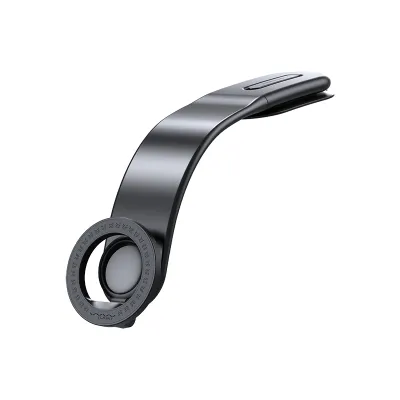
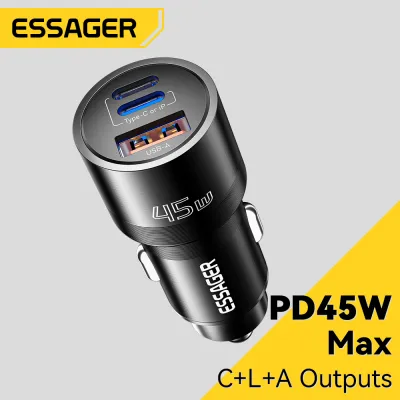
Prices are valid at publication and may change. Please refer to the product page for the latest price.
Another critical factor is the inherent energy loss associated with wireless power transmission. Wireless charging relies on electromagnetic induction, where an alternating current in the charger’s transmitter coil creates a magnetic field that induces a current in the phone’s receiver coil. This process is significantly less efficient than a direct copper-to-copper wired connection. Approximately 20% to 30% of the electrical energy is lost as heat during wireless transmission. This means that even if a wireless charger draws 15W of power from your car’s electrical system, your phone may only receive 10W to 12W of actual charging power, resulting in slower charging times compared to a wired USB-C connection of the same nominal wattage.
Finally, you must ensure your vehicle’s power source can supply sufficient input wattage to the charger itself. Many built-in USB ports in older vehicles are designed primarily for data transfer and only output a meager 5W (5V/1A). If you plug a high-performance wireless charger or a fast-charging USB-C cable into one of these low-output ports, the charger will be severely bottlenecked. To achieve the rated speeds of your Ugreen charger, you will generally need to plug it into a dedicated 12V cigarette lighter adapter that supports modern fast-charging standards like USB-C Power Delivery.
Heat Management and Battery Health
Heat is the single greatest enemy of lithium-ion battery health and charging efficiency. When comparing wireless and wired charging, the thermal dynamics are vastly different. Wireless induction naturally generates substantial heat due to the energy losses inherent in electromagnetic transfer. When you place your phone on a MagSafe wireless charger, both the charger’s internal coils and the phone’s receiving coil warm up. If you are simultaneously running power-intensive applications such as GPS navigation, streaming music, or hands-free calling, your phone’s processor will generate additional heat, compounding the thermal load on the battery.

In contrast, wired USB-C charging is highly efficient and generates far less heat within the phone itself. While the phone’s battery will still warm up slightly during fast charging, the absence of induction coils means the overall thermal footprint is much lower. This lower temperature allows the phone’s power management system to sustain higher charging speeds for longer periods. When a phone detects that its internal temperature has crossed a safe threshold, it will automatically throttle the charging speed to protect the battery, sometimes dropping the charging rate to a crawl or stopping it entirely until the device cools down.
Your choice of mounting location plays a pivotal role in managing these thermal risks, especially in hot tropical climates. Mounting your Ugreen MagSafe charger on the dashboard or windshield exposes your phone to direct sunlight through the glass. This greenhouse effect, combined with the heat from wireless charging and GPS usage, can quickly push your phone into thermal overload. To mitigate this, consider using an air conditioning vent mount. The cool air flowing from the vent acts as an active cooling system, dissipating heat from both the back of the charger and the phone, allowing for more consistent charging speeds and protecting your battery’s long-term lifespan.
When shopping for a car charger, always verify the built-in safety features listed on the product packaging or manufacturer’s specification sheet. High-quality chargers, such as those from Ugreen, typically feature integrated safety mechanisms designed to prevent overheating, overcurrent, and short circuits. Look for labels indicating Over-Temperature Protection (OTP) and Foreign Object Detection (FOD). Foreign Object Detection is particularly important for wireless chargers, as it automatically cuts power if a metallic object, such as a coin or a key, is detected between the charger and the phone, preventing potential fire hazards.
Connection Reliability and Driving Conditions
A car charger must do more than just deliver power; it must also hold your phone securely under a variety of driving conditions. The physical stability of your charging setup depends heavily on the mounting mechanism you choose. Common options include vent clips, suction cups, and dashboard adhesive mounts. Vent clips are highly popular because they keep the phone within easy reach and benefit from air conditioning cooling, but they must be compatible with your car’s specific vent blade design. Suction cups and adhesive mounts offer more placement flexibility but can degrade over time when exposed to intense cabin heat and UV radiation.
The primary appeal of a MagSafe car charger is its magnetic alignment system. Built-in magnets automatically align the phone’s charging coil with the charger’s coil, ensuring optimal charging efficiency every time you place your phone on the mount. This magnetic grip allows for effortless, one-handed mounting and removal, which is incredibly convenient for quick errands or frequent stops. However, the holding strength of a magnetic mount is subject to physical limits. While a high-quality magnetic mount can easily handle standard road vibrations and minor bumps, severe potholes, speed bumps, or sudden emergency braking can break the magnetic bond, causing the phone to fall.
Wired USB-C setups offer a different set of reliability trade-offs. A physical USB-C cable plugged directly into your phone provides an absolute guarantee that the charging connection will not be broken by road vibrations. However, constant plugging and unplugging can cause physical wear and tear on your phone’s charging port over time. Furthermore, loose cables running across your dashboard can create a cluttered appearance and pose a safety hazard if they snag on your gear shifter, handbrake, or steering wheel. Managing cable routing is essential to ensure that a wired setup does not interfere with safe vehicle operation.
Your choice of phone case also has a massive impact on the reliability of a MagSafe wireless charger. Standard plastic, silicone, or leather cases without integrated MagSafe magnets increase the distance between the phone and the charger, drastically reducing the magnetic holding force. This weak grip makes your phone highly susceptible to falling off the mount on bumpy roads. To maintain a secure hold and ensure efficient power transfer, you must use a dedicated MagSafe-compatible case that features an embedded magnetic ring, or mount the phone without a case entirely.
How to Choose the Right Ugreen Car Charger for Your Setup
To select the optimal charging method for your vehicle, you should evaluate your daily driving habits, your phone’s hardware capabilities, and your aesthetic preferences. If your daily commute consists of short trips around town, a Ugreen MagSafe wireless car charger is often the most practical choice. The convenience of simply snapping your phone onto the magnetic mount without fumbling with cables makes getting in and out of the car seamless. This setup also keeps your dashboard looking clean, modern, and free of tangled wires, which appeals to drivers who value a minimalist cabin aesthetic.
Conversely, a USB-C wired car charger is the superior choice for long-distance driving, road trips, or professional drivers who spend hours on the road. If you rely heavily on continuous GPS navigation and screen-on usage, the superior thermal efficiency and faster charging speeds of a wired connection are indispensable. A wired setup ensures that your phone’s battery actually charges up rather than merely maintaining its current percentage under heavy use. Additionally, if your smartphone does not natively support magnetic wireless charging, or if you prefer to use heavy-duty, rugged cases that block wireless signals, a wired USB-C charger is the only reliable option.
Before purchasing any charging accessory, you must verify that your vehicle’s electrical system can support it. Check your car’s manual to locate the fuse ratings and power limits of your 12V accessory sockets. If you plan to use a high-wattage USB-C PD charger, ensure you pair it with a high-quality 12V cigarette lighter adapter rated for the appropriate wattage. Investing in a premium adapter, such as a Ugreen dual-port car charger, allows you to power a MagSafe wireless mount for daily convenience while keeping a high-speed USB-C cable in your glove box for those times when you need a rapid power boost.
Finally, always prioritize safety and road legality when installing any car accessory. Ensure that your chosen mount—whether wireless or wired—is positioned so that it does not obstruct your view of the road, block your vehicle’s instrument cluster, or interfere with the deployment of your car’s airbags. Route all cables neatly along the dashboard panels using adhesive cable clips to prevent them from dangling near your foot pedals or physical controls. By taking the time to plan your installation and verify your equipment’s specifications, you can enjoy a safe, reliable, and highly efficient charging experience on every journey.
Frequently Asked Questions (FAQ)
Can I use a thick phone case with the Ugreen MagSafe car charger?
Phone case thickness and material directly affect both the magnetic grip and the charging efficiency of a MagSafe car charger. Standard cases that are thicker than 2mm, or those made of dense materials like metal or heavy-duty rubber, increase the physical gap between the charger and your phone’s internal coils. This gap weakens the magnetic attraction, making your phone highly likely to slip off the mount when driving over speed bumps or rough roads. Additionally, thick cases trap heat and act as insulators, which can cause your phone to overheat and trigger thermal throttling.
For a secure hold and efficient charging, you should use a case specifically labeled as MagSafe-compatible, which contains built-in magnets to pass the magnetic force through the case material. Avoid using cases with metal plates, kickstands, ring holders, or credit card slots on the back. Metal objects placed between the phone and a wireless charger will absorb the electromagnetic energy, causing them to heat up rapidly and potentially damage your phone or the charger.
Will the car's built-in USB port power the Ugreen charger at full speed?
In most vehicles, the built-in USB ports are not designed for high-speed charging. Older vehicles typically feature standard USB-A ports that output a maximum of 5W (5V/1A), which is barely enough to charge a modern smartphone slowly, let alone power a fast wireless charging mount. Even in newer vehicles equipped with built-in USB-C ports, the power output is often limited to 10W or 15W, which may not be sufficient to trigger the fast-charging protocols of your phone or your Ugreen MagSafe charger.
To ensure your Ugreen charger operates at its full rated speed, it is highly recommended to use a dedicated 12V cigarette lighter adapter. A high-quality 12V adapter plugs into your car’s accessory socket and converts the vehicle’s electrical power into high-wattage USB Power Delivery (PD) output, often providing 30W, 45W, or more. This ensures that your wireless charger receives the stable, high-wattage input it needs to deliver maximum wireless speeds, or that your wired USB-C cable can fast-charge your phone to 50% in about thirty minutes.
Community discussion
Share your experience or ask a question. Comments are reviewed before publication.