
Choosing a dash cam for your vehicle in Singapore requires balancing regulatory compliance, recording capabilities, and electrical safety. The Thinkware Q200 represents a modern, feature-rich option, but deciding whether it is the right fit for your car involves comparing its manufacturer-stated specifications against alternative systems. By evaluating key factors such as video resolution, parking surveillance power draw, and driver assistance features, you can make an informed decision that aligns with your daily commute and parking habits.
To find the best value, you must look beyond marketing claims and focus on how a dash cam integrates with your specific vehicle. Factors like windshield design, battery health, and local road regulations play a critical role in how effectively any camera system operates. This guide provides a structured framework to compare the Thinkware Q200 with other compliant options on the market, helping you navigate the technical and practical aspects of your purchase.
LTA Compliance Baseline: What Makes a Dash Cam Legal in Singapore?
Before comparing specific features, every motorist in Singapore must ensure their chosen dash cam complies with the Land Transport Authority (LTA) guidelines. The primary regulatory requirement centers on driver visibility and vehicle safety. Any device mounted on the windshield must not obstruct the driver’s direct line of sight or interfere with the safe operation of the vehicle.
Products mentioned in this guide
![Thinkware Q200 | 2K + 1080p QHD Dashcam | Simple & Fuss-free | Wi-fi | Parking Mode [on-site installation available]](https://img.lazcdn.com/g/p/c34151e96e285b6de7eba72718910041.jpg_400x400q80.jpg_.webp)
Prices are valid at publication and may change. Please refer to the product page for the latest price.
To meet these visibility standards, dash cams are typically installed behind the rearview mirror or within the area swept by the windshield wipers. This positioning ensures the camera has a clear view of the road during rain while remaining outside the driver’s primary field of vision. Mounting a device too low or in a position that blocks critical viewing angles can lead to compliance issues during vehicle inspections or roadside checks.
Additionally, the LTA regulates external and internal light emissions from vehicles to prevent driver distraction and maintain road safety. Dash cams with highly visible status lights, bright screens that remain active while driving, or intense inward-facing infrared (IR) light-emitting diodes (LEDs) may run afoul of these rules. When selecting a camera, look for models that allow you to dim or disable status lights and screens during operation.
To guarantee compliance, always verify the manufacturer’s documentation or consult with authorized local distributors. Reputable brands design their hardware to meet local regulatory frameworks, but the responsibility ultimately lies with the vehicle owner to ensure proper installation. Checking for explicit compliance statements on product packaging or official retail listings is a necessary first step before making any financial commitment.
Thinkware Q200 Profile: Core Specifications and Capabilities
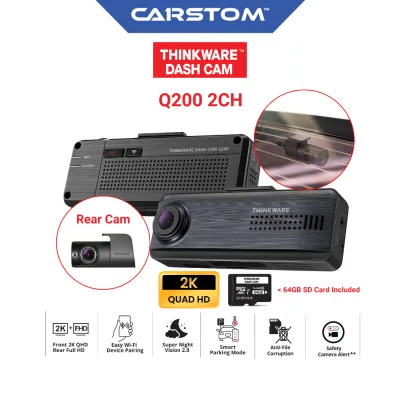
The Thinkware Q200 is designed as a multi-channel system, offering front and rear coverage to capture events around your vehicle. According to manufacturer specifications, the front camera records in 2K Quad High Definition (QHD) resolution, while the rear camera captures footage in 1080p Full HD. This combination aims to balance image clarity with storage efficiency, allowing you to record legible license plates without rapidly exhausting your memory card space.

A key feature of the Q200 is its integrated Global Positioning System (GPS) module, which enables several Advanced Driver Assistance Systems (ADAS). These features include Forward Collision Warning Systems (FCWS) and Lane Departure Warning Systems (LDWS). It is important to note that these driver aids rely heavily on precise camera calibration, clean windshields, and clearly visible road markings to function as intended. They are designed to supplement safe driving habits rather than replace driver attentiveness.
For stationary protection, the Q200 supports multiple parking surveillance modes, including motion detection, impact detection, and time-lapse recording. To utilize these features safely, the camera must be connected to a constant power source. This requires either a dedicated hardwiring cable connected to the vehicle’s fuse box or an external, dash-cam-specific battery pack. These power accessories prevent the camera from draining your vehicle’s primary starter battery while parked.
Connectivity is managed through a built-in Wi-Fi module, allowing you to pair the camera with a companion mobile application on your smartphone. Through this app, you can adjust settings, view live feeds, and download recorded footage directly to your device. Some configurations also support cloud-based features for remote monitoring, though these capabilities depend on a stable local network connection, such as a mobile hotspot, and may involve separate subscription terms.
Head-to-Head Dimensions: How to Compare Dash Cam Features
Video Quality and Low-Light Performance
When comparing the Thinkware Q200 to alternative brands, video quality under challenging lighting conditions is a primary differentiator. Many premium dash cams utilize specialized image sensors, such as the Sony STARVIS series, which are engineered to enhance low-light sensitivity. When evaluating specifications, compare the sensor models and lens apertures (such as f/1.8 or f/2.0) across different brands, as these physical attributes dictate how much light reaches the sensor. Because compression algorithms affect final image clarity, reviewing uncompressed user footage from local night-driving scenarios can provide a more realistic expectation of license plate readability than manufacturer promotional clips.
Parking Mode Power Management
Parking mode functionality varies significantly in how systems manage power consumption and heat. Singapore’s tropical climate subjects parked vehicles to high cabin temperatures, making thermal protection a critical safety feature. Compare how different brands handle heat dissipation; some models feature automatic high-temperature shutoff mechanisms to protect the internal hardware and memory card. Furthermore, look for built-in voltage meters that automatically cut power to the dash cam if the vehicle’s battery drops below a safe threshold, preventing a dead battery when you return to your car.
ADAS Calibration and Alert Accuracy
While many modern dash cams offer GPS-based driver assistance alerts, their real-world utility depends on calibration accuracy and software refinement. In dense urban environments characterized by narrow lanes, high-rise buildings, and frequent lane changes, overly sensitive ADAS systems can generate frequent false alerts. When comparing brands, check if the companion software allows you to customize alert sensitivity or disable specific warnings entirely. A system that permits fine-tuning is less likely to become a source of driver distraction during heavy traffic.
App Interface and Cloud Infrastructure
The usability of a dash cam’s companion app directly impacts how easily you can retrieve footage during an emergency. Some manufacturers invest heavily in localized cloud infrastructure, which can result in faster video download speeds and more reliable remote connections. When comparing options, research the user feedback regarding app stability, connection speeds over local Wi-Fi, and the manufacturer’s data privacy policies. Understanding where your cloud-stored footage is hosted and whether the service requires an ongoing paid subscription is essential for calculating long-term value.
Total Cost of Ownership: Pricing, Installation, and Warranty
Evaluating the value of the Thinkware Q200 requires looking beyond the initial retail price of the camera itself. Premium dash cam systems often sit in a higher price bracket compared to basic entry-level models, reflecting their advanced sensors, GPS modules, and cloud capabilities. To get an accurate picture of the financial commitment, check authorized local retailers or official brand stores for current S$ pricing, keeping in mind that bundles including rear cameras, hardwiring kits, or high-endurance memory cards often provide better overall value.
Professional installation is highly recommended, particularly for multi-channel systems that require routing cables through interior trim panels and connecting to the vehicle’s electrical system. Hardwiring a dash cam for parking mode involves tapping into the vehicle’s fuse box, which must be done with extreme care. Modern vehicles feature complex Controller Area Network (CAN bus) systems, and improper wiring can trigger dashboard error lights, drain the battery, or cause electrical malfunctions.
Safety is the paramount boundary when performing any vehicle electrical work. Unauthorized modifications, DIY wire splicing, or using non-compliant hardware can void your vehicle’s manufacturer warranty and pose serious safety hazards, including electrical fires. Always refer to your vehicle’s original owner’s manual for electrical specifications and seek out qualified, professional installers who have experience with your specific car make and model.
Finally, consider the long-term support and warranty terms offered by the manufacturer or local distributor. A local warranty ensures you can easily obtain replacement parts, such as adhesive mounts, replacement cables, or compatible high-endurance microSD cards, without waiting for international shipping. Responsive after-sales support is invaluable if you encounter software glitches, firmware update issues, or hardware failures down the road.
Final Verdict: Which Dash Cam Fits Your Driving Setup?
Choose the Thinkware Q200 if
The Thinkware Q200 is an excellent choice if you prioritize active driver assistance features, require robust parking surveillance, and want a reliable dual-channel setup from an established brand. Its 2K front recording capability and integrated GPS make it highly suitable for drivers who spend significant time on the road and want detailed driving logs. To get the most out of this system, ensure your vehicle’s electrical system is in good health and that you are willing to invest in professional hardwiring or a dedicated battery pack to support its parking modes safely.
Choose an Alternative Brand if
An alternative dash cam may be more appropriate if you prefer a simple, plug-and-play installation that runs solely off a standard 12V auxiliary power outlet without hardwiring. If your vehicle has a unique windshield angle, or if you prefer a highly discreet, wedge-shaped design that blends seamlessly into the rearview mirror assembly, other specialized form factors might serve you better. Additionally, if cloud connectivity and ADAS alerts are features you do not plan to use, a more basic model can offer comparable video recording capabilities at a lower price point.
Verify First if
Before purchasing any dash cam system, verify the compatibility of your vehicle’s electrical architecture and physical layout. Check if your windshield features specialized solar films, built-in rain sensors, or factory-installed ADAS camera housings, as these can obstruct the dash cam’s lens or interfere with GPS signals. If you drive a hybrid, electric, or continental vehicle with sensitive battery management systems, consult a qualified professional to determine the safest method for powering the camera during extended parking periods.
Community discussion
Share your experience or ask a question. Comments are reviewed before publication.