
To find the best Spigen phone mount or center console organizer for your Tesla, you must first pinpoint your vehicle’s exact model year and interior design phase. Because Tesla frequently updates its cabin layouts without changing model names, a generic accessory search often leads to fitment issues. Selecting the right accessory requires matching the product’s mounting mechanism or tray dimensions to your specific dashboard shape and console configuration. By verifying these physical specifications, you can maintain the clean aesthetic of your cabin while ensuring your devices and storage remain secure on every drive.
Identifying Your Tesla's Specific Interior Layout
Tesla’s minimalist design language is highly unified, but the physical dimensions of the dashboard and center console vary significantly across models and production years. For instance, the Model 3 and Model Y share many interior elements, yet their console depths and seat heights differ, which can affect how you reach a mounted phone or access a console tray. Meanwhile, the flagship Model S and Model X feature entirely different dashboard geometries, instrument clusters, and console layouts that require dedicated accessories.
Production refreshes introduce the most critical compatibility hurdles for aftermarket accessories. The Model 3 underwent a major interior redesign, which altered the dashboard trim, removed physical stalks, and redesigned the center console with a sliding lid mechanism. Similarly, older Model 3 and Model Y vehicles manufactured before 2021 feature a glossy, split-opening console lid, whereas post-2021 versions utilize a matte sliding lid. An organizer designed for a sliding console will not fit the older split-lid configuration, making it essential to know your exact build phase.
Products mentioned in this guide
Prices are valid at publication and may change. Please refer to the product page for the latest price.
Screen orientation and bezel thickness also dictate which phone mounts will function correctly. Flagship models have transitioned between portrait and landscape screens over the years, and newer screens feature thinner bezels that offer less surface area for clip-on or clamp-style mounts. If a mount relies on clamping onto the screen’s outer frame, even a millimeter of difference in bezel thickness can prevent a secure grip or cause unwanted pressure on the display panel.
To avoid purchasing the wrong accessory, do not rely solely on the calendar year of your car’s registration. Instead, check your vehicle’s manufacturing date on the door jamb sticker or reference the tenth character of your Vehicle Identification Number (VIN) to determine the precise model year. Cross-referencing this information with the accessory manufacturer’s compatibility guide is the most reliable way to ensure a perfect fit.
Evaluating Spigen Phone Mount Options for Your Dash
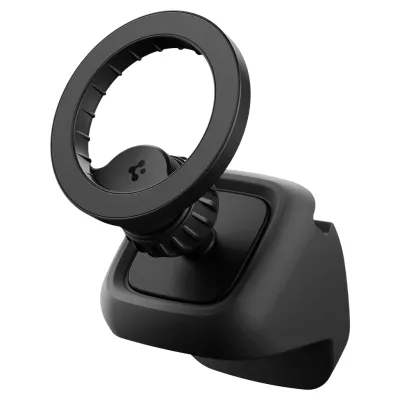
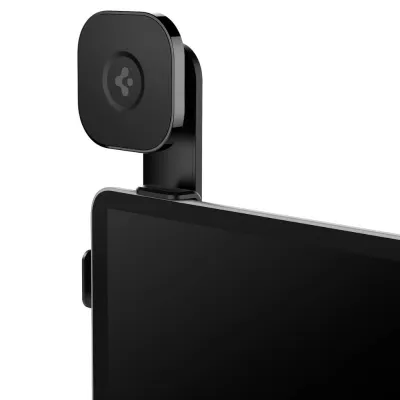
Choosing a phone mount for a Tesla requires balancing accessibility with driver visibility and safety. Because Tesla dashboards lack traditional horizontal air vents in the standard positions, conventional vent-clip mounts are generally incompatible or highly restricted in where they can be placed. Instead, aftermarket solutions like those from Spigen typically utilize screen-back mounts, dashboard adhesives, or specialized trim-clipping mechanisms.

Screen-back mounts are highly popular because they leverage the sturdy frame of the central display. These mounts clamp or adhere to the rear of the screen housing, extending an arm around the side to position your phone next to the display. This setup keeps your phone within your natural line of sight without blocking the windshield. However, you must ensure the mounting arm does not block your view of the instrument cluster area or the critical driver-assist notifications on the main screen.
Adhesive-based dashboard mounts offer flexible placement but require careful consideration of the mounting surface. Tesla dashboards use soft-touch synthetic materials and wood or metallic veneers that can be sensitive to strong chemical adhesives. If you choose an adhesive mount, verify that the adhesive is rated for automotive high-temperature environments and is formulated to release without tearing or staining the underlying material.
The choice between magnetic and mechanical clamping mechanisms depends largely on your phone setup and driving habits. Magnetic mounts, especially those compatible with MagSafe standards, offer rapid, one-handed mounting and a clean look. However, if you use a thick protective case or drive on rough roads, you must verify that the magnetic connection is strong enough to prevent the phone from slipping. Mechanical clamps provide a more positive, locked-in hold but require two hands or a button release to operate, which can be less convenient during quick stops.
Before finalizing your mount selection, simulate the physical clearance of your phone in its intended position. Ensure that the phone does not interfere with your hands on the steering wheel, block the path of the turn signal or gear selector stalks (if your model has them), or obstruct the view of the side mirrors. If your Tesla features a tilting screen, verify that the mount allows the screen to pivot freely without binding against the dashboard or pinching any cables.
Selecting a Spigen Center Console Organizer
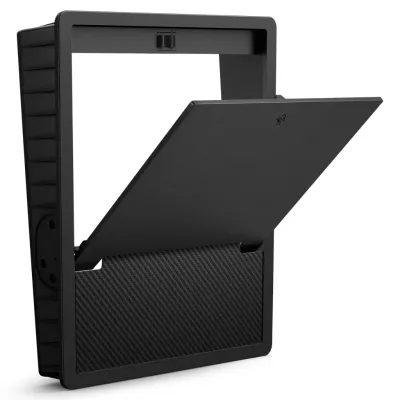
The deep, open storage cavities of Tesla’s center consoles are highly spacious but quickly become cluttered without proper organization. Spigen’s console organizers are designed to divide these deep wells into manageable compartments, but finding the right one requires careful measurement. The console cavities are often tapered, meaning they are wider at the top than at the bottom, so a tray must match these exact angles to slide smoothly or sit securely.
A primary consideration when choosing an organizer is how it interacts with the vehicle’s built-in technology. Many Tesla models feature dual wireless charging pads directly below the main screen. An improperly sized or poorly positioned console tray can block access to these pads or prevent larger phones from resting flat against the charging coils. Ensure the organizer’s front edge is low enough to clear the charging area completely.
Power access is another critical factor. Tesla places USB-C ports and 12V power sockets inside the console storage compartments. A well-designed organizer tray must feature precise cutouts or pass-through channels that allow you to route charging cables without pinching them or blocking access to the ports. If you frequently plug and unplug devices, look for a sliding tray design that allows you to push the organizer out of the way to access the lower section of the console.
Material selection plays a major role in the daily usability of a console organizer. Hard plastic trays without lining can cause keys, coins, and sunglasses to rattle loudly during acceleration, braking, and cornering. Look for organizers that feature removable silicone or rubber mats at the bottom of each compartment. These liners dampen noise, prevent items from sliding around, and can be easily removed and washed when dust or spills accumulate.
Finally, consider the mechanical operation of your console lid. Whether your Tesla has a sliding cover, a roller shutter, or a split-opening armrest, the organizer must sit flush enough to allow the lid to close and latch completely. If the tray sits even slightly too high, it can rub against the underside of the lid, causing scratches to the interior trim or causing the latch mechanism to jam over time.
Fitment Verification and Installation Safety Checks
Before purchasing any interior accessory, perform a thorough fitment verification to protect your vehicle’s cabin and ensure passenger safety. Start by cross-referencing the Spigen product’s official compatibility list with your exact vehicle configuration. Pay close attention to footnotes regarding specific trim levels, such as performance models or regional variations, which may feature subtle differences in console lining or dashboard materials.
Safety must be your top priority when installing any aftermarket accessory. Never mount a phone or place an organizer in a location that could interfere with airbag deployment. The passenger-side dashboard and the steering wheel hub contain rapid-deployment airbags that require completely unobstructed clearance. Additionally, avoid routing any accessory cables across the steering column or footwells where they could snag on your feet or control pedals.
When dealing with adhesive mounts, surface preparation is critical for a secure bond and to prevent damage. Clean the mounting area with a mild, manufacturer-approved cleaner to remove oils and dust, but avoid harsh solvents like high-concentration isopropyl alcohol on sensitive synthetic leathers or wood veneers. Apply the adhesive only within the recommended temperature range, and allow it to cure fully—typically 24 hours—before subjecting the mount to the weight of your phone.
Once your accessory arrives, perform a dry-fit test before removing any adhesive backings or committing to a permanent position. Place the mount or organizer in its intended spot and manually operate all nearby moving parts. Open and close the glovebox, slide the console lids, adjust the steering wheel through its full range of motion, and tilt the main screen. If you detect any rubbing, resistance, or restricted movement, adjust the placement of the accessory immediately.
Monitor the accessory during your first few drives for any signs of instability or noise. A loose phone mount can become a dangerous projectile in the event of a sudden stop or collision, while a rattling console tray can distract you from the road. If you notice any movement, re-tighten the mounting clamps or verify that the organizer is seated correctly in its tracks.
Frequently Asked Questions (FAQ)
Will a screen-back mount damage my Tesla's display hinge?
Screen-back mounts are designed to distribute their weight across a broad contact area on the rear of the display housing, minimizing localized stress. However, adding a heavy phone and mount increases the leverage applied to the display’s mounting hinge, especially when driving over bumps or rough surfaces. To prevent damage, choose a lightweight mount with soft silicone padding at all contact points, and consult your Tesla owner’s manual for any specific warnings regarding aftermarket attachments to the display.
Do console organizers fit all Tesla interior trim levels?
Console organizers are typically designed for standard interior configurations, but premium trim packages, aftermarket wraps, or regional manufacturing differences can alter console dimensions. For example, if you have applied a thick vinyl wrap to your center console, a precision-fit organizer tray may bind or scratch the wrap during operation. Always check the manufacturer’s product description for specific trim exclusions and measure your console’s interior dimensions if your vehicle has custom modifications.
Community discussion
Share your experience or ask a question. Comments are reviewed before publication.