
Quick Answer: Spigen Compatibility with the Model Y Interior
Finding a reliable phone mount for the Tesla Model Y requires a departure from traditional universal mounting solutions. Because the Model Y features a highly minimalist interior design, it completely lacks the flat, textured dashboard surfaces required for standard suction cup mounts. Furthermore, its unique HVAC system utilizes a continuous, hidden slit-style vent running across the width of the cabin rather than traditional slatted air vents, making standard vent clips completely unusable.
To address this unique cabin geometry, Spigen has engineered dedicated mounting solutions within their MagFit and OneTap product lines. These mounts are designed specifically to attach to the outer bezel of the central 15-inch touchscreen or to wedge securely into the natural gaps of the center console. In the context of the Model Y, “dashboard compatibility” refers to these screen-adjacent or console-integrated mounting positions, as the physical dashboard itself cannot support direct mounting without permanent adhesives.
When selecting a Spigen mount, you must verify the specific model year compatibility listed on the packaging or official brand store. While the overall interior layout of the Model Y has remained highly consistent, minor trim revisions—such as changes to the center console materials, wireless charging pad dimensions, or subtle adjustments to the screen bezel thickness—can affect how snugly a custom-fit mount attaches to your vehicle’s interior components.
Products mentioned in this guide
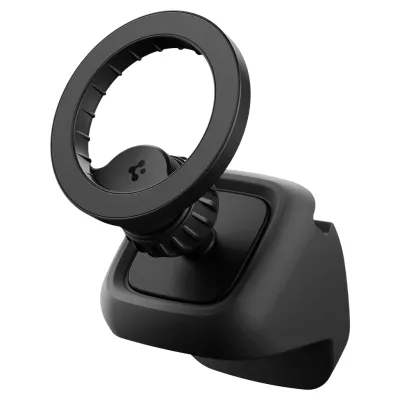
Prices are valid at publication and may change. Please refer to the product page for the latest price.
No-Modification Attachment Methods for the Model Y
Preserving the pristine condition of a Tesla interior is a priority for most owners, especially those navigating lease agreements or prioritizing resale value. Spigen’s Model Y mounting solutions are designed to install securely without requiring permanent modifications, drilling, or messy adhesives that can degrade under high temperatures.

Screen-Edge and Back-of-Screen Mounts
Screen-edge and back-of-screen mounts represent the most popular integration method for the Model Y. These brackets are engineered to clamp directly onto the outer frame of the central 15-inch touchscreen or utilize a tension-based arm that hooks securely behind the display housing. By leveraging the structural rigidity of the screen’s frame, these mounts provide a rock-solid foundation for your phone without placing any direct pressure on the sensitive LCD panel itself.
Before purchasing a screen-edge mount, it is crucial to verify the clamp’s depth against the thickness of your Model Y’s screen. A mount designed with incorrect tolerances may either slide around during acceleration or apply excessive localized pressure to the glass. Spigen addresses this by molding their clamps to match the exact profile of the Tesla display bezel, ensuring an even distribution of clamping force.
To protect the vehicle’s premium finishes, genuine Spigen screen mounts are equipped with internal silicone or microfiber padding. This protective layer acts as a barrier between the mount’s rigid structure and the car’s components, preventing micro-scratches on the aluminum screen backing or the glass edges during installation, adjustment, or eventual removal. This ensures that when you decide to remove the mount, the screen remains in showroom condition.
Center Console Gap Insert Mounts
For drivers who prefer to keep their upper dashboard and touchscreen completely clear, center console gap insert mounts offer an elegant alternative. These mounts are engineered with a custom-molded base that slides directly into the tight structural seam where the center console meets the lower dashboard trim. This design relies on a precise friction-fit mechanism, anchoring the mount securely using the vehicle’s existing panel gaps.
Because these mounts sit flush against the center console, you must perform a quick compatibility check with your daily cabin routine. Ensure that the installed base does not interfere with the smooth operation of the sliding console cover, obstruct access to the dual wireless charging pads, crowd the cup holders, or pinch any charging cables connected to the front USB-C ports. A properly designed Spigen console mount will sit adjacent to these features without limiting their functionality.
Positioning your phone near the center console places the device lower in your physical field of vision. While this layout keeps the main 15-inch touchscreen entirely unobstructed and reduces windshield clutter, it does require you to look further down from the road to glance at your phone. This ergonomic trade-off makes console mounts highly suitable for drivers who rely primarily on the Tesla’s built-in navigation system and use their phone mainly for background tasks like media playback.
Choosing the Right Spigen Series for Your Phone
Selecting the ideal Spigen mount depends heavily on your specific phone model, the type of protective case you use, and your daily driving habits. Spigen categorizes their premium Tesla-compatible mounts into distinct series, each catering to different user preferences.
Magnetic (MagFit) Options
Spigen’s MagFit series is designed specifically for Apple’s MagSafe ecosystem and compatible magnetic cases. These mounts utilize an array of high-grade neodymium magnets to hold your phone in place, allowing for instantaneous, one-handed mounting and removal without the need to fiddle with mechanical clamps or release buttons.
Driving in Singapore demands a mount with exceptional holding strength. Navigating rapid lane changes on the Pan Island Expressway (PIE), crossing harsh expansion joints on flyovers, or traversing speed bumps in HDB estates can easily dislodge a phone secured by weak magnets. Spigen’s MagFit mounts are engineered to withstand these sudden multi-directional forces, ensuring your device remains locked in place even during sudden emergency braking.
If you use an Android device or an older iPhone that lacks native magnetic capabilities, you can still utilize a MagFit mount by applying an adhesive metal ring to the back of your phone or case. However, you must be aware that adding a metallic ring can interfere with your phone’s native Qi wireless charging functionality. The metal can block the inductive coils, preventing the phone from charging on standard wireless pads, including the Tesla’s built-in console chargers.
The primary aesthetic advantage of the MagFit series is its incredibly compact footprint. When your phone is not mounted, the magnetic pad presents a clean, unobtrusive profile that blends seamlessly with the minimalist design language of the Model Y cabin. This minimizes visual clutter and preserves the open feel of the dashboard area.
Mechanical (OneTap / Auto-Clamping) Options
For drivers who prioritize absolute physical security or use heavy-duty protective cases, Spigen’s mechanical OneTap and auto-clamping mounts are the preferred choice. These systems utilize spring-loaded side arms or gravity-driven linkages that physically cradle the perimeter of your phone, locking it into a rigid structural frame.
Mechanical mounts are highly versatile because they do not rely on magnetic alignment or specific case materials. If you protect your phone with a thick, dual-layer case—such as the Spigen Tough Armor—or carry a larger, heavier device like an iPhone Pro Max or Samsung Ultra, a mechanical cradle ensures the phone cannot slip or slide, regardless of road conditions.
However, mechanical mounts are inherently bulkier than magnetic options. Because they feature lateral clamping arms and a bottom support foot, they occupy more physical space. In a right-hand drive (RHD) vehicle, a bulky mechanical mount positioned on the right side of the central screen can easily overlap with critical on-screen vehicle controls, such as the digital speedometer, gear selector status, or climate control shortcuts. You must carefully adjust the mount’s articulating arm to ensure it does not block these vital user interface elements.
Despite their bulk, mechanical mounts offer superior adjustability. Most Spigen OneTap models feature telescopic arms and 360-degree ball joints, allowing you to position your phone at the perfect angle to eliminate glare coming through the Model Y’s expansive panoramic glass roof.
Installation Safety and Interior Protection Checks
Installing an aftermarket accessory in a highly digital vehicle like the Tesla Model Y requires careful attention to safety boundaries, local driving regulations, and material protection.
- Visibility and Airbag Clearance: Because the Model Y does not feature a traditional instrument cluster directly behind the steering wheel, all vital driving telemetry—including your current speed, Autopilot visualizations, and system warnings—is displayed on the right-hand side of the central touchscreen (for right-hand drive vehicles). If you choose a screen-edge mount, it is critical to position it on the left-hand bezel or use an offset arm to ensure your phone does not block your direct line of sight to the speedometer. Furthermore, never run charging cables across the top of the dashboard or mount devices near the passenger-side dashboard trim, as this is the primary deployment zone for the front passenger airbag. A mounted device in this path can become a dangerous projectile in an accident.
- Heat Management: Singapore's tropical climate poses a significant challenge for interior car accessories. When parked in open-air car parks under direct sunlight, cabin temperatures under the panoramic glass roof can quickly soar. Standard aftermarket mounts relying on double-sided adhesive tapes will often fail as the high heat melts the adhesive backing, leaving sticky residue on your trim and causing the mount to collapse. Genuine custom-fit Spigen mounts avoid this issue entirely by utilizing mechanical clamping or friction-fit gap inserts instead of glues. However, you should still avoid leaving your mobile phone mounted in direct sunlight when parked, as modern smartphones will rapidly overheat and enter thermal shutdown.
- Screen and Trim Protection: Before installing any screen-edge or console-gap mount, you must thoroughly clean the contact surfaces. Small particles of road dust, grit, or sand can act like sandpaper when trapped between the mount's clamp and the car's interior trim. Over time, normal road vibrations will grind these abrasive particles into the screen's glass bezel or the console's plastic trim, leading to permanent micro-scratches. Always wipe the installation area down with a clean microfiber cloth and a mild, surface-safe cleaner before sliding the Spigen mount into place, and verify that the mount's protective silicone pads are completely free of debris.
Frequently Asked Questions (FAQ)
Will a Spigen screen mount block the Tesla Model Y's on-screen controls?
No, provided you utilize the mount’s built-in adjustability correctly. The Tesla Model Y’s user interface concentrates critical driving data on the side of the screen closest to the driver, while navigation, media, and passenger controls occupy the center and left portions. Spigen screen mounts feature adjustable articulating arms and ball joints that allow you to offset your phone’s physical position. By mounting the bracket on the left-hand bezel of the screen or angling the phone downward, you can ensure that vital controls—such as the climate control dock, volume sliders, and application launcher—remain fully visible and accessible. Always perform a static check of all touchscreen controls while parked before driving with a newly installed mount.
Can I use a standard Spigen vent mount in the Tesla Model Y?
No, standard Spigen vent mounts designed for traditional slatted air vents are completely incompatible with the Tesla Model Y. The Model Y features a unique, minimalist HVAC design that utilizes a single continuous horizontal slit running across the dashboard rather than exposed plastic slats or louvers. Attempting to force a standard vent clip into this delicate slot can damage the internal directional positioners of the vehicle’s climate control system. To avoid dashboard damage, you must use Spigen models specifically engineered to clamp onto the central screen’s outer bezel or slide into the center console’s structural gaps.
Community discussion
Share your experience or ask a question. Comments are reviewed before publication.