
The Short Answer: Which Navigation System is Right for You?
Choosing between a mobile device secured in a mounted phone holder and a built-in car GPS system in Singapore depends on your daily driving habits, budget, and vehicle age. For most drivers, a high-quality phone mount paired with a modern navigation app is the most practical and cost-effective solution. This setup delivers real-time, crowd-sourced traffic updates, immediate alerts for Electronic Road Pricing (ERP) changes, and instant notifications of road closures or speed cameras without any subscription fees.
Conversely, a dedicated built-in car GPS system is highly beneficial if you frequently drive through long underground expressways, such as the Marina Coastal Expressway (MCE) or Kallang-Paya Lebar Expressway (KPE), where cellular signals frequently drop. Built-in systems utilize dedicated external antennas to maintain precise tracking and offer a seamless, wire-free dashboard aesthetic. If your vehicle features a modern infotainment system supporting Apple CarPlay or Android Auto, you can enjoy the best of both worlds by projecting your phone’s navigation apps directly onto the integrated dashboard screen, eliminating the need for a separate mount.
Head-to-Head Comparison: Phone Mount vs Built-in GPS
To determine which navigation setup fits your daily commute, it is essential to compare how each system performs across critical real-world categories. From map freshness to hardware reliability under the tropical sun, each option presents distinct engineering and practical trade-offs.
Products mentioned in this guide
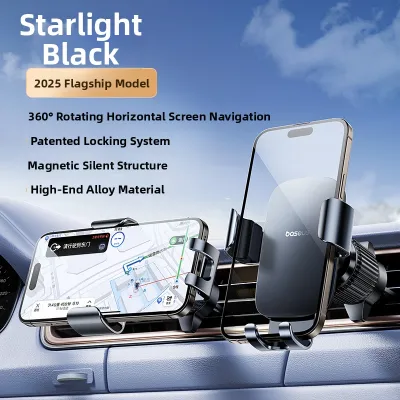
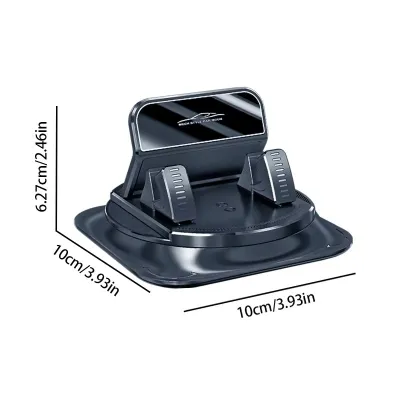

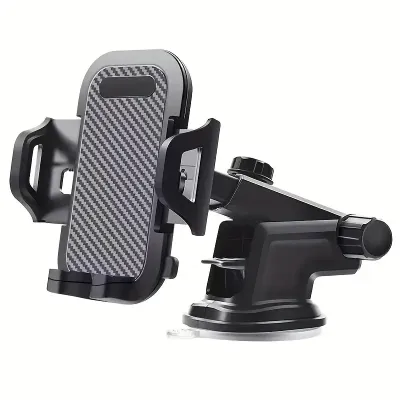

Prices are valid at publication and may change. Please refer to the product page for the latest price.

Map Accuracy, Traffic Data, and Updates
Mobile navigation apps excel at providing dynamic, real-time data because they leverage crowd-sourced information from thousands of active road users. When you use an app on your phone, you receive instant notifications about sudden traffic build-ups on the Pan Island Expressway (PIE), active roadworks, or broken-down vehicles blocking lanes. These applications update their underlying maps automatically in the background, ensuring that new housing estates, modified slip roads, and updated ERP gantry operational hours are reflected immediately without requiring manual intervention.
Older or more traditional built-in car GPS systems operate on a different update model. These systems rely on proprietary map databases stored locally on the vehicle’s hard drive or an SD card. Updating these maps typically requires downloading large files onto a USB drive, purchasing update packages from the manufacturer, or visiting an authorized dealership during regular servicing. While newer, internet-connected luxury vehicles feature over-the-air (OTA) map updates, many standard built-in systems lag behind mobile apps in reflecting rapid infrastructural changes across Singapore’s evolving road network.
Screen Quality, Usability, and Integration
Built-in GPS systems are designed by automotive manufacturers to offer optimal visibility under diverse lighting conditions. These screens are typically larger than smartphone displays, ranging from 8 to over 12 inches, and feature matte, glare-resistant coatings that remain highly readable even under intense midday sunlight. Furthermore, built-in systems integrate directly with your vehicle’s audio system, automatically lowering the volume of your music when a voice prompt is announced, and allowing you to control map views using physical steering wheel buttons.
Smartphones offer a highly responsive and familiar user experience, but their hardware faces specific environmental challenges when used on the road. A phone secured in a mounted phone holder provides intuitive pinch-to-zoom gestures, familiar predictive text search, and seamless integration with your personal contacts and calendar. However, the glossy glass screens of modern smartphones are highly reflective, which can make them difficult to read in bright sunlight. Additionally, continuous GPS processing combined with high screen brightness can cause smartphones to overheat rapidly when positioned near the windshield, leading the device to dim its screen or shut down entirely to protect its battery.
Power, Connectivity, and Reliability
Running high-performance navigation applications on a mobile phone places a heavy load on the device’s processor, screen, and cellular modem. This intensive processing drains the battery rapidly, making a reliable charging cable or an active wireless charging mount an absolute necessity for trips lasting longer than a few minutes. If you rely on a standard USB port built into an older car, you may find that the power output (often limited to 0.5 amperes) is insufficient to charge the phone while navigation is active, resulting in a slowly depleting battery despite being plugged in.
Built-in GPS units draw power directly from the vehicle’s electrical system, eliminating any concerns regarding battery depletion. More importantly, they feature superior satellite connectivity. While smartphones rely on internal, multi-purpose antennas and Assisted GPS (A-GPS) which requires cellular tower signals, built-in systems use dedicated external GPS antennas mounted on the vehicle’s roof or dashboard. This hardware difference is highly apparent when navigating Singapore’s dense urban canyons, high-rise housing estates, or extensive underground road networks where mobile phone signals are frequently lost or severely delayed.
Distraction and Driving Ergonomics
Vehicle designers position built-in screens at calculated, ergonomic heights to ensure that drivers can glance at navigation prompts with minimal eye deviation from the road. This integrated placement keeps the dashboard clean and preserves your natural forward field of vision. The primary drawback is that some built-in screens are positioned relatively low in the center console, requiring you to look down and away from the windshield, which can temporarily compromise your situational awareness.
Using a mounted phone holder allows you to customize the placement of your screen to suit your height and seating position. You can attach the mount to the windshield, dashboard, or air vents to keep the navigation prompts directly within your peripheral line of sight. However, this flexibility introduces the risk of cluttering your dashboard with trailing charging cables. If the mount is positioned poorly, it can block critical forward sightlines or create physical obstructions when you operate your vehicle’s manual controls, wiper stalks, or gear selector.
Cost and Value Breakdown in Singapore
Evaluating the financial commitment of both navigation options involves looking beyond the initial purchase price to consider long-term operating costs, convenience, and device longevity.
Opting for phone-based navigation is highly cost-effective because it leverages hardware you already own. The primary investment is a high-quality, durable mounted phone holder. Basic mechanical vent or CD-slot mounts typically cost between S$15 and S$35, while premium dashboard mounts featuring active magnetic alignment and wireless fast-charging capabilities generally range from S$45 to S$90. When you pair this with a robust car charger capable of delivering sufficient wattage (such as a USB-C Power Delivery charger), the total upfront cost rarely exceeds S$120. Map data and traffic routing services are completely free, though you must account for the minor cellular data consumption associated with real-time map rendering.
In contrast, a built-in car GPS system represents a significant financial investment. If you are purchasing a new vehicle, choosing a trim level that includes native navigation can add thousands of dollars to the purchase price. For older vehicles, upgrading to an aftermarket double-DIN infotainment head unit with built-in GPS functionality can cost anywhere from S$400 to over S$1,500, depending on the brand, screen technology, and audio processing capabilities. Professional installation labor in Singapore typically adds an additional S$80 to S$200, depending on the complexity of your vehicle’s wiring harness and steering wheel control integration. Furthermore, some manufacturers charge recurring fees or require the purchase of updated map packages after the initial vehicle warranty period expires.
To make an informed financial decision, compare the current pricing of reputable aftermarket head units at local car accessory shops against the cost of a premium phone mount. If your current vehicle’s dashboard is difficult to modify or if you plan to change vehicles within a few years, investing in a high-quality phone mount offers far better value and portability.
Safety, Legal, and Installation Considerations
Operating a vehicle safely in Singapore requires strict adherence to local traffic regulations and careful attention to how aftermarket accessories are installed.
Singapore’s Road Traffic Act strictly prohibits drivers from holding or operating any mobile communication device while the vehicle is in motion. This regulation means that holding your phone in your hand, resting it on your lap, or attempting to type in a destination while waiting at a red light is a serious offense that can result in heavy fines, demerit points, or court prosecution. To use a mobile phone legally for navigation, the device must be securely held in a mounted phone holder, and you must input your destination before starting your journey or utilize hands-free voice commands while driving.
When installing a phone mount, you must prioritize your physical safety and protect your vehicle’s interior from damage:
- Airbag Deployment Zones: Never position a phone mount, charging cable, or the phone itself over or near the steering wheel boss, the passenger-side dashboard, or the side pillars where SRS airbags deploy. A phone placed in these zones can become a dangerous projectile if the airbags inflate.
- Windshield Obstructions: If you use a suction-cup mount on your windshield, place it low and close to the dashboard or high near the rearview mirror to ensure it does not block your view of pedestrians, cyclists, or blind spots near the A-pillars.
- Air Vent Protection: Heavy modern smartphones can place significant mechanical stress on thin plastic vent louvers. When using a vent mount, ensure the clip features rubberized padding to prevent scratching, and avoid overtightening the clamp to prevent cracking the delicate air conditioning vents.
- Dashboard Material Care: High cabin temperatures in parked cars can cause cheap adhesives or suction cups to melt, leaving permanent residue or warping soft-touch leather and vinyl dashboards. Consider using a temporary friction-based dashboard pad or a mount that clips securely to existing console seams.
For built-in or aftermarket GPS systems, the safety boundaries are even more critical. Installing or replacing an infotainment head unit involves modifying your vehicle’s electrical wiring. Improper wiring can lead to short circuits, parasitic battery drain, or interference with critical vehicle safety systems. Always consult your vehicle’s owner manual before attempting any electrical modifications, and have all aftermarket head units installed by qualified automotive technicians who can guarantee that the installation does not void your manufacturer’s warranty or disrupt your steering wheel controls.
Decision Framework: How to Make Your Final Choice
To determine the ideal navigation setup for your vehicle, apply this structured decision framework based on your specific driving requirements.
- Choose a Mounted Phone Holder if:
- You want the most accurate, real-time traffic routing to avoid congestion on major expressways during peak hours.
- You prefer a highly cost-effective setup with zero ongoing map subscription fees.
- You already own a modern smartphone with a reliable local mobile data plan.
- You drive multiple vehicles or use car-sharing services frequently and need a portable navigation solution.
- Choose a Built-in Car GPS if:
- You drive an older vehicle that lacks smartphone integration and you want a permanent, clean dashboard setup.
- You frequently navigate through long underground tunnels, underpasses, or high-density urban areas where cellular reception is poor.
- You prefer a larger, glare-resistant screen that integrates directly with your car's steering wheel controls and native audio system.
- You want to avoid cluttering your cabin with visible charging cables and phone mounts.
- Verify First if:
- Your vehicle's existing infotainment system supports Apple CarPlay or Android Auto. If it does, you do not need to choose between the two systems. You can connect your smartphone via USB or wireless connection to project your favorite navigation apps directly onto the built-in dashboard screen, combining the real-time data of your phone with the ergonomic, high-quality hardware of your vehicle.
Frequently Asked Questions (FAQ)
Is it legal to use a phone mount while driving in Singapore?
Yes, it is legal to use a mobile phone for navigation in Singapore as long as the device is securely fixed in a mounted phone holder. You must not hold the phone in your hand, rest it on your body, or manually interact with the screen while the vehicle is in motion. All destination inputs should be completed before you begin driving, or managed entirely through hands-free voice commands to ensure compliance with local traffic laws.
Will a phone mount damage my car's air vents or dashboard?
It is possible if you use low-quality mounts or install them incorrectly. Heavy smartphones can put excessive leverage on fragile plastic air vent louvers, potentially cracking them over time. Additionally, cheap suction cups and strong adhesives can melt under high cabin temperatures, leaving sticky residue or causing permanent discoloration on soft-touch dashboard materials. To protect your vehicle’s interior, select a high-quality mount with rubberized grips, or opt for specialized console brackets or CD-slot mounts that do not rely on direct dashboard adhesion.
Community discussion
Share your experience or ask a question. Comments are reviewed before publication.