
Choosing between a phone mount with navigation apps and a dedicated built-in car navigation system depends on your priorities for real-time data, budget, and dashboard aesthetics. For drivers navigating congested urban roads who require instant rerouting, a smartphone secured in a reliable mount offers exceptional agility and up-to-date maps. Conversely, built-in systems provide a stable, distraction-free interface that operates independently of cellular signals and preserves your phone’s battery life. Evaluating how each option handles data, costs, safety, and physical integration will help you determine the most practical setup for your daily commute.
Routing, Updates, and Real-Time Data Comparison
Smartphone navigation apps update their maps continuously in the background, often daily or weekly, without requiring manual intervention. These updates are typically free and reflect road closures, new housing estates, and altered traffic schemes almost instantly. In contrast, built-in car navigation systems often rely on static map databases stored on internal hard drives or SD cards. Updating these built-in maps usually requires downloading large files onto a USB drive or visiting an authorized service center, a process that many car owners neglect due to the inconvenience or associated costs.
Smartphone apps rely heavily on continuous cellular data to fetch live map tiles and traffic information. While many apps allow you to download offline maps for areas with poor reception, their core strength lies in active connectivity. Built-in navigation systems, however, utilize dedicated GPS antennas integrated into the vehicle’s roof or dashboard. This hardware-based connection ensures reliable positioning even when driving through deep tunnels, under heavy foliage, or in remote areas where cellular signals drop completely.
Products mentioned in this guide


Prices are valid at publication and may change. Please refer to the product page for the latest price.
The dynamic routing capabilities of modern smartphone apps are driven by crowdsourced data from millions of active users. This allows apps to detect sudden traffic build-ups, road hazards, and speed cameras, offering alternative routes to save time. Built-in systems, unless connected to a proprietary telematics service or a tethered mobile hotspot, generally offer slower traffic updates. They may rely on older broadcast technologies like FM-based Traffic Message Channel (TMC), which updates less frequently and covers fewer secondary roads.
Searching for a specific business, restaurant, or petrol station is significantly easier on a smartphone app, which pulls live data directly from search engines and user reviews. Built-in systems are limited to the POI database installed during the last map update. If a business has closed or a new shopping mall has opened, a built-in system may fail to locate it, forcing you to manually input the coordinates or address.
Smartphone screens have made massive leaps in brightness and anti-reflective coatings, but their smaller size can still make them difficult to read when placed in direct sunlight on a dashboard mount. Built-in infotainment screens are typically larger, recessed, or angled to minimize glare, providing a clearer view at a glance. Furthermore, built-in systems are designed to automatically mute or lower the volume of your music when broadcasting navigation prompts through the car’s speakers, whereas a phone setup may require manual Bluetooth pairing or rely on the phone’s built-in speaker, which can be drowned out by road noise.
Upfront Costs, Installation, and Long-Term Upkeep
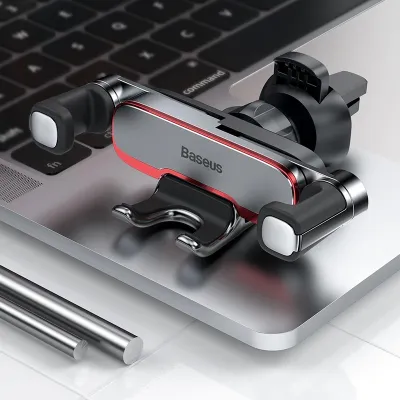
Opting for smartphone navigation is highly cost-effective, as most drivers already own a capable smartphone. The primary upfront cost is limited to purchasing a secure mounting accessory, such as a Baseus phone mount, which typically ranges from S$15 to S$40 depending on the mounting mechanism and wireless charging capabilities. On the other hand, a built-in navigation system is either bundled into the vehicle’s purchase price as an expensive trim option or requires installing an aftermarket head unit, which can cost anywhere from hundreds to over a thousand dollars.

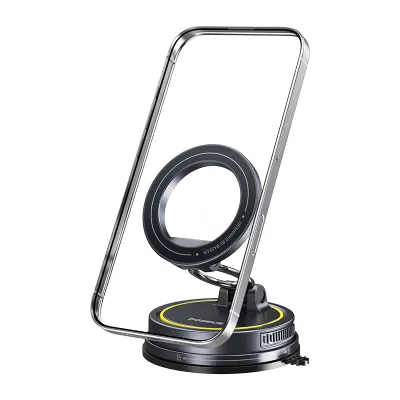
Setting up a phone mount is a straightforward, tool-free process that takes only a few minutes. Drivers can choose between air vent clips, dashboard suction cups, or magnetic mounts that attach directly to flat surfaces. Upgrading or replacing a built-in navigation system, however, is a complex task. Installing an aftermarket head unit requires disassembling the dashboard, splicing wiring harnesses, and ensuring compatibility with steering wheel controls and backup cameras, which often necessitates hiring a qualified professional to avoid damaging the vehicle’s electrical system.
While smartphone apps are generally free to download and use, they do consume mobile data. For drivers with limited data plans, daily navigation can contribute to monthly overage charges, though this is rarely an issue with modern high-data packages. Built-in systems do not consume mobile data, but they often incur long-term upkeep costs. Manufacturers frequently charge subscription fees for annual map updates or live traffic services after an initial trial period, which can become a recurring financial burden over the lifespan of the vehicle.
Smartphones are upgraded every few years, ensuring that your navigation hardware remains fast and responsive. Built-in infotainment systems, however, are designed to last the lifetime of the vehicle. As the car ages, the built-in processor can become sluggish, and the screen may suffer from degradation or touch-responsiveness issues. Replacing a faulty built-in screen or navigation module is significantly more expensive than replacing a worn-out phone mount or upgrading to a newer smartphone.
Safety, Dashboard Ergonomics, and Device Management
When using a phone mount, placement is critical to maintaining road safety and complying with local traffic regulations. The mount must be positioned so it does not obstruct your forward view of the road or block essential dashboard instruments. Crucially, you must never install a phone mount directly over or near airbag deployment zones, such as the center of the steering wheel or the passenger-side dashboard panel. Refer to your vehicle’s owner manual to identify these deployment zones, as an improperly placed mount can turn a smartphone into a dangerous projectile during a collision.
Interacting with a navigation system while driving poses significant safety risks. Built-in systems are often integrated with physical steering wheel buttons or advanced voice control systems designed specifically for automotive use, allowing you to input destinations or adjust settings without taking your eyes off the road. While smartphones also offer voice assistants, their smaller touch targets and notifications from other apps can tempt drivers to look away from the road, increasing cognitive load and distraction.
In tropical environments like Singapore, placing a smartphone on the dashboard under direct sunlight can cause rapid thermal buildup. Running a high-demand navigation app while simultaneously charging the device generates substantial internal heat. This often triggers the phone’s thermal protection mechanism, causing the screen to dim, charging to pause, or the device to shut down entirely mid-journey. Built-in navigation systems are engineered to automotive-grade thermal standards, allowing them to operate reliably in extreme cabin temperatures without risk of overheating.
Continuous GPS tracking and screen usage drain a smartphone’s battery rapidly. To prevent your phone from dying during a long drive, you must keep it plugged into a car charger or use a wireless charging mount. This constant power delivery, combined with the heat of navigation, can accelerate the degradation of your phone’s lithium-ion battery over time. Built-in systems draw power directly from the vehicle’s electrical system, leaving your phone free to rest in a cool pocket or console.
Many drivers prefer air vent mounts because they keep the phone closer to eye level and utilize the car’s air conditioning to cool the device. However, heavy smartphones can strain or damage delicate vent louvers over time, and blocking the airflow can reduce cabin cooling efficiency. Suction cup mounts on the windscreen or dashboard offer an alternative but can lose adhesion over time due to humidity and temperature fluctuations, potentially causing the phone to fall while the vehicle is in motion. Always verify your vehicle’s specific vent design, dashboard material, and mounting dimensions against the product specifications before purchasing to ensure a secure and safe fit.
Decision Framework: Which Setup Fits Your Driving Needs?
To determine the best setup for your vehicle, start by evaluating your typical driving routes and geographic location. If your daily commute involves navigating dense city traffic with frequent road works, unexpected jams, and changing speed zones, a phone mount setup is highly advantageous. The agility of crowdsourced navigation apps ensures you receive the fastest routes based on real-time conditions, and the low cost of a quality mount makes it an accessible solution for any driver.
If you frequently travel through areas with spotty cellular coverage, prefer a clean and uncluttered dashboard aesthetic, or simply want a system that is always ready to go without plugging in your phone, built-in navigation is a highly practical choice. It offers consistent reliability, integrates seamlessly with your car’s audio and instrument cluster, and eliminates the clutter of exposed charging cables and mounting brackets.
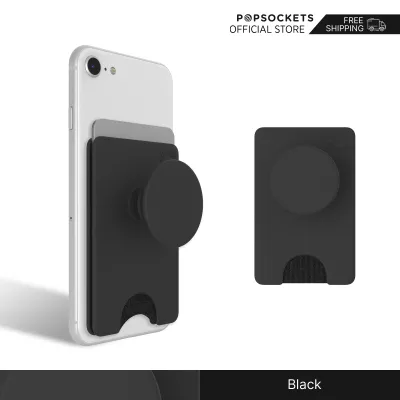
Before making a final decision, verify whether your vehicle’s existing infotainment system supports smartphone projection protocols like Apple CarPlay or Android Auto. This hybrid solution offers the benefits of both systems: it projects your phone’s high-performance navigation apps, real-time traffic data, and familiar interface directly onto the car’s large, built-in dashboard screen. If your car supports this feature, you may only need a simple phone mount or a dedicated storage slot to keep your phone secure and connected while enjoying an integrated navigation experience.
Frequently Asked Questions (FAQ)
Can I use a phone mount if my car already has built-in navigation?
Yes, many drivers choose to use a phone mount even if their vehicle is equipped with a built-in navigation system. This dual-screen setup allows you to dedicate the larger built-in screen to basic map routing or vehicle settings, while using your mounted smartphone for secondary tasks. For instance, you can use the phone to manage music playlists, monitor incoming hands-free calls, or run a secondary traffic app to cross-reference route suggestions. It also provides a convenient backup if your built-in system’s maps are outdated or if you lose cellular signal on your phone.
Do phone mounts damage the car interior or block air vents?
Phone mounts are generally safe, but choosing the wrong type or installing it incorrectly can cause minor damage to your car’s interior. Heavy phones mounted on air vent clips can bend or crack the plastic vent slats, especially when driving over rough roads. Adhesive-backed mounts can leave a sticky residue or even discolor soft-touch dashboard plastics when removed after prolonged exposure to heat. To protect your interior, consider using a high-quality suction mount on the glass windscreen, or select a vent mount with a supportive brace that distributes the weight of the phone evenly across the surrounding dashboard trim.
Community discussion
Share your experience or ask a question. Comments are reviewed before publication.