
Choosing between a smartphone mounted on a mobile stand and a built-in car GPS system comes down to how you balance real-time adaptability against seamless vehicle integration. The optimal choice depends on whether you prioritize instant map updates, application flexibility, and minimal upfront costs—which favor a smartphone paired with a reliable mobile stand for car use—or if you prefer a clean dashboard aesthetic, dedicated hardware, and integrated vehicle telemetry, which favor a built-in GPS system. To make an informed decision, you must evaluate how each option performs across daily convenience, safety, overall cost, and long-term value.
Both setups offer distinct pathways to navigating busy roads, but they handle data, power, and driver attention in fundamentally different ways. By understanding these differences, you can select a setup that matches your driving habits, vehicle cabin layout, and budget.
Core Differences in Navigation Experience
Smartphone navigation apps leverage rapid cloud computing to deliver near-instantaneous map updates. Because these applications rely on millions of active users sharing location data, they excel at real-time traffic routing, identifying sudden congestion, and flagging temporary road hazards. If your daily commute involves navigating unpredictable traffic bottlenecks, the dynamic rerouting capabilities of a smartphone app are difficult to match.
Products mentioned in this guide

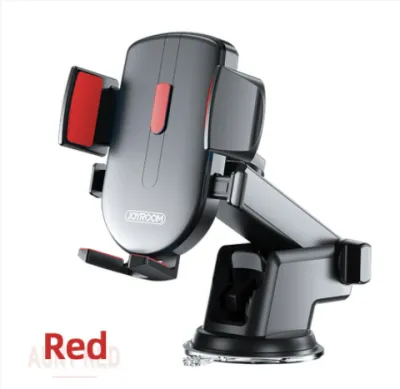
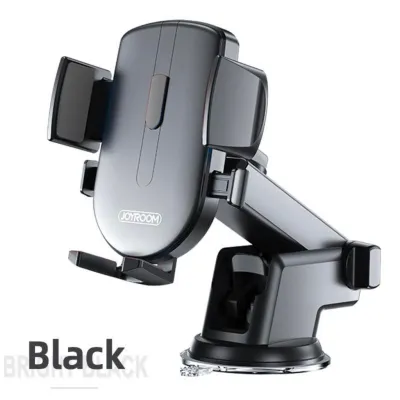
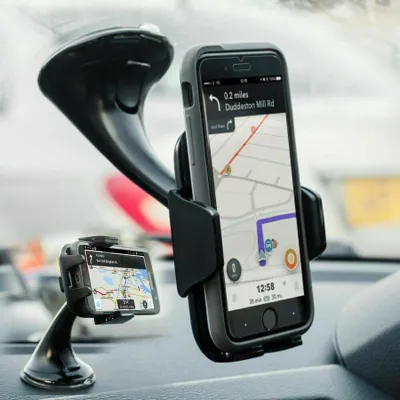
![[SG] 360° Car Phone Holder Gravity Stand with Suction Cup for Dashboard/Windscreen/Curved Dashboard - Adjustable Bracket Mount Car Windscreen Mobile Mount Gravity Double Stable Strong Suction Cup Car Mount Holder for iPhone Huawei Xiaomi](https://img.lazcdn.com/g/p/80cdc8b87227aa42285f1e08973c194e.jpg_400x400q80.jpg_.webp)
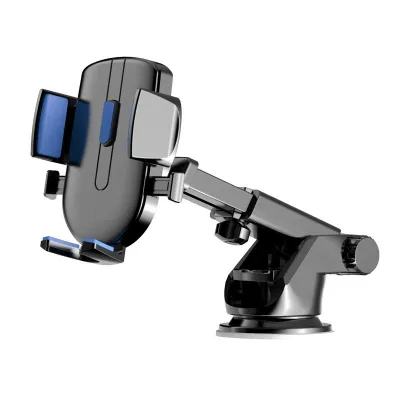


Prices are valid at publication and may change. Please refer to the product page for the latest price.
In contrast, built-in car GPS systems often rely on pre-loaded map databases stored locally on the vehicle’s hardware. While some modern systems offer connected services for live traffic, many require manual updates via USB drives, SD cards, or dealership visits to reflect new road layouts. This can result in outdated routing suggestions if the local database has not been recently serviced.
Screen visibility and touch responsiveness also differ significantly between the two setups. Modern smartphones feature high-density capacitive touchscreens that respond instantly to gestures and remain highly legible under various lighting conditions. Built-in infotainment screens, particularly in older vehicle models, may use resistive touch technology or lower-resolution displays that feel sluggish or suffer from distracting glare in direct sunlight.
App ecosystem flexibility is another major advantage for the smartphone route. Using a mobile stand allows you to switch between various navigation, music, and messaging applications depending on your preference. Built-in systems restrict you to the manufacturer’s proprietary user interface, which can feel rigid and lacks the familiar, intuitive design of modern mobile operating systems.
Installation, Power, and Cabin Integration
Integrating a mobile stand for car use requires careful consideration of physical placement and stability. Suction mounts, air vent clips, and dashboard adhesive mounts each offer different levels of stability. A poorly positioned stand can vibrate excessively on uneven roads, block essential air vents, or partially obstruct your physical view of the windshield, creating a subtle but persistent driving hazard.

Cable management is a common challenge when relying on a smartphone for navigation. Running a charging cable from a cigarette lighter adapter or a USB port to a dashboard-mounted phone can clutter the center console. Without proper cable routing clips, loose wires can interfere with gear shifters, physical climate controls, or your hands while steering.
Power delivery and heat management are critical factors during long journeys. Running GPS, cellular data, and high screen brightness simultaneously places a heavy load on a smartphone battery. In warm climates, such as Singapore’s tropical environment, mounting a phone directly on the dashboard under intense sunlight while drawing continuous power can cause the device to overheat, leading to thermal throttling, screen dimming, or unexpected shutdowns.
Built-in GPS systems eliminate these physical integration challenges entirely. Because they are factory-installed or professionally integrated into the dashboard, there are no exposed wires, mounting brackets, or suction cups to manage. They draw power directly from the vehicle’s primary electrical system and are engineered to withstand extreme cabin temperatures without thermal failure, ensuring consistent operation regardless of weather conditions.
Cost and Long-Term Value Comparison
From an upfront financial perspective, utilizing a smartphone with a mobile stand is highly cost-effective. A high-quality, durable mobile stand for car mounting typically costs between S$15 and S$50. Since most drivers already own a capable smartphone, the initial investment required to establish a highly functional navigation system is minimal.
Built-in GPS systems, on the other hand, represent a substantial upfront investment. When purchasing a new vehicle, factory navigation is often bundled into premium trim levels or expensive technology packages that can add thousands of dollars to the purchase price. Retrofitting an aftermarket head unit with built-in GPS into an existing vehicle also requires purchasing specialized hardware and paying for professional installation to ensure proper integration with the car’s electrical system.
Ongoing maintenance costs also diverge over time. Smartphone navigation apps are generally free to use, though they do consume mobile data, which may impact your monthly cellular bill. Built-in systems often require proprietary map updates from the manufacturer, which can carry recurring subscription fees or flat charges per update after an initial trial period expires.
Hardware lifespans and upgrade cycles favor the smartphone ecosystem. Consumers typically upgrade their mobile phones every two to four years, meaning your navigation hardware naturally benefits from regular processor, screen, and software upgrades. A built-in car GPS system is tied to the lifespan of the vehicle; as the car ages, the infotainment hardware can become obsolete, slow, and incompatible with newer digital services, with replacement being a costly and complex undertaking.
Safety, Ergonomics, and Local Compliance
Maintaining a clear line of sight is paramount for safe driving. A mobile stand allows you to position your phone closer to your natural field of vision, reducing the distance your eyes must travel from the road to check a map. However, if the stand is mounted too high on the windshield, it can create dangerous blind spots. Built-in screens are typically positioned in a fixed, central dashboard location designed by automotive engineers to minimize distraction, though they may require you to look slightly downward.
Ergonomic integration with vehicle controls is a major strength of built-in systems. Factory GPS units often connect directly to steering wheel buttons and native voice control systems, allowing you to adjust volume, mute guidance, or input destinations without taking your hands off the wheel. While smartphones offer voice assistants, triggering them can sometimes be less reliable in a noisy cabin compared to integrated vehicle microphones.
Local traffic regulations strictly govern how electronic devices are used while driving. In Singapore, holding a mobile communication device while the vehicle is in motion is a serious offense. If you choose to use a smartphone for navigation, it must be mounted securely in a dedicated holder, and you must not interact with the screen physically while driving. Ensuring your mobile stand is securely fixed and does not obstruct your forward view is essential for remaining compliant with local road safety laws.
Nighttime driving comfort is another ergonomic detail to consider. Built-in systems automatically dim their displays and switch to dark mode when the vehicle’s headlights are turned on. While smartphones can adjust brightness automatically using ambient light sensors, they can sometimes remain too bright in pitch-black driving environments, requiring manual adjustment to prevent eye strain and dashboard glare.
Decision Framework: Which Setup Fits Your Driving Needs?
To determine the best navigation setup for your vehicle, evaluate your daily driving patterns and hardware preferences against these specific scenarios:
Choose a smartphone paired with a mobile stand if:
- You require real-time, crowdsourced traffic data to navigate daily peak-hour congestion.
- You prefer using familiar, regularly updated navigation applications.
- You want to avoid the high upfront costs of factory navigation packages or aftermarket head unit installations.
- You are comfortable managing charging cables and mounting hardware on your dashboard.
Choose a built-in car GPS system if:
- You prefer a clean, clutter-free dashboard free of visible wires and mounting brackets.
- You want a system that operates independently of your phone's battery, data plan, and thermal limits.
- You value seamless integration with steering wheel controls, vehicle speakers, and native voice command systems.
- You frequently drive through areas with poor cellular reception where offline reliability is critical.
Before making a final decision, verify whether your vehicle’s existing infotainment system supports smartphone projection technologies like Apple CarPlay or Android Auto. This integration serves as an ideal middle ground, allowing you to run your phone’s advanced navigation apps directly on the car’s built-in, factory-installed dashboard screen. If your vehicle supports this feature, you can enjoy the software benefits of a smartphone alongside the clean integration of a built-in system, eliminating the need for a separate mobile stand entirely.
Frequently Asked Questions (FAQ)
Can I use my phone's GPS without a mobile data connection?
Yes, you can use your phone’s GPS without an active mobile data connection by downloading offline maps within your preferred navigation app before your journey. Modern smartphones contain dedicated GPS receivers that can calculate your physical location using satellite signals alone, requiring no cellular data.
However, offline navigation has distinct functional limitations. While you can view map layouts and receive basic turn-by-turn routing instructions, you will not receive real-time traffic updates, dynamic rerouting suggestions, or active hazard alerts. Additionally, address searching and point-of-interest lookups may be limited to the specific geographic data packages you downloaded in advance.
Does a built-in car GPS work when the car battery is disconnected?
A built-in car GPS system cannot operate when the vehicle’s main 12-volt battery is disconnected, as it relies entirely on the car’s electrical system for power. Unlike smartphones, built-in infotainment units do not feature internal rechargeable batteries to sustain active navigation without external power.
Despite the loss of active power, modern built-in systems utilize non-volatile flash memory to retain your saved data. Your programmed home address, saved waypoints, system preferences, and map databases will remain intact during a battery replacement. However, some older systems may lose temporary data, such as your recent trip history, current time settings, or active route progress, requiring a brief initialization period once power is restored.

Community discussion
Share your experience or ask a question. Comments are reviewed before publication.