
Selecting the right magnetic phone holder for your vehicle depends on your car’s existing ports, your smartphone model, and your daily driving habits. The ideal setup balances charging speed, dashboard neatness, and hardware compatibility without cluttering your cabin.
A USB-A magnetic holder is best if your vehicle features older, rectangular USB ports and you want a budget-friendly option to keep your battery stable during short trips. This setup relies on standard cables and is widely compatible with older electronics.
A USB-C magnetic holder is a practical choice for modern vehicles equipped with native USB-C ports. This option supports higher power delivery, making it suitable for drivers who run demanding navigation apps and need to replenish their battery quickly.
Products mentioned in this guide
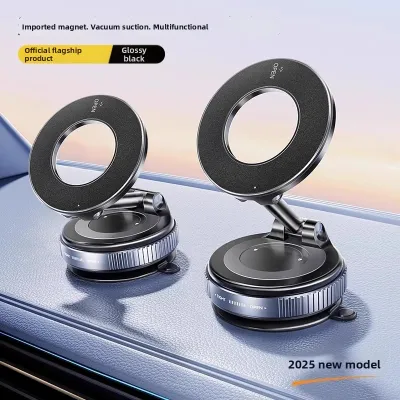
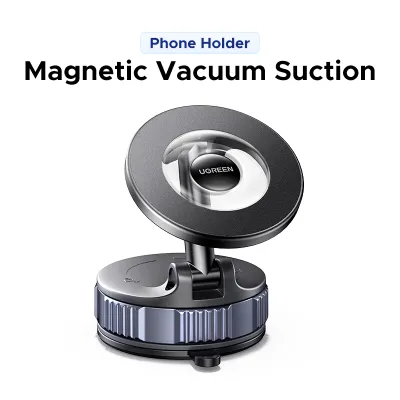
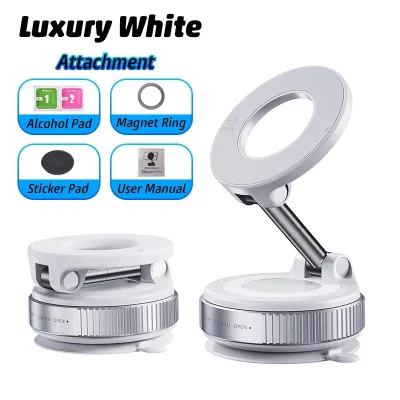
Prices are valid at publication and may change. Please refer to the product page for the latest price.
A wireless magnetic holder offers a clean, cable-free mounting experience by utilizing magnetic alignment to secure and charge your phone simultaneously. It is ideal for drivers who prioritize convenience, though it still requires a hidden cable running from the mount to a power source.
Before making a purchase, you must verify your vehicle’s actual port output and check your phone case’s physical compatibility. Not all USB ports deliver the same wattage, and thick cases can severely reduce magnetic grip and charging efficiency.
Quick Answer: Which Charging Method Should You Choose?
To quickly determine the most suitable magnetic phone holder for your daily drive, consider your vehicle’s age and your charging priorities:
- Choose USB-A if your car only has older, rectangular USB ports and you prioritize a budget-friendly, basic charging option to maintain your battery level.
- Choose USB-C if your vehicle has modern USB-C ports and you require faster, more reliable wired charging for power-hungry devices during short commutes.
- Choose Wireless if you want a clean, cable-free dashboard experience and your phone supports compatible magnetic wireless standards.
Ultimately, your final choice depends on verifying your car’s actual port output and your phone case’s physical compatibility to ensure a secure and efficient connection.
USB-A Magnetic Holders: Suited for Older Cars and Budget Setups
USB-A magnetic holders remain a common choice for drivers operating older vehicle models. These cars typically feature the traditional, rectangular USB-A ports built directly into the dashboard or center console. Because these ports are already present, using a compatible mount avoids the need for additional adapters.

However, standard USB-A ports are generally limited in their power delivery capabilities. Most built-in vehicle USB-A ports output low wattage, which is often only sufficient to maintain your phone’s current battery level while running GPS navigation. If your battery is low, a short commute may not provide a meaningful charge.
Cable management is another practical consideration when choosing this setup. You must run a physical cable from the USB-A port to your phone’s charging port every time you mount the device. This requirement can lead to visible cable clutter across your dashboard, potentially interfering with physical console controls.
From a budget perspective, USB-A mounts and their associated cables are highly cost-effective and widely available. To ensure reliable operation, you should check your vehicle’s manual to verify the port’s actual amperage output. Some older ports are designed solely for data transfer and may not deliver enough current to charge modern smartphones.
USB-C Magnetic Holders: Suited for Fast Charging and Modern Vehicles
Modern vehicles are increasingly equipped with USB-C ports, which offer significant advantages for mobile power delivery. USB-C magnetic holders leverage these modern connections to support higher wattage and advanced Power Delivery standards. This allows for faster charging speeds compared to older USB-A configurations, subject to your car’s built-in port limits.
This setup is highly compatible with newer car models that feature native USB-C ports on the dashboard or inside the armrest. These ports are specifically engineered to handle the power demands of modern, large-screen smartphones. Drivers who frequently take short trips will appreciate the ability to quickly boost their battery level.
Using a USB-C system requires a compatible USB-C to USB-C or USB-C to Lightning cable. These cables feature reversible connectors, making them easier to plug in while seated in the cabin. The physical connection is generally more secure than older standards, reducing the risk of charging interruptions over bumpy roads.
While higher wattage charging is highly efficient, it also generates more heat within the phone and the mount. During long drives in warm climates, this thermal buildup can cause your phone to temporarily reduce its charging speed to protect the battery. To mitigate this, look for mounts with robust heat-dissipating materials and avoid placing the setup in direct sunlight.
Wireless Magnetic Holders: Suited for Cable-Free Convenience
Wireless magnetic holders offer excellent convenience for daily commuters. By utilizing integrated magnetic arrays, these mounts allow you to simply place your phone against the holder to secure it and begin charging instantly. This eliminates the need to manually plug a cable into your phone every time you enter or exit the vehicle.
It is important to understand that wireless mounts are not entirely cable-free. The mounting bracket itself must remain permanently connected to your car’s USB port or a cigarette lighter adapter via a physical cable. The convenience lies solely in the wireless connection between the mount’s surface and the back of your phone.
In terms of performance, wireless charging is inherently less efficient than a direct wired connection. A portion of the energy is lost as heat during the induction process, resulting in slower overall charging speeds. For this reason, wireless mounts are best viewed as tools to maintain your battery level during a commute rather than for rapid emergency charging.
Successful wireless charging depends heavily on precise physical alignment between the coils in the mount and those in your phone. Thick protective cases, integrated wallet attachments, or heavy-duty metal plates can block the wireless signal or weaken the magnetic grip. To ensure a secure hold and consistent charging, you should use a case specifically designed for magnetic wireless compatibility.
How to Verify Compatibility Before You Buy
Before purchasing a magnetic phone holder, you must verify that your vehicle’s built-in ports can supply the necessary power. Consult your car’s owner manual or inspect the physical port labels to distinguish between low-power data ports and dedicated charging ports. Data ports often output very low current, which may fail to power a wireless charging mount.
Next, evaluate your phone and case compatibility to prevent mounting failures. Ensure your smartphone model supports the specific wireless charging standard utilized by the mount. If you use a protective case, verify that it contains built-in magnetic rings; standard plastic or leather cases can reduce magnetic attraction, causing your phone to slip off during sudden stops.
Mount placement is critical for both safety and physical stability. Assess your vehicle’s dashboard curvature, the strength of your air vent slats, and overall windshield visibility. The mount must be positioned so that it does not obstruct your view of the road or interfere with airbag deployment zones, keeping your setup compliant with local traffic regulations.
Finally, always read the manufacturer’s product labels and technical specifications on the packaging. Avoid relying on broad marketing claims like “universal fast charging” without checking the exact input and output ratings. Verifying these specifications ensures that your car charger, cable, and magnetic mount are fully compatible and safe to use together.
Frequently Asked Questions (FAQ)
Can I use a wireless magnetic holder if my car only has USB-A ports?
Yes, you can use a wireless magnetic holder in a vehicle that only features USB-A ports, but you must verify the power output. Wireless charging mounts require a minimum input wattage to activate their internal charging coils. If your car’s built-in USB-A port does not supply enough power, the mount may charge very slowly or fail to work entirely. To resolve this, you can plug the mount’s cable into a high-quality cigarette lighter adapter that supports modern power delivery standards, ensuring the wireless mount receives sufficient wattage.
Do magnetic car mounts damage my phone's battery or internal components?
Modern smartphones are designed with solid-state components that are not affected by the magnetic fields generated by consumer car mounts. However, the wireless charging process itself can generate excess heat, especially when the phone is running navigation apps in direct sunlight. This heat, rather than the magnets, can temporarily slow down charging speeds as your phone’s internal safety systems act to protect the battery. If your phone feels excessively hot during a long drive, it is best to temporarily remove it from the charger or adjust your vehicle’s air conditioning to cool the device.

Community discussion
Share your experience or ask a question. Comments are reviewed before publication.