
A 45W USB-C car charger is highly compatible with most modern smartphones and tablets, but achieving the fastest possible charging speeds depends on matching specific charging protocols and using the correct cable. Because modern mobile devices feature smart power management systems, they will only draw the amount of power they are safely designed to handle. This means you can safely plug a lower-power device into a high-output charger without risking damage, while a high-power tablet will simply draw up to the charger’s maximum limit.
Understanding how your charger distributes its power and how your devices negotiate energy is key to getting the best performance on the road. By verifying a few technical specifications, you can ensure your devices charge efficiently and safely during your daily commute or road trips.
Understanding 45W Output and Device Power Requirements
When evaluating a 45W car charger, it is essential to distinguish between the total maximum output of the charger and the maximum output of an individual port. Many multi-port chargers advertise a combined wattage, such as 45W, which might be split across a USB-C port and a USB-A port (for example, 30W and 15W respectively). If you plug two devices in simultaneously, neither will receive the full 45W. To find the exact power distribution, check the small printed specifications on the charger’s casing, which detail the maximum output for single-port and multi-port configurations.
Products mentioned in this guide
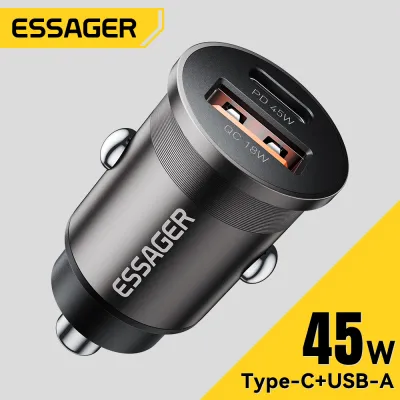
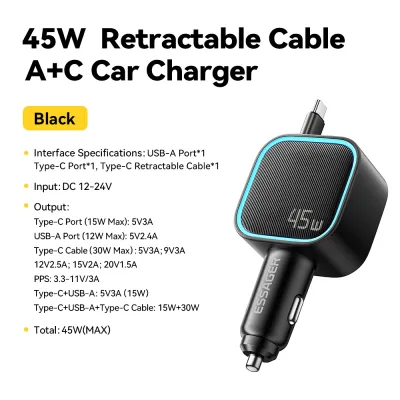
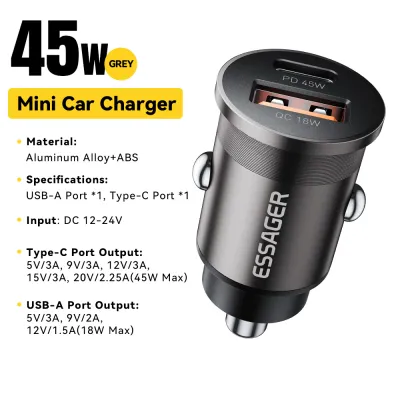
Prices are valid at publication and may change. Please refer to the product page for the latest price.
Modern smartphones and tablets operate on a “pull” power delivery system, meaning the receiving device controls the rate of charge. If you connect a smartphone that only supports an 18W charge to a 45W USB-C port, the phone’s internal charging circuit will limit the intake to 18W. The charger does not “push” 45W of power into the device, which prevents overheating and battery damage.
To determine your device’s maximum power requirement, inspect the original wall charger that came with it or consult the manufacturer’s official specifications. The power rating is typically printed on the adapter in volts (V) and amperes (A). Multiplying these two numbers gives you the wattage; for instance, an adapter outputting 9V at 2.22A delivers approximately 20W of power.
How to Verify Charging Protocol Compatibility
Physical compatibility is only the first step; the charger and your device must also share a compatible charging protocol to enable fast charging. The most common universal standard is USB Power Delivery (USB PD), which is utilized by Apple, Google, and many tablet manufacturers. Another critical standard is Programmable Power Supply (PPS), a subset of the USB PD specification that allows the charger to dynamically adjust voltage and current based on the battery’s real-time status, which is required for fast-charging many modern Android flagships.

To verify which protocols are supported, inspect the printed label on your charger. Look for markings such as “PD3.0”, “PPS”, or “QC3.0” (Quick Charge). If these protocols match the fast-charging requirements specified by your phone or tablet manufacturer, the device will charge at its maximum supported speed.
If the charging protocols do not match, your device will still charge safely, but it will fall back to a standard, slower charging speed. This baseline speed is typically limited to 5V at 1.5A or 2A, resulting in a 7.5W to 10W charge. While this is sufficient for maintaining your battery level while using navigation apps, it will take significantly longer to charge the battery from empty.
Estimating Charging Speeds for Different Devices
The actual charging speed you experience is always capped by the lower of two values: the maximum output of the active charger port or the maximum input capacity of your device. If you connect a tablet capable of accepting 30W to a port that only outputs 15W, the charging speed is capped at 15W. Conversely, connecting a phone capped at 20W to a 45W port will result in a 20W charge.
Most standard smartphones require between 15W and 20W for fast charging, while premium flagship models can accept 25W to 45W. Tablets generally have larger batteries and higher power requirements, with standard models accepting 20W to 30W, and larger professional tablets drawing up to 35W or 45W. A true 45W single-port output is highly versatile, as it can fast-charge almost any smartphone at its maximum rate and comfortably power most tablets.
To confirm that fast charging is actively engaged, observe your device’s screen when you first plug it in. Many Android devices display specific text such as “Fast Charging” or “Super Fast Charging” on the lock screen. On iOS devices, there is no explicit text indicator, but you can confirm active charging by checking the battery icon or monitoring how quickly the battery percentage rises during the first thirty minutes of charging.
Safe Usage and Electrical Conditions in the Vehicle
Operating a high-output charger in your vehicle requires a basic understanding of your car’s electrical limits. The 12V or 24V accessory socket (commonly known as the cigarette lighter socket) is protected by a fuse, typically rated at 10A or 15A. A 45W charger draws a maximum of about 4A from a 12V system, which is well within safe operating limits and poses no risk of blowing the vehicle’s fuse under normal conditions.
Heat dissipation is another important safety consideration. Charging at high wattages generates heat within the compact housing of the car charger. Metal-bodied chargers are excellent at dissipating this heat through their outer shell, which may feel warm or hot to the touch during operation. To prevent thermal throttling—where the charger automatically reduces its power output to cool down—ensure the area around the accessory socket is well-ventilated and free from clutter like papers, cables, or console covers.
Finally, be aware of how your vehicle’s accessory socket behaves when the engine is turned off. In some vehicles, the socket remains powered even after the key is removed. If your vehicle is designed this way, leaving the charger plugged in with a device attached can slowly drain your car’s battery. Even without a device connected, some chargers have standby lights or internal circuits that draw a tiny amount of parasitic power, so it is best practice to unplug the charger if the vehicle will be parked for several days.
Frequently Asked Questions (FAQ)
Will charging a phone and tablet simultaneously reduce the charging speed?
Yes, if you use a multi-port charger, connecting two devices at the same time will usually reduce the charging speed of at least one port. The charger must distribute its total 45W power budget across the active connections. For example, the charger might allocate 30W to the USB-C port for your tablet and 15W to the USB-A port for your phone. To find the exact power split, refer to the output matrix printed on the charger’s casing or in the user manual.
Does the USB-C cable affect the 45W charging capability?
Yes, the cable is just as important as the charger itself. To achieve a full 45W charge, you must use a USB-C cable rated to handle that level of power. Standard or low-quality cables may lack the thicker internal copper wiring or the necessary e-marker chip required to safely negotiate and carry higher currents. Additionally, the cable must have fully functional data pins to allow the charger and your device to communicate and agree on the correct fast-charging protocol.

Community discussion
Share your experience or ask a question. Comments are reviewed before publication.