
Rear-seat entertainment has become a staple for road trips and daily commutes alike, making a reliable car hp holder a highly sought-after accessory. However, many vehicle owners face a common dilemma: installing a phone mount on the seat back often renders the existing storage pockets or aftermarket organizers completely unusable. Blocking these pockets defeats their purpose, leaving passengers with nowhere to store drinks, tablets, or travel essentials.
To successfully mount a car hp holder without sacrificing your storage space, you must focus on vertical clearance, adjustable mounting arms, and strategic positioning. By anchoring the holder to the headrest posts and selecting a design with an extendable or pivoting arm, you can suspend your device safely above or to the side of the pocket openings. This approach ensures that both the phone screen and the storage compartments remain fully accessible throughout your journey.
Assessing Your Seat Back Layout and Existing Organizers
Before purchasing any mounting hardware, a thorough inspection of your vehicle’s seat back architecture is essential. Start by examining the headrest configuration. Most standard vehicles feature adjustable headrests supported by two metal posts, which serve as the ideal anchoring point for a car hp holder. Measure the distance between these posts, as well as their diameter, to ensure compatibility with potential mounting brackets. You should also measure the vertical clearance between the bottom of the headrest and the top edge of the seat back pocket. This measurement determines the maximum height profile your mount can occupy before it begins to overlap with the pocket opening.
Products mentioned in this guide
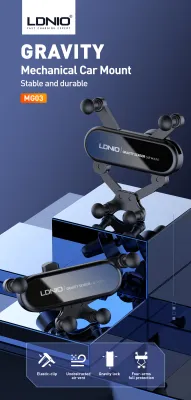
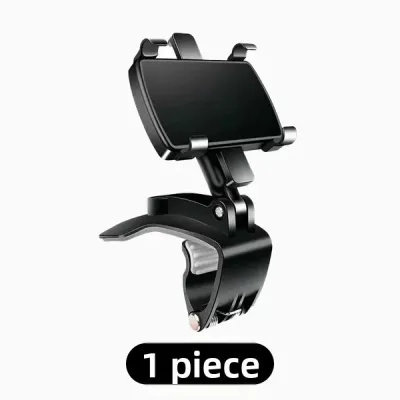
Prices are valid at publication and may change. Please refer to the product page for the latest price.
Safety must remain your primary concern during this assessment phase. Many modern vehicles are equipped with seat-mounted side airbags designed to deploy from the outer edges of the front seats. Consult your vehicle owner’s manual to locate these deployment zones precisely. Any mount, strap, or bracket that wraps around the entire seat back or clings to the outer edges could interfere with airbag deployment, posing a severe safety risk. Ensure your chosen mounting zone is strictly confined to the center column of the seat back, well away from any airbag seams.
Additionally, take note of how your existing storage pockets function. Built-in pockets often feature elastic bands that stretch outward when filled, while aftermarket organizers may have rigid compartments, zippers, or fold-down trays. Measure the maximum outward expansion of these pockets when they are fully loaded with typical items like water bottles or books. Your phone holder must be positioned so that even when the pocket is packed to capacity, the phone and its mounting arm do not press against the stored items or restrict access to the zippers.
Selecting a Mount Type That Coexists with Storage
Choosing the right mechanical design for your car hp holder is the most critical step in preserving your storage space. Headrest bar clamps are generally the most effective option for this scenario. These mounts clamp directly onto the metal headrest posts, keeping the entire mounting apparatus elevated well above the seat back pocket. Because they do not rely on straps that wrap around the seat body, they leave the lower portion of the seat completely free, allowing built-in pockets to expand naturally without restriction.

Another option is the strap-based wrap, which is commonly used for larger aftermarket organizers that feature integrated phone sleeves. While these can be highly functional, they require careful selection. If you choose a strap-based mount, look for models with thin, high-tensile straps that can be routed behind or through the organizer’s existing attachment points. Avoid thick, bulky straps that bind the pocket openings shut or compress the storage compartments, which would limit their carrying capacity.
To achieve the perfect balance between screen visibility and pocket accessibility, prioritize mounts that feature adjustable extension arms or multi-angle ball joints. A mount with a telescopic or articulating arm allows you to secure the base high up on the headrest posts while extending the phone holder downward, upward, or to the side. This adjustability means you can position the phone screen directly in the passenger’s line of sight while keeping the physical bracket clear of the pocket’s opening path.
Before finalizing your choice, always verify the manufacturer’s specifications regarding weight limits and post compatibility. Heavy devices, such as large-screen handphones or tablets, require robust brackets that will not sag under vibration. Measure your device with its protective case installed, and compare these dimensions and weight against the mount’s rated capacity to prevent premature wear or bracket failure.
Step-by-Step Installation Process
To begin the installation, park your vehicle on a flat surface and ensure the front seats are adjusted to their typical driving positions. Clean the headrest posts using a dry microfiber cloth to remove any dust, oils, or manufacturing residues that could cause the mount to slip. If your vehicle’s headrests are currently pushed all the way down, raise them slightly to expose the metal posts. This provides the necessary clearance to attach the mounting bracket securely without pinching the seat fabric or leather.
Next, align the mounting bracket with the headrest posts. For clamp-style holders, open the clamp mechanism fully and position it around the posts. If your mount uses spacer rings or rubber inserts to accommodate different post diameters, select the size that matches your vehicle’s specifications. Tighten the clamping screws or locking levers evenly on both sides. Avoid over-tightening, which can strip the threads or damage the posts; instead, tighten until the bracket cannot be rotated or slid vertically by hand.
If you are integrating the holder with an aftermarket seat back organizer, thread any securing straps carefully. Ensure the straps run underneath the organizer’s pockets rather than across them, which would compress the storage space. Double-check that the straps do not cover or obstruct any seat adjustment levers, seatbelt paths, or safety sensors located near the base of the seat.
Once the mount is physically secured, address cable management. Passengers will likely want to charge their devices while watching media, which requires routing a charging cable from the front console or rear USB ports. Route the cable along the side of the seat back, securing it with small, adhesive cable clips or hook-and-loop fasteners. Ensure the cable has enough slack to accommodate seat adjustments but remains taut enough that it does not dangle into the passenger footwell or get caught in storage pocket zippers.
Verifying Safety, Stability, and Passenger Comfort
With the installation complete, you must conduct a series of checks to ensure the setup is safe and practical for daily use. Start by testing the physical stability of the car hp holder. Insert your phone into the cradle and gently shake the mount to simulate road vibrations. If the holder sags, rotates, or rattles, re-examine the mounting clamps and tighten them as necessary. A loose mount can become a dangerous projectile in the event of sudden braking or a collision.
Next, evaluate the physical safety of the installation from the perspective of the rear passenger. Sit in the back seat and check the clearance between your knees, chest, and the installed phone holder. The mount should not protrude so far forward that it poses an injury hazard during a sudden stop. Ensure there are no sharp plastic edges, exposed metal screws, or rigid brackets pointing directly at the passenger’s face or torso. If the mount is too close, use the adjustable arm to fold it flatter against the seat back when not in use.
Finally, perform a comprehensive functional test of your storage pockets. Open and close every zipper, flap, and elastic compartment on the seat back. Insert typical travel items, such as a water bottle or a tablet, into the pockets to confirm they can be accessed and removed smoothly without striking the phone holder or its extension arm. If you detect any interference, adjust the angle or height of the mounting arm until both the storage compartments and the phone holder can be used simultaneously without friction.
Frequently Asked Questions (FAQ)
Can I mount a car hp holder on a seat with built-in entertainment screens?
Mounting a secondary phone holder on a seat equipped with factory-installed entertainment screens requires careful planning to avoid blocking the screen or damaging its delicate components. First, measure the bezel clearance around the built-in screen to see if there is sufficient space on the headrest posts to attach a clamp without touching the screen’s housing. Avoid any mounting positions that block the screen’s infrared sensors, cameras, or ventilation grilles, as this can cause overheating or system malfunctions. Always consult your vehicle’s owner’s manual for specific restrictions regarding aftermarket accessories near factory electronics, and opt for low-profile, offset mounts that position the phone completely clear of the built-in display.
Will strap-based mounts damage leather or synthetic seat backs?
Strap-based mounts can potentially cause wear, indentation, or discoloration on leather and synthetic seat backs due to constant friction and pressure during transit. To mitigate this risk, identify the high-friction points where the straps or the back of the mount press directly against the seat material. Place a soft, protective barrier, such as a thin microfiber pad or a felt adhesive sheet, between the mount components and the seat surface. Additionally, establish a routine to inspect the seat back every few weeks. Remove the mount periodically to allow the seat material to recover, and check for any signs of wear, indentation, or color transfer so you can adjust the strap tension or padding before permanent damage occurs.

Community discussion
Share your experience or ask a question. Comments are reviewed before publication.