
Finding the right car CD player with Bluetooth and USB in Singapore requires balancing classic physical media playback with modern digital convenience. While digital streaming dominates today’s audio landscape, many drivers still cherish the superior, uncompressed sound quality of physical compact discs. Upgrading your vehicle’s head unit to a model that features both wireless Bluetooth connectivity and a physical USB port allows you to enjoy the best of both worlds. The ideal unit must fit your vehicle’s physical dashboard dimensions, integrate seamlessly with your existing steering wheel controls, and deliver reliable audio performance under local driving conditions.
When shopping for a new car CD player, you must evaluate how a replacement unit will interface with your vehicle’s electrical and physical architecture. Modern aftermarket head units offer a wide array of features, from high-resolution audio playback to hands-free calling and customizable illumination. By understanding your vehicle’s constraints and identifying your personal audio priorities, you can select a unit that enhances your daily commute while preserving your physical music collection.
Understanding Your Car Audio Needs and Compatibility
Before purchasing a new car CD player, you must determine the physical size of your vehicle’s radio opening. Car stereos generally follow standardized sizes known as DIN (Duetschland Institut für Normung) standards. A Single-DIN unit measures approximately 180mm by 50mm, which is the standard slim profile found in many older or compact vehicles. A Double-DIN unit measures approximately 180mm by 100mm, offering twice the height and often accommodating larger displays or touchscreens. You must measure your dashboard opening accurately or consult your vehicle’s manual to determine which size your car supports. If your car has a non-standard dashboard design, you will likely need a vehicle-specific fascia kit to achieve a clean, integrated look.
Products mentioned in this guide
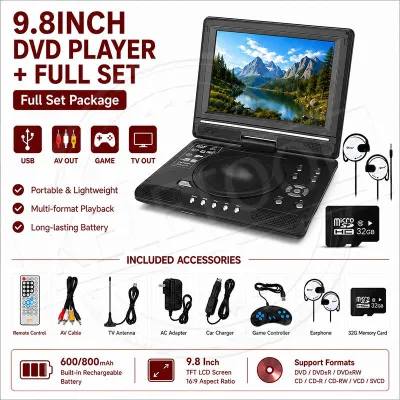
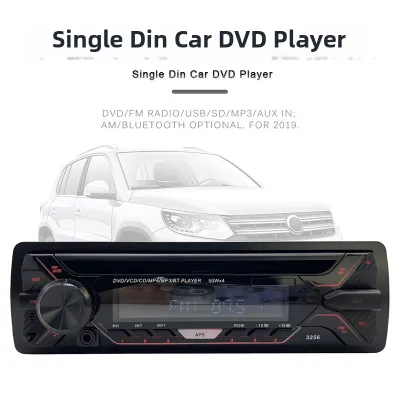
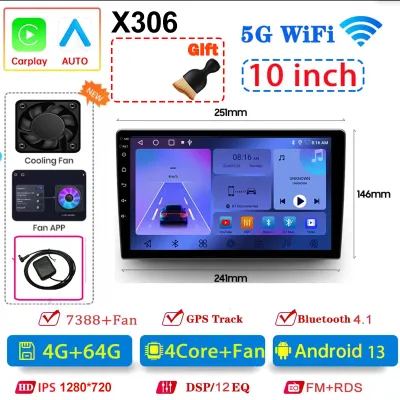
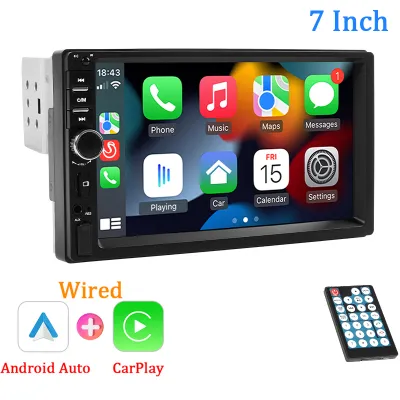
Prices are valid at publication and may change. Please refer to the product page for the latest price.
Steering wheel control compatibility is another crucial factor to consider before making a purchase. Many modern vehicles feature integrated steering wheel buttons that allow you to adjust the volume, skip tracks, and answer phone calls without taking your hands off the wheel. When you install an aftermarket car CD player, these buttons will not work automatically. To retain this functionality, you must purchase a compatible steering wheel control interface adapter. These adapters translate the signals from your car’s steering wheel buttons into commands that the new head unit can interpret. You should verify whether the head unit you are considering supports steering wheel control input and which specific adapter is required for your vehicle make and model.
Checking your car’s existing wiring harness is essential to ensure a safe and reliable electrical connection. Vehicles do not use a universal plug for their audio systems; instead, each manufacturer utilizes proprietary wiring configurations. To avoid cutting and splicing your vehicle’s factory wiring, which can void warranties and lead to electrical faults, you should use a vehicle-specific wiring harness adapter. This adapter plugs directly into your car’s factory connector on one end and connects to the aftermarket CD player’s harness on the other. Always consult your vehicle’s service manual or a professional car audio installer in Singapore to verify fitment and identify any unique wiring requirements, such as active antenna power lines or factory amplifier integration modules.
Key Features to Evaluate in Modern Car CD Players
Bluetooth connectivity is a standard expectation for modern drivers, but not all Bluetooth implementations are identical. When evaluating a car CD player, you should distinguish between different Bluetooth profiles to ensure a seamless hands-free experience. The Advanced Audio Distribution Profile (A2DP) is responsible for streaming high-quality stereo audio from your smartphone to the head unit. The Audio/Video Remote Control Profile (AVRCP) allows you to control playback directly from the CD player’s buttons, enabling you to play, pause, and skip tracks. For voice communication, the Hands-Free Profile (HFP) manages phone calls, utilizing an external or built-in microphone to deliver clear voice quality while minimizing cabin noise.

USB ports on modern car CD players serve multiple purposes, and you must verify their capabilities before purchasing. Some basic units feature USB ports designed solely for charging mobile devices, offering low amperage that may charge modern smartphones very slowly. For media playback, you should look for a USB port that supports data transfer and offers at least 1.5 amperes of current for rapid charging. A high-quality USB port should support direct playback of various digital file formats. While standard MP3 and WMA files are universally supported, audio enthusiasts should look for units that can decode AAC and lossless FLAC (Free Lossless Audio Codec) files directly from a USB flash drive, ensuring maximum audio fidelity.
CD mechanism reliability remains a vital consideration, especially when driving on uneven road surfaces. Unlike home audio systems, a car CD player is subjected to constant vibrations, acceleration forces, and bumps. To prevent annoying audio dropouts, you should look for units equipped with robust anti-skip protection or electronic skip protection (ESP). This technology works by reading the data from the CD slightly faster than necessary and storing it in a temporary buffer memory. If the laser lens momentarily loses track due to a bump, the unit continues playing audio from the buffer while the laser reposition itself, ensuring uninterrupted music playback.
Types of Car CD Players Based on Driver Scenarios
The right car CD player for your vehicle depends largely on your daily driving habits, budget, and audio expectations. While some drivers simply want a reliable way to play their favorite compact discs and take hands-free calls, others view the head unit as the centerpiece of a high-end mobile audio system. Understanding the distinct categories of car CD players allows you to match a unit’s features to your specific driving scenario.
Basic Connectivity Units for Daily Commuters
For drivers who prioritize simplicity and functionality during their daily commute, basic connectivity units offer an excellent balance of utility and value. These models typically feature a Single-DIN chassis with physical buttons, a high-contrast segment display, and straightforward menu navigation. They provide reliable CD playback alongside essential modern features like Bluetooth hands-free calling and a front-panel USB port for quick device charging and basic media playback.
These units generally utilize standard built-in amplifiers, typically delivering around 15 to 20 watts RMS per channel. This power level is perfectly suited for driving factory-installed speakers without the need for external amplification. Because they lack complex touchscreen interfaces or advanced audio processing chips, these units are highly reliable, easy to operate while driving, and represent a budget-friendly option for those who want to modernize their vehicle’s audio system without unnecessary complexity.
High-Fidelity Units for Audio Enthusiasts
If your primary goal is to achieve the highest possible sound quality from your physical CDs and high-resolution digital files, you should focus on high-fidelity head units. These specialized players are engineered with premium internal components, including high-performance Digital-to-Analog Converters (DACs) that accurately translate digital data into clean analog signals. They also feature advanced audio customization tools that allow you to fine-tune the soundstage to match your vehicle’s unique cabin acoustics.
Key features to look for in high-fidelity units include multiple sets of high-voltage preamp outputs (RCA ports, typically 4 volts or higher), which send a clean, noise-free signal to external amplifiers and subwoofers. Time alignment is another critical feature; it allows you to delay the audio signals from individual speakers by milliseconds, ensuring that the sound from all speakers reaches your ears at the exact same moment. Additionally, look for units with comprehensive graphic equalizers (typically 13 bands or more) and active crossover networks to precisely manage the frequency ranges sent to your tweeters, mid-range speakers, and subwoofers.
Multimedia Units with Screen Integration
For drivers who want visual feedback, navigation assistance, or backup camera integration alongside physical CD playback, multimedia units are the ideal choice. These Double-DIN units feature large touchscreen displays that make it easy to navigate complex USB folder structures, view album art, and manage phone contacts. Because they feature a physical CD slot, usually located directly above or behind a motorized screen, they allow you to maintain your physical media collection while enjoying a modern digital interface.
When evaluating multimedia units, you should pay close attention to screen brightness and anti-glare coatings, as bright sunlight can make glossy screens difficult to read while driving. Many of these units include dedicated inputs for a rear-view camera, which automatically displays a camera feed when you shift into reverse, significantly improving parking safety. You should be aware that installing a Double-DIN multimedia unit may require a custom dashboard fascia kit and, in some cases, minor modifications to the internal dashboard subframe to accommodate the larger chassis.
Installation Considerations and Safety Boundaries
Installing a new car CD player involves working with your vehicle’s electrical system, which requires strict adherence to safety protocols to prevent damage to the vehicle or personal injury. Before beginning any installation work, you must disconnect the negative terminal of your vehicle’s battery. This simple step eliminates the risk of accidental short circuits, blown fuses, or damage to sensitive electronic control units (ECUs) while you are handling live wires behind the dashboard.
Airbag safety is another critical consideration during the installation process. In many modern vehicles, passenger airbag status indicators, passenger detection sensors, or side-curtain airbag wiring harnesses run behind or adjacent to the dashboard trim panels. You must handle these panels with extreme care and avoid using metal prying tools near airbag deployment zones. Never disconnect any airbag-related wiring harnesses while the vehicle’s battery is connected, as this can trigger an airbag fault code on your instrument cluster that can only be cleared using specialized diagnostic equipment.
To ensure long-term reliability and prevent electrical fires, you must avoid makeshift wiring practices. Do not twist wires together and wrap them in electrical tape, as this tape can degrade over time due to the high cabin temperatures experienced in parked vehicles, leading to exposed wires and short circuits. Instead, use high-quality crimp connectors, solder the connections and seal them with adhesive-lined heat-shrink tubing, or utilize plug-and-play wiring harness adapters. Ensure that all wiring is neatly bundled and secured away from sharp metal brackets or moving parts inside the dashboard, such as steering columns or climate control linkages.
If your vehicle utilizes a complex Controller Area Network (CAN bus) system, which is common in many continental and modern vehicles, the factory radio is integrated into the vehicle’s broader computer network. In these vehicles, simply cutting wires or tapping into power sources can disrupt communication between other electronic modules, leading to unexpected error messages or battery drain. If your vehicle uses a CAN bus system, or if you feel uncomfortable working with automotive electrical systems, you should consult a certified automotive electrician or a professional car audio installer in Singapore to perform the installation safely.
Purchasing and Verifying Warranties in Singapore
When purchasing a car CD player in Singapore, you should buy from authorized local dealers rather than relying on unverified online listings or grey-market imports. While importing a unit online may offer a lower initial purchase price, these units often lack a valid local warranty. If the unit develops a defect, you may have to pay high shipping costs to send it back to the country of origin for repair, or find that local service centers refuse to service the unit entirely. Authorized local distributors provide official warranties, typically covering parts and labor for 12 months, giving you peace of mind and access to local technical support.
Furthermore, units designed for foreign markets may have radio tuners configured for different frequency steps, which can prevent you from tuning into local FM or AM radio stations properly. Purchasing a localized model ensures full compatibility with local broadcasting standards. You should also verify that the physical placement of the unit complies with local traffic regulations. The Land Transport Authority (LTA) and traffic police regulate driver distraction; any installed screen must not obstruct your forward view of the road, and video playback functions must be wired to the vehicle’s handbrake safety switch so that video can only be viewed when the vehicle is safely parked.
Before finalizing your purchase, clarify the return policies and installation guarantees offered by your chosen car audio shop. Many reputable local shops offer package deals that include both the head unit and professional installation. If you choose this route, ensure that the shop provides a warranty on their installation workmanship, which protects you against issues like loose trim panels, rattling wires, or faulty connections that may arise after the installation is complete. Taking the time to verify these details ensures a smooth upgrade process and a high-quality audio experience in your vehicle.
Frequently Asked Questions (FAQ)
Can I use my existing steering wheel controls with a new Bluetooth car CD player?
Yes, you can generally use your existing steering wheel controls with a new car CD player, but it is rarely a direct plug-and-play connection. Most aftermarket head units require an external steering wheel control (SWC) interface adapter to translate the signals from your vehicle’s steering wheel buttons into commands the new unit can understand. You must purchase an adapter that is compatible with both your specific vehicle make and model and the brand of your new CD player. Some high-end head units feature built-in programmable steering wheel control inputs for vehicles with analog resistance-based systems, but vehicles using digital CAN bus systems will always require a dedicated interface adapter.
Will a new car CD player drain my car battery when the engine is off?
An aftermarket car CD player will not drain your vehicle’s battery if it is wired correctly. Car head units require two separate power connections: a constant 12-volt wire (typically yellow) and a switched accessory 12-volt wire (typically red). The constant wire provides a small amount of power to maintain the unit’s memory settings, such as radio presets, clock time, and audio configurations, when the engine is off. The switched wire tells the unit to turn on only when the ignition key is in the accessory or run position. If these two wires are spliced together and connected to a constant power source, the CD player will remain fully powered even when the engine is off, which will eventually drain your battery.
Do I need a special antenna adapter for radio reception when upgrading my unit?
Many vehicle manufacturers use proprietary antenna connectors that do not match the standard Motorola antenna jack found on aftermarket car CD players. To maintain clear AM/FM radio reception in Singapore, you will likely need to purchase a vehicle-specific antenna adapter. Additionally, some modern vehicles feature active or amplified antennas integrated into the rear glass or a roof-mounted shark fin. These active antennas require a 12-volt power source to operate their internal amplifier. When installing your new CD player, you must ensure that the head unit’s power antenna or amplifier turn-on wire is connected to the vehicle’s antenna amplifier wire to ensure optimal radio reception.
Community discussion
Share your experience or ask a question. Comments are reviewed before publication.