
Selecting the right suction phone holder is critical for safe and uninterrupted navigation while driving. A poorly designed mount can detach unexpectedly, block your line of sight, or damage your device. To ensure your navigation remains stable, you must evaluate suction mechanisms, mounting styles, and device compatibility to build a reliable shortlist that keeps your phone secure and your focus on the road. By understanding how different materials and designs perform under real-world driving conditions, you can make an informed decision that prevents sudden drops and maintains clear visibility throughout your journey.
Evaluating Suction Mechanisms for a Reliable Grip
The foundation of any secure phone holder is its suction base. Standard silicone suction cups rely entirely on a vacuum seal to adhere to surfaces. While they perform exceptionally well on perfectly smooth, non-porous glass, any microscopic texture or dust can allow air to seep in, causing the vacuum to fail. For dashboard mounting, sticky polyurethane gel pads are generally more effective. These pads combine a vacuum seal with a tacky adhesive layer that fills minor surface imperfections, though they can leave a residue on certain dashboard materials if exposed to extreme heat over long periods.
The mechanical locking system is what generates the holding force of the suction cup. Lever-lock mechanisms use a physical lever to pull the center of the suction cup upward, creating a deep vacuum chamber. These are highly common, easy to operate, and provide strong initial adhesion. Twist-lock mechanisms, on the other hand, use a rotating collar to gradually draw the suction cup upward. This design allows for a more controlled, high-pressure seal that is less prone to accidental release, making it a robust choice for heavier smartphones.
Products mentioned in this guide
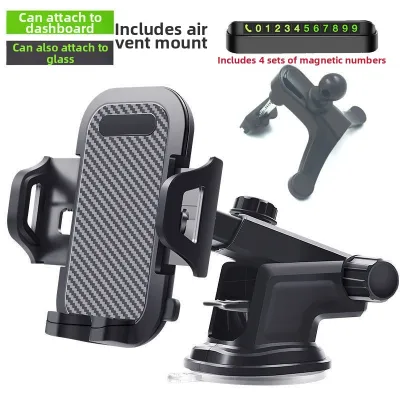
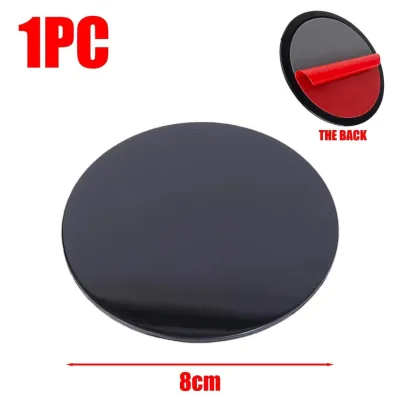
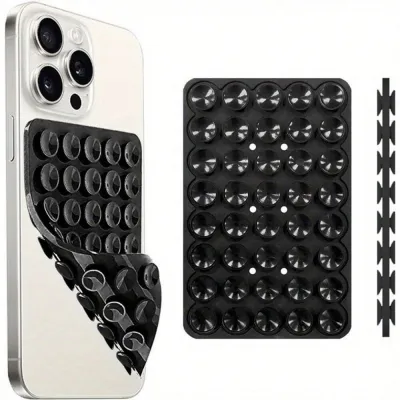
Prices are valid at publication and may change. Please refer to the product page for the latest price.
Surface compatibility is a major factor in suction reliability. Windshields offer a uniform, smooth glass surface that is ideal for almost any suction cup. Dashboards, however, vary widely in texture and material. A hard, flat plastic dashboard can support a gel-infused suction cup, but soft-touch, leather, or heavily grained vinyl dashboards present significant challenges. Air will inevitably bypass the seal on textured surfaces unless a smooth adhesive mounting disc is used as an intermediary base.
In tropical climates like Singapore, cabin temperatures in a parked car can rise significantly. This intense heat can soften cheap thermoplastic elastomers and degrade adhesive gels, leading to sudden mount failure. When selecting a holder, look for materials specified to withstand high thermal limits, such as high-grade silicone or polyurethane that retains its structural integrity and tackiness under prolonged heat and UV exposure.
Choosing the Right Mounting Style for Clear Visibility
Choosing where and how to mount your phone holder directly impacts both your driving safety and navigation convenience. Windshield mounting places the phone closer to your natural line of sight, making it easier to glance at navigation prompts without taking your eyes off the road. However, it can obstruct your forward view and exposes the phone directly to intense sunlight, which can cause the device to overheat. Dashboard mounting keeps the windshield clear and often positions the phone closer to your hand, but it may require you to look further down, momentarily diverting your attention from traffic.

The physical arm connecting the suction cup to the phone cradle determines how much the phone vibrates while driving. Gooseneck arms are highly flexible and allow for custom positioning, but their inherent flexibility makes them prone to bouncing and shaking on uneven roads, which can make reading a map difficult. Telescopic arms extend to bring the phone closer to you, which is useful in deep dashboards, but extending the arm increases leverage and vibration. Rigid, short arms offer the highest stability and minimize screen shake, though they offer less positional flexibility.
Safety must be your primary concern when positioning a phone holder. The mount must not block your view of the road, side mirrors, or pedestrians. Furthermore, you must never place the mount or the phone within the deployment path of any airbag. Check your vehicle’s manual to identify where the passenger and side airbags deploy to ensure the mount does not become a dangerous projectile in an accident.
Direct sunlight can wash out your phone’s screen, making navigation maps unreadable. To counter this, choose a mount with a highly adjustable ball joint that allows you to tilt the screen away from direct light. Positioning the phone slightly lower on the dashboard can also use the car’s instrument cluster or dashboard lip to shade the screen, reducing glare and helping to keep the device cool during long drives.
Ensuring Phone Compatibility and Cradle Security
The cradle is what physically holds your phone. Spring-loaded cradles use strong tension springs to clamp the phone’s sides; they are highly reliable and do not require power, but they can be stiff to operate. Magnetic mounts offer ultimate convenience, allowing you to slap the phone on and off instantly, but they require a metal plate on your phone or case and may slip during sudden stops or sharp turns if the magnet is weak. Auto-clamping cradles use infrared sensors or physical triggers to automatically close motorized arms around the phone when placed, offering a secure grip, but they require a power connection to function.
Navigation apps consume significant battery power, meaning you will likely need to keep your phone plugged into a charger during long trips. Ensure the cradle’s bottom support feet are spaced widely enough to accommodate your charging cable’s connector. If the support feet block the charging port, or if they force the cable to bend at an extreme angle against the dashboard, it can damage both the cable and your phone’s charging port over time.
Modern smartphones have buttons along their sides that can easily be pressed accidentally by cradle clamps. Look for a cradle with adjustable side arms or strategically placed padding that avoids your phone’s volume and power buttons. Additionally, if you use your phone’s camera for dashcam apps or AR navigation, ensure the back of the cradle does not block the camera lenses or sensors.
Do not assume a universal mount will fit your specific phone, especially if you use a thick, heavy-duty protective case or a wallet case. Heavy phones place extra leverage on the suction cup and joint mechanisms. Always check the manufacturer’s specifications for the maximum supported width, thickness, and weight. If your combined phone and case weight exceeds the mount’s rated capacity, the joint may droop, or the suction cup may fail prematurely under the strain.
Building Your Shortlist: What to Verify Before Purchase
When browsing online marketplaces or automotive accessory shops, look closely at the technical specifications rather than just the marketing photos. A reliable manufacturer will explicitly state the maximum weight capacity and the operational temperature range. If a product lacks these basic specifications, it is often a sign of low-quality materials that may not survive the harsh thermal environment of a vehicle cabin.
User reviews on ecommerce platforms are invaluable for spotting real-world durability issues. Filter reviews to look for recurring complaints. Pay close attention to mentions of the adhesive gel melting or turning into a liquid residue, the locking lever snapping under moderate pressure, or the mount repeatedly falling off after a few weeks of use. These patterns indicate systemic design flaws or poor material quality that you should avoid.
Even high-quality suction mounts eventually wear out, particularly the gel pad or the adhesive dashboard disc. Check if the brand offers replacement parts or if the suction cup can be detached and replaced independently. Some manufacturers sell standalone adhesive discs, which allow you to move the mount to a new vehicle without having to buy an entirely new holder system.
Because suction performance depends heavily on your specific vehicle’s dashboard material and local climate, look for products that offer a clear warranty or return policy. A manufacturer warranty that specifically covers mechanical defects or premature suction failure provides peace of mind. Verify the return conditions on the retail platform to ensure you can return or exchange the mount if it fails to adhere to your dashboard upon initial installation.
Installation and Maintenance for Long-Lasting Adhesion
The secret to a long-lasting suction seal lies in the preparation of the mounting surface. Even a microscopic layer of dust, dashboard polish, or fingerprint oil can compromise the vacuum. Clean the target area thoroughly using isopropyl alcohol and a lint-free microfiber cloth. Avoid using household glass cleaners or dashboard wipes, as they often leave behind a thin film of wax or silicone that prevents proper adhesion. Allow the surface to dry completely before applying the mount.
To install, press the suction cup firmly against the prepared surface to expel as much air as possible from underneath the cup before engaging the locking lever or twist collar. This physical pre-pressing ensures a much stronger vacuum. Over time, temperature fluctuations and vibrations will naturally cause microscopic amounts of air to seep back under the seal. Make it a habit to release the lock, press the cup down, and re-engage the lock every few weeks to restore the vacuum.
Regularly inspect your phone holder for signs of wear. If you notice the edges of the suction cup beginning to curl upward, the gel pad becoming dry and losing its tackiness, or the plastic locking lever feeling loose, the mount is reaching the end of its lifespan. For gel pads, you can sometimes restore their stickiness by rinsing them under warm water and letting them air dry, but if the material itself has warped or hardened, it must be replaced.
If your phone holder falls off while you are driving, do not attempt to catch it or reattach it while the vehicle is in motion. This is a major source of driver distraction and can lead to serious accidents. If the mount shows signs of failing—such as drooping under the weight of your phone or repeatedly losing suction—cease using it immediately. Remove the mount and secure your phone in a safe place, like the glove box or center console, until you can properly clean the surface or replace the holder.
Frequently Asked Questions (FAQ)
Can I use a suction mount on a leather or textured dashboard?
Standard suction cups cannot maintain a vacuum seal on leather, stitched, or heavily textured dashboards because air easily leaks through the microscopic gaps in the texture. To use a suction mount in these vehicles, you must first apply an adhesive dashboard mounting disc. These discs have a strong, semi-permanent adhesive on one side that conforms to the textured surface, and a perfectly smooth plastic face on the other side, providing an ideal surface for the suction cup to grip.
Will the heat inside a parked car damage the suction cup?
Yes, prolonged exposure to high temperatures and UV radiation inside a parked car can degrade the materials of a suction mount. Over time, the heat can cause the silicone or polyurethane gel to soften, warp, or lose its adhesive properties, leading to sudden mount failure. To protect your mount, try to park in shaded areas, use a reflective front windshield sunshade to block direct sunlight, or simply remove the mount from the windshield and store it in the glove compartment when parking for extended periods.

Community discussion
Share your experience or ask a question. Comments are reviewed before publication.