
To keep rear-seat passengers entertained during long road trips—such as driving up the North-South Highway from Singapore—a dedicated headrest-mount or seat-back strap MagSafe car phone holder is the most effective solution. Unlike front-row dashboard or air vent mounts, a rear-seat holder must withstand different physical forces, provide comfortable viewing angles, and anchor securely to the unique geometry of front seats. The ideal option combines a robust mechanical clamp on the headrest poles with a high-strength magnetic array to prevent your phone from detaching on bumpy roads. By selecting a specialized holder designed specifically for the rear cabin, you can ensure a reliable, hands-free viewing experience that remains secure throughout your journey.
Why Rear Seat-Back Mounting Requires a Specialized Approach
Rear seat entertainment often relies on passengers holding their devices for hours, leading to neck strain and fatigue. A hands-free mounting system positions the screen at eye level, which is crucial for ergonomic comfort, especially for children in child seats or boosters. When passengers look down at their laps for extended periods, it not only strains the cervical spine but also increases the likelihood of motion sickness, a common issue during long drives on winding roads. Elevating the device to eye level aligns the screen with the passenger’s natural line of sight, mitigating these physical discomforts.
Unlike the front dashboard, which has flat surfaces, windshield glass, and standard air vents, the rear cabin offers very few mounting points. You cannot simply stick a suction cup to the leather or fabric backing of a front seat, nor are there convenient air vents to clip onto. The back of a front seat is typically soft, contoured, and covered in materials like leather, vinyl, or fabric, none of which support adhesive or suction-based attachments. This lack of standard interfaces means any rear-seat phone holder must rely on the structural elements of the front seats.
Products mentioned in this guide
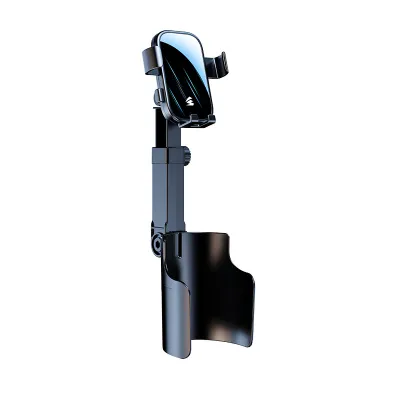
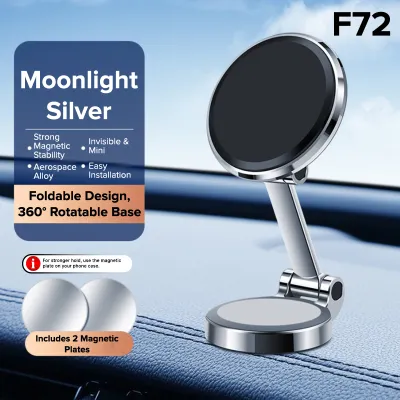
Prices are valid at publication and may change. Please refer to the product page for the latest price.
Furthermore, front seats are dynamic; they slide, tilt, and vibrate independently of the car’s chassis. When the driver adjusts their seating position or when the vehicle travels over uneven road surfaces, these movements are transmitted directly to the seat back. A generic mount designed for a static dashboard will quickly fail when subjected to these dynamic forces, resulting in a sagging phone, misaligned viewing angles, or a complete fall. A specialized rear-seat mount is engineered to absorb these vibrations and maintain a rigid connection to the seat’s structural frame.
Key Features to Evaluate in a Rear Seat MagSafe Holder
Selecting the right MagSafe holder for the rear seat requires a close look at how the device connects to your vehicle and how it manages the physical forces of transit. Because the rear cabin environment varies significantly between car makes and models, you must evaluate specific mechanical features to ensure compatibility and performance.

Headrest Pole vs. Seat-Back Strap Mounting
Headrest pole mounts clamp onto the exposed metal support rods of the front seats. They are highly secure because they lock onto a rigid metal structure that is bolted directly to the seat frame. When evaluating these mounts, look for adjustable clamps that can accommodate varying pole diameters and spacing. Many of these clamps use a screw-tightened collar or a heavy-duty spring mechanism to grip the poles tightly.
However, you must inspect your vehicle’s seats first. Many modern cars, particularly some electric vehicles (EVs) or sports models with integrated one-piece bucket seats, do not have exposed headrest poles. For those with adjustable headrests, measure the pole diameter and the distance between the two poles to ensure compatibility with the clamp’s specifications before purchasing.
Seat-back strap or hook mounts offer an alternative if your vehicle has integrated headrests without exposed poles. These mounts typically wrap around the top contour of the seat or hook into the map pockets on the seat back. Because these systems rely on friction against the seat upholstery to stay in place, look for designs that feature high-friction, non-slip silicone or rubberized backing. This padding prevents the strap from sliding side-to-side and protects delicate leather or fabric from chafing. Always check the manufacturer’s care instructions for your car’s seats before applying tight straps, as prolonged pressure can sometimes leave permanent indentations on soft leather surfaces.
Adjustability and Vibration Dampening
A rear-seat mount must accommodate various passenger heights. A child sitting in a booster seat requires a lower viewing angle than an adult sitting directly on the rear bench. To handle this, look for mounts equipped with articulating extension arms or high-quality aluminum ball joints that permit full 360-degree rotation and multi-angle tilting. This level of adjustability allows passengers to position the screen perfectly, avoiding glare from side windows and reducing eye strain.
However, adjustability introduces a physical trade-off: leverage. Long, multi-jointed extension arms act as levers that amplify road vibrations. On uneven road surfaces or when crossing speed humps, a long arm can cause the phone screen to shake violently, leading to eye strain or motion sickness. To mitigate this, prioritize mounts with rigid, reinforced arms (such as carbon fiber or aircraft-grade aluminum) and shorter extension profiles. Some premium mounts feature built-in dampening mechanisms or dual-point attachments that distribute the weight more evenly, minimizing screen flutter.
The magnetic interface itself must be exceptionally strong. Standard MagSafe-compatible cases work well, but for car mounts, look for holders that specify an enhanced magnetic pull rating (often measured in grams or using a high count of N52 magnets). This ensures that even when the car experiences sudden vertical movements, the magnetic bond remains unbroken.
Safety Clearances and Vehicle Compatibility Checks
Safety must be the primary consideration when installing any aftermarket accessory inside a passenger cabin. First, consult your vehicle’s owner manual to locate all airbag deployment zones. Many modern vehicles feature side-curtain airbags or side-torso airbags integrated directly into the outer bolsters of the front seats. Ensure that the mount, the extension arm, and the mounted phone do not cross or obstruct these deployment paths. An airbag deploying at high speed against a metal or plastic phone holder can turn the device into a dangerous projectile, causing severe injury to passengers.
Second, consider the driver’s rearward visibility. If you mount a large phone or a small tablet on the back of the front passenger seat, adjust its height to ensure it does not block your central rearview mirror’s line of sight. A clear view through the rear windscreen is essential for safe driving, especially when changing lanes on busy expressways. Position the mount low enough or close enough to the seat back so it remains within the physical footprint of the front seat from the driver’s perspective.
Third, protect your vehicle’s interior materials. The mechanical clamps of headrest mounts are often made of hard plastics or metals. If these components contact the top of the seat bolster or the headrest itself, they can scratch leather or tear fabric over time. Prioritize mounts that include protective rubber pads, or consider adding thin felt adhesive strips to the contact points to safeguard your upholstery.
Finally, address the risk of sudden deceleration. In a collision or emergency braking scenario, loose objects in the cabin pose a severe risk to occupants. The mount’s base clamp must be tightened securely according to the manufacturer’s instructions, and the magnetic connection must be strong enough to hold the phone under high G-forces. Never use a mount that feels loose or wobbles under light manual pressure.
Magnetic Grip vs. Active Charging: Managing Power in the Rear Seat
When choosing a MagSafe holder, you must decide between a passive magnetic mount and an active wireless charging mount. Passive mounts use magnets solely to hold the phone in place. They are lighter, less expensive, and highly reliable because they have no electronic components that can fail. If your passengers only need a mount for short trips, a passive holder is often the most practical choice.
Active charging mounts integrate a Qi or Qi2 wireless charging coil within the magnetic pad, allowing the phone to charge while mounted. This is highly convenient for long journeys but introduces cable management challenges. You will need to route a charging cable—often a USB-C cable—from a power source to the back of the seat. If your vehicle has USB ports on the rear console or behind the front seats, this routing is relatively short. If you must run a cable from the front dashboard console, use a long, high-quality cable (typically 1.5 to 2 meters).
To ensure safety, route the cable carefully. Loose, dangling cables can become tripping hazards for passengers entering or exiting the vehicle, or they can get caught in the front seat’s manual or electric adjustment tracks. Secure the cable along the headrest poles using hook-and-loop straps or cable clips, and run it down the side of the seat bolster where it will not interfere with any moving parts or airbag deployment zones.
Secure Installation and Routine Maintenance Steps
Proper installation ensures both the longevity of the mount and the safety of your passengers. Before mounting, clean the installation area. If you are clamping onto headrest poles, wipe them down with a clean microfibre cloth and a mild interior cleaner or rubbing alcohol to remove any residual oils or dust. For leather or fabric seat backs, ensure the surface is free of dust and conditioning oils that could cause straps to slip. Always check the cleaner’s label and the treated item’s manufacturer instructions to ensure it is safe for the specific material you are cleaning.
When securing the base clamp to the headrest poles, tighten the screws or lever mechanism firmly. The mount should not twist or slide when you apply moderate force. However, avoid over-tightening or over-torquing plastic clamps, as excessive force can crack the mount’s housing or damage the headrest poles. If the manufacturer specifies a torque limit or provides specific installation steps, follow them precisely.
Establish a routine maintenance schedule. The vibrations from daily driving, combined with cabin temperature fluctuations (especially in hot, humid climates like Singapore where parked cars can reach high internal temperatures), can cause materials to expand and contract. This thermal cycling can loosen mechanical clamps and degrade adhesives or rubber pads over time. Check the tightness of the mount’s clamps and the stability of the ball joint once a month.
If you need to remove the mount, do so carefully. Do not yank or pull forcefully, as this can damage the headrest poles or tear the seat upholstery. Loosen the clamps completely before sliding them off, and gently unfasten any straps or hooks.
Frequently Asked Questions (FAQ)
Will a MagSafe mount work with a thick phone case?
Standard thick plastic, leather, or rugged cases significantly weaken the magnetic field of a MagSafe-compatible phone. Without a direct, strong magnetic connection, the phone is highly likely to fall off the mount when the vehicle encounters bumps, speed humps, or sharp turns. To ensure a secure hold, you must use an official MagSafe-compatible case that features its own integrated magnet ring, or remove the thick case entirely before mounting the device.
Can I use a dashboard MagSafe mount on the back of a seat?
No, using a dashboard MagSafe mount on a seat back is highly discouraged. Dashboard mounts typically rely on adhesive pads or suction cups designed for flat, rigid, non-porous surfaces like glass or smooth plastic. The curved, textured, and flexible surfaces of leather or fabric seat backs do not allow these mounts to form a secure vacuum or adhesive bond. Attempting to use them in this manner will result in the mount detaching, creating a distraction for the driver and a safety hazard for rear passengers.

Community discussion
Share your experience or ask a question. Comments are reviewed before publication.