
The Short Answer: Built-In Car Navigation vs. Phone Navigation
For most drivers navigating Singapore’s dense and rapidly changing road network, securing a smartphone with a high-quality phone mount car accessory—or utilizing integrated systems like Apple CarPlay and Android Auto—stands as the most practical, cost-effective, and accurate navigation solution. Smartphone apps provide superior real-time traffic routing, instant updates on road changes, and seamless integration with daily digital routines without any added subscription fees.
Dedicated car navigation systems remain a viable alternative for drivers who prioritize a clean, cable-free dashboard aesthetic, prefer larger built-in screens, and want to avoid the battery drain and thermal issues associated with active smartphone use. This article compares factory-fitted or aftermarket head units against a standalone smartphone secured by a physical mount, helping you determine which setup best fits your daily commute and budget.
Upfront Costs and Long-Term Value
Choosing between a dedicated navigation system and a smartphone-and-mount setup involves weighing immediate expenses against long-term operational costs. A dedicated car navigation system, particularly an aftermarket head unit from established brands like Pioneer, Kenwood, or Alpine, requires a significant initial investment. Purchasing a high-quality double-DIN receiver typically costs between S$400 and S$1,500, depending on screen size, processing speed, and audio capabilities. Professional installation at local automotive workshops in hubs like Kaki Bukit, Ubi, or Toh Guan generally adds another S$100 to S$250 to the total bill, depending on the complexity of your vehicle’s wiring harness and dashboard integration.
Products mentioned in this guide
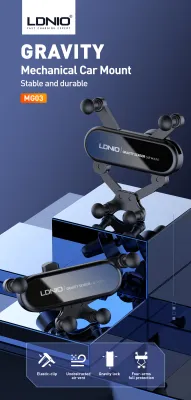
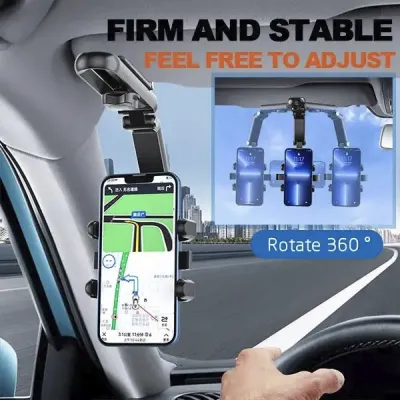
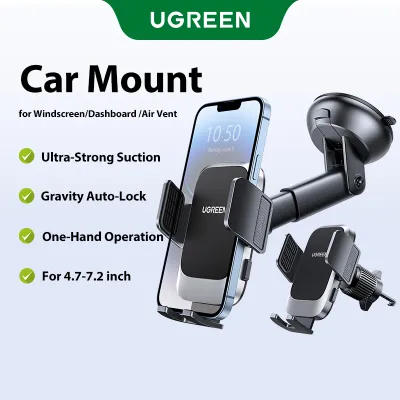
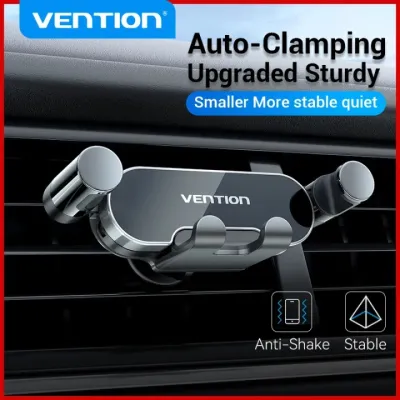
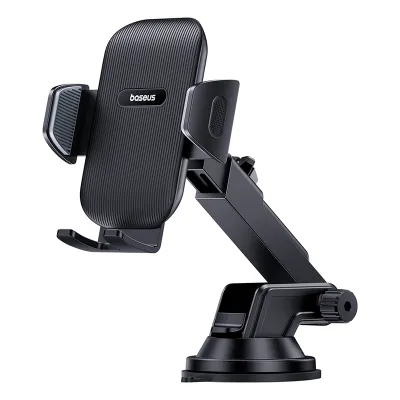


![🇸🇬[Ready Stock] New 360 Rotation Vacuum Suction Cup Phone Holder Foldable Magnetic Magsafe Car Phone Mount for Gym/Mirror/Smooth Surface](https://img.lazcdn.com/g/p/8209a6499e644df04a911de525ca3b30.jpg_400x400q80.jpg_.webp)
Prices are valid at publication and may change. Please refer to the product page for the latest price.

Beyond the initial hardware and labor costs, dedicated systems can incur ongoing maintenance fees. While basic mapping software is usually preloaded, keeping these maps accurate often requires purchasing proprietary updates from the manufacturer. These update packages can cost anywhere from S$80 to S$200 annually. If you opt for a premium system that offers live traffic data, you may also need to pay for an ongoing subscription after an initial trial period. The primary financial advantage of a dedicated system is that it operates independently of your mobile data plan, meaning you will not consume cellular data while navigating.
In contrast, the phone-and-mount approach requires a minimal upfront investment. A reliable, sturdy phone mount car accessory costs between S$15 and S$80, depending on the mounting mechanism and build quality. Because the system utilizes your existing smartphone, there are no additional hardware costs. Navigation applications such as Google Maps, Waze, and Apple Maps are free to download and use, with no hidden subscription fees for map updates or real-time traffic data.
Using a smartphone for navigation relies on your mobile data plan. While modern navigation apps are highly optimized, consuming only about 100MB to 300MB of data per month for moderate daily driving, this consumption still counts against your monthly cellular quota. Additionally, running GPS, cellular antennas, and high screen brightness simultaneously generates substantial heat. Over time, this thermal stress can accelerate the degradation of your smartphone’s lithium-ion battery, potentially leading to a premature battery replacement cost of S$100 to S$150, which is a key hidden cost of this setup.
Real-Time Traffic, ERP, and Route Accuracy
Singapore’s road network is highly dynamic, characterized by sudden congestion on major expressways like the Pan Island Expressway (PIE), Central Expressway (CTE), and Ayer Rajah Expressway (AYE). Navigating these conditions efficiently requires rapid, data-driven routing decisions. Smartphone navigation apps excel in this environment due to their cloud-based, crowd-sourced data models. Apps like Waze and Google Maps collect real-time speed and location data from millions of active users, allowing them to detect traffic slowdowns, accidents, and road hazards within seconds of their occurrence.
This real-time data integration is particularly valuable for managing Electronic Road Pricing (ERP) costs. Smartphone apps can calculate alternative routes that bypass active ERP gantries during peak hours, displaying the trade-off between travel time and toll costs. This feature allows drivers to make informed financial decisions on the fly. Furthermore, crowd-sourced platforms provide immediate alerts regarding temporary road closures, construction diversions, and active speed cameras, ensuring high route accuracy.
Dedicated car navigation systems generally struggle to match this level of responsiveness. Traditional built-in GPS units rely on static map databases stored on internal memory or SD cards. While these systems provide reliable positioning even in areas with poor cellular reception, such as underground tunnels or remote industrial zones, their routing algorithms cannot account for sudden, real-time traffic incidents unless they are connected to a live data feed.
Some modern aftermarket head units attempt to bridge this performance gap by allowing drivers to tether the system to their smartphone’s mobile hotspot. This connection enables the head unit to download live traffic updates and weather information. However, the integration is often less seamless than a native smartphone app, requiring manual connection steps and occasionally suffering from laggy interface transitions. Additionally, proprietary built-in navigation systems often lag behind in updating temporary road changes, such as those surrounding new Build-To-Order (BTO) housing estates or major infrastructural redevelopments.
It is also worth noting Singapore’s transition to the ERP 2.0 system, which utilizes a Global Navigation Satellite System (GNSS) via an On-Board Unit (OBU). While the OBU includes its own touchscreen display that provides basic navigation, traffic alerts, and ERP charging information, its interface is highly specialized and lacks the comprehensive, user-friendly routing features of dedicated smartphone apps. Consequently, most drivers will still need to rely on a secondary navigation solution alongside the mandatory OBU display.
Usability, Interface, and Smart Features
The daily user experience of a navigation system depends heavily on its user interface, responsiveness, and integration with other digital tools. Using a smartphone secured by a phone mount car accessory offers the advantage of a highly familiar operating system. Drivers are already accustomed to the touch gestures, keyboard layouts, and search functionalities of their personal devices. This familiarity allows for rapid destination entry, often integrated with personal calendars, contact lists, and web browsers.
Voice control is another major strength of the smartphone setup. Systems like Siri and Google Assistant allow drivers to input destinations, search for points of interest, or send hands-free messages using natural language processing. However, physical limitations can hinder usability. A smartphone screen is relatively small, typically ranging from 5.5 to 6.7 inches, which can make text and map details difficult to read at a glance. Screen glare is also a persistent issue under direct sunlight, and incoming notifications can occasionally interrupt the navigation display at critical junctions.
Dedicated car navigation systems offer a more physically integrated user experience. These systems feature larger screens, often ranging from 7 to 10 inches, which are designed with anti-glare coatings specifically optimized for automotive environments. Because they are wired directly into the vehicle’s electrical system, they do not suffer from battery drain issues. Many dedicated systems also integrate with physical steering wheel controls, allowing drivers to adjust volume or toggle map views without removing their hands from the steering wheel.
The primary drawback of dedicated systems is their software longevity. While a smartphone receives regular operating system updates that improve speed and functionality, a dedicated car head unit’s software is static. Over a few years of ownership, the interface can begin to feel sluggish, touch responsiveness may degrade, and compatibility with newer digital formats may decline. This technological obsolescence can make an older dedicated system frustrating to use compared to a modern smartphone.
Apple CarPlay and Android Auto represent the middle ground in this comparison. These platforms project your smartphone’s navigation, media, and communication apps directly onto the car’s built-in dashboard screen. This setup combines the processing power, real-time data, and voice assistants of your smartphone with the larger, anti-glare display and physical controls of your vehicle. If your car supports wired or wireless CarPlay or Android Auto, it effectively eliminates the need for a physical phone mount while delivering the best features of both worlds.
Safety, Installation, and Singapore Traffic Regulations
When choosing a navigation setup, safety and legal compliance must be your primary considerations. In Singapore, the Road Traffic Act strictly regulates the use of mobile communication devices while driving. Under Section 65B of the Act, it is a serious offense for a driver to hold a mobile device in their hand and operate any of its functions while the vehicle is in motion, including when stopped at a red light. To use a smartphone legally for navigation, the device must be mounted securely in a hands-free position.
To comply with local regulations and maintain optimal safety, a phone mount car accessory must be installed correctly. The mount must be positioned in a way that does not obstruct the driver’s forward view of the road, side mirrors, or the deployment path of any dashboard airbags. Drivers must also ensure that using the mounted phone does not distract them from driving, as they can still be charged with reckless or inconsiderate driving if the device causes them to drive unsafely.
When installing a phone mount, you must select the appropriate mounting mechanism for your vehicle’s interior:
- Dashboard and Windshield Suction Mounts: These mounts place the phone close to the driver's line of sight, making maps easy to read. However, Singapore's intense tropical heat and high UV exposure can degrade the suction gel over time. This degradation can cause the mount to lose adhesion and fall off mid-drive, creating a dangerous distraction. Suction cups can also leave permanent rings or damage soft-touch dashboard materials.
- Air Vent Mounts: These clips attach directly to the air conditioning louvers. This positioning is highly beneficial for device safety, as the cool air from the vent actively prevents the smartphone from overheating. However, heavy modern smartphones can put excessive strain on delicate plastic vent blades, potentially bending or snapping them over time. These mounts also block a portion of the airflow, which can reduce cabin cooling efficiency.
- CD Slot Mounts: These units insert into the vehicle's CD player slot, providing an exceptionally stable mount that is shielded from direct sunlight. The primary drawback is that they block access to the CD player and often position the screen lower down on the console, requiring the driver to look away from the road to view the map.
Device safety is a unique challenge in Singapore’s tropical climate, where ambient temperatures regularly exceed 32°C. Inside a car parked in direct sunlight, cabin temperatures can quickly surpass 60°C. Running GPS navigation, keeping the screen at maximum brightness, and charging the phone simultaneously generates massive internal heat. This combination can cause smartphones to trigger thermal protection protocols, which dim the screen, stop battery charging, throttle processing speed, or shut down the device entirely. Dedicated car navigation systems are built with automotive-grade components designed to operate reliably within extreme temperature ranges, making them far more resilient to thermal stress.
Quick Comparison: Car Navigation vs. Phone Mount
| Feature | Dedicated Car Navigation | Phone Navigation with Mount |
|---|---|---|
| Initial Cost | High (S$400 to S$1,500+ plus installation) | Low (S$15 to S$80 for the mount) |
| Map Update Frequency | Infrequent (requires manual or paid updates) | Instant and continuous (automatic app updates) |
| Real-Time Traffic Accuracy | Moderate (depends on data connection/tethering) | High (crowd-sourced, minute-by-minute updates) |
| Screen Size & Glare | Large (7-10 inches), optimized anti-glare | Small (5.5-6.7 inches), prone to glare |
| Legal Compliance (Singapore) | Fully compliant (integrated into dashboard) | Compliant only if securely mounted without obstructing view |
| Heat Management | High (automotive-grade thermal design) | Low (prone to thermal throttling in direct sunlight) |
How to Choose the Right Navigation Setup
Selecting the ideal navigation setup depends on your vehicle’s existing capabilities, your daily driving habits, and your personal preferences. By analyzing these factors, you can determine which system provides the safest and most efficient driving experience.
Choose Phone Navigation with a Mount if:
- You prioritize real-time traffic and cost savings: If your daily commute involves navigating highly congested expressways during peak hours, the crowd-sourced data from apps like Waze and Google Maps is invaluable. This setup also minimizes your upfront expenses, requiring only a small investment in a high-quality physical mount.
- You drive an older vehicle without integrated screen options: For cars where retrofitting a modern double-DIN head unit is physically impossible or financially impractical, a dashboard or vent mount is the most logical solution to bring modern navigation capabilities into the cabin.
- You want a familiar, unified digital ecosystem: If you rely heavily on voice assistants, calendar integrations, and hands-free communication tools that are already configured on your personal smartphone, keeping the device as your primary interface is highly convenient.
Choose Dedicated Car Navigation if:
- You want a clean, OEM-style dashboard aesthetic: If you prefer a clutter-free interior without exposed charging cables, suction marks on the glass, or plastic clips attached to your air vents, a built-in or professionally integrated aftermarket head unit is the superior choice.
- You want to protect your smartphone's battery life: If you drive long distances daily—such as private-hire drivers or delivery professionals—using a dedicated system prevents your personal smartphone from suffering from accelerated battery degradation and thermal wear.
- You frequently drive in areas with poor cellular reception: If your routes take you through underground carparks, tunnels, or remote areas where mobile data connections are unstable, the offline reliability of a dedicated GPS system ensures you never lose your route guidance.
Verify First if:
Before purchasing any new hardware, check whether your vehicle’s head unit supports Apple CarPlay or Android Auto. If your car has this capability, you do not need to choose between the two systems. You can connect your phone to the car’s system to display real-time navigation apps on the larger, integrated dashboard screen. This configuration provides the accuracy of phone navigation with the safety and usability of a dedicated car screen, rendering a physical phone mount unnecessary.
Frequently Asked Questions (FAQ)
Is it legal to use a phone mount while driving in Singapore?
Yes, it is legal to use a phone mount while driving in Singapore, provided the setup meets specific safety criteria. The phone must be securely held in a dedicated physical mount that is attached to the dashboard, windshield, or air vent. The mount must be positioned so that it does not block your view of the road ahead, your side mirrors, or any safety equipment like airbags. It is important to note that while hands-free navigation is legal, touching, holding, or operating the phone with your hands while the vehicle is in motion remains a serious traffic offense.
Do dashboard or vent phone mounts damage car interiors?
Some types of phone mounts can cause minor damage to your car’s interior if not selected or installed carefully. Suction cup mounts that use sticky adhesive gel can leave permanent rings, discoloration, or sticky residue on soft-touch dashboard plastics, especially when exposed to intense heat. Air vent mounts, if loaded with a heavy modern smartphone, can put excessive leverage on the delicate plastic louvers of your air conditioning vents, potentially bending or snapping them. To minimize risk, check the weight limit of your mount and choose a mounting position that matches your vehicle’s interior materials.
Will my phone overheat on a car mount in Singapore's weather?
Yes, smartphones are highly susceptible to overheating when mounted on a dashboard or windshield under Singapore’s intense tropical sun. Running GPS tracking, keeping the screen at maximum brightness, and charging the battery simultaneously generates substantial internal heat. When combined with direct solar radiation through the windshield, the phone can quickly reach its thermal limit, causing it to dim the display, stop charging, or shut down entirely. To mitigate this issue, consider using an air vent mount so that the air conditioning system actively cools the back of the phone, lower your screen brightness, and avoid using wireless charging during peak afternoon hours.
Community discussion
Share your experience or ask a question. Comments are reviewed before publication.