
Choosing between a built-in car navigation system and a smartphone navigation setup using a ugreen handphone holder depends on how you value real-time traffic accuracy, update convenience, and cabin integration on Singapore’s rapidly changing roads. While built-in systems offer seamless dashboard integration, phone-based navigation paired with a reliable mount provides unmatched flexibility and live traffic updates. Both setups have distinct advantages, but they cater to different driving habits, budgets, and preferences.
To make an informed choice, you must evaluate how each option performs in real-world local conditions. A built-in system offers a clean, integrated look that keeps your dashboard free of clutter, while a smartphone mounted on a dedicated holder provides rapid updates and highly responsive real-time traffic data. Understanding the trade-offs in accuracy, cost, safety, and convenience will help you establish the ideal navigation setup for your daily commute.
Accuracy, Real-Time Traffic, and Map Updates
Singapore’s road network is dynamic, with frequent modifications due to major infrastructure developments, temporary road diversions, and new residential estates. Keeping your navigation maps updated is essential to avoid wrong turns and unnecessary detours. Built-in car navigation systems typically receive updates through physical dealer visits, SD card swaps, or, in newer connected vehicles, over-the-air wireless updates. Depending on your vehicle manufacturer, these updates may only be released a few times a year, meaning newly opened roads or modified traffic schemes might not reflect immediately on your dashboard screen.
Products mentioned in this guide
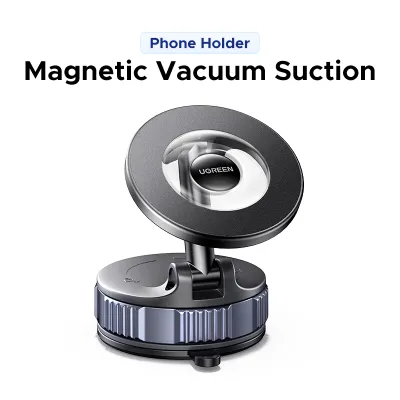
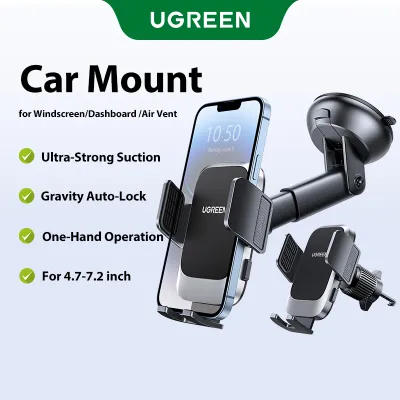

Prices are valid at publication and may change. Please refer to the product page for the latest price.
In contrast, smartphone navigation applications update their mapping data automatically in the background without requiring manual intervention or dealer appointments. This rapid update cycle ensures that new expressways, flyovers, and local road adjustments are visible almost as soon as they open to traffic. For drivers who frequently navigate newly developed areas or complex industrial estates, the immediacy of smartphone map updates offers a significant practical advantage.
Real-time traffic data is another critical factor when driving on congested expressways. Smartphone navigation apps excel in this area by leveraging crowd-sourced data from active users to provide minute-by-minute traffic conditions, accident alerts, and alternative routing. This live data allows you to bypass heavy congestion and optimize your travel times. While some modern built-in navigation systems also offer live traffic feeds, they often rely on proprietary telematics services that may require an active subscription or a paired mobile hotspot to function.
Before deciding to rely solely on your vehicle’s integrated system, it is highly recommended to consult your car’s infotainment manual or contact your local dealership. Verify whether live traffic services are supported in Singapore, how frequently map updates are released, and whether these updates require a paid subscription after the initial vehicle warranty period. If your built-in system lacks real-time traffic capabilities or charges high fees for updates, pairing your smartphone with a reliable mount becomes a highly practical alternative.
Cost Breakdown: System Upgrades vs Phone Mounts
The financial commitment required to maintain an accurate navigation system varies greatly between built-in hardware and smartphone-based setups. Built-in navigation systems often carry a high initial cost, as they are typically bundled into premium vehicle trim levels or offered as expensive optional add-ons at the point of purchase. Beyond the initial acquisition cost, maintaining these systems over the lifespan of the vehicle can introduce ongoing expenses.

Many automotive manufacturers charge recurring fees for map update packages or connected service subscriptions once the complimentary trial period expires. These updates can cost a substantial amount in S$ per update or require an annual subscription fee to keep the navigation software and live traffic features active. Over several years of vehicle ownership, these maintenance costs can accumulate significantly, prompting many drivers to look for more cost-effective alternatives.
On the other hand, utilizing a smartphone for navigation involves a much lower financial barrier. The primary hardware investment is a one-time purchase of a high-quality ugreen handphone holder, which is available at an accessible price point in S$. Because you likely already pay for a monthly mobile data plan with sufficient data allowance, using navigation apps on your phone incurs virtually no additional ongoing operational costs.
To make an accurate financial comparison, check the official website of your vehicle manufacturer or contact your local dealer to verify the current pricing for map updates and connected services. Compare these recurring costs against the nominal, one-time cost of a durable phone mount. For many budget-conscious drivers in Singapore, the minimal investment of a phone holder combined with a standard mobile data plan offers far greater long-term value than paying for proprietary automotive software updates.
Convenience, Cabin Safety, and Daily Usability
Daily usability and cabin safety are paramount when choosing how to display your route guidance. Built-in navigation systems are designed to integrate seamlessly with your vehicle’s cabin electronics. They often support steering wheel controls, voice commands integrated with the car’s microphone system, and clear visual prompts on the primary infotainment screen or head-up display. This integration minimizes physical distractions, allowing you to keep your hands on the wheel and your eyes closer to the road.
However, smartphone navigation interfaces are highly familiar to most users, offering intuitive touch controls, rapid search functions, and seamless integration with your preferred music streaming and communication apps. Searching for a destination on a smartphone is typically much faster than typing addresses into an older or less responsive built-in infotainment system. The challenge lies in positioning the phone safely within the cabin to ensure it does not compromise driving safety.
When installing a ugreen handphone holder, you must prioritize cabin safety and adhere to local traffic regulations. It is essential to consult your vehicle’s owner manual to identify the exact locations of all passenger and driver airbags, dashboard sensors, and climate control vents. Mounting a phone holder directly in the deployment path of an airbag can cause severe injury during a collision, while blocking essential sensors can interfere with your vehicle’s automatic climate control or driver-assist systems.
Selecting the right type of mount depends heavily on your car’s interior layout and your personal preferences. Air vent mounts keep the phone within easy reach and out of your direct line of sight through the windshield, but they require compatible vent blades. Dashboard and windshield suction mounts position the screen closer to your natural line of sight, but you must ensure they do not block your view of the road or violate local transport authority guidelines regarding windscreen obstructions. Always adjust the mount so that the phone is securely held, easily readable at a glance, and positioned where it does not require you to take your eyes off the road for extended periods.
Decision Framework: Choosing the Right Navigation Setup
To finalize your navigation strategy, you can use a structured decision framework based on your specific driving habits, vehicle capabilities, and personal preferences.
Choose built-in navigation if:
- You prefer a completely clean, clutter-free dashboard without visible wires or mounting brackets.
- Your vehicle includes free lifetime map updates and reliable, built-in live traffic data.
- You highly value integration with your car's head-up display, steering wheel controls, and instrument cluster.
- You want to avoid placing your smartphone in direct sunlight, which can cause the device to overheat during long drives.
Choose phone navigation with a UGREEN holder if:
- Your vehicle's built-in maps are outdated, slow to load, or expensive to update.
- You rely heavily on real-time, crowd-sourced traffic alerts to navigate peak-hour congestion and optimize your routes around ERP gantries.
- You frequently switch between multiple vehicles, such as family cars, rental vehicles, or car-sharing services, and require a portable navigation solution.
- You prefer the familiar, highly responsive user interface of modern smartphone navigation applications.
Verify first if:
- Your chosen mounting position complies fully with local transport authority regulations regarding driver visibility and windscreen obstructions.
- The phone holder does not interfere with any physical vehicle controls, gear shifters, wiper stalks, or safety sensor zones.
- Your smartphone is securely fitted into the holder's grip mechanism to prevent it from slipping or falling while driving over uneven road surfaces or speed humps.
Frequently Asked Questions (FAQ)
Do I need a specific UGREEN holder for my car's air vent design?
Yes, it is important to match the mounting mechanism of the phone holder with the specific design of your vehicle’s air vents. Standard air vent mounts are typically designed for traditional horizontal or vertical straight blades. If your vehicle features circular, deeply recessed, or uniquely angled vent blades, a standard clip may not secure properly. Before purchasing, inspect your dashboard layout; if your vents are incompatible, consider alternative UGREEN models that utilize dashboard suction cups, CD slot mounts, or adhesive bases to ensure a stable and secure installation.
Will using my phone for navigation drain its battery quickly?
Yes, running navigation applications continuously can drain your smartphone’s battery rapidly because it requires constant GPS tracking, active mobile data transfer, and continuous screen illumination. To prevent your phone from running out of power during your journey, it is highly recommended to use a compatible car charger plugged into your vehicle’s 12V accessory socket or USB power port. Using a high-quality charging cable ensures a stable power supply, keeping your device charged and ready for use when you reach your destination.
Community discussion
Share your experience or ask a question. Comments are reviewed before publication.