
Finding the perfect phone mount for the BYD Atto 3 requires moving away from traditional mounting logic. The defining feature of this electric vehicle’s cabin is its massive 12.8-inch rotating intelligent touchscreen. Because this display physically transitions between landscape and portrait orientations at the touch of a button, standard universal phone holders often block the screen’s path, strain the rotation motor, or obscure your view of the road. To keep your smartphone accessible and your dashboard functional, you need a mounting solution that respects the physical clearance of the rotating screen while handling Singapore’s demanding tropical climate.
Why the Atto 3's Rotating Screen Changes Mount Placement
The rotating screen on the BYD Atto 3 is a marvel of modern cabin design, but it introduces a dynamic physical sweep zone that most phone mount manufacturers never anticipated. When the screen rotates from landscape to portrait mode, its outer corners describe a wide circular arc. Any accessory placed within this clearance zone will inevitably collide with the screen during its transition. This is not just an inconvenience; physical interference can trigger the screen motor’s resistance sensors, leading to system error codes or premature wear on the internal gear mechanisms.
Beyond mechanical interference, the sheer size of the screen means that improper mount placement easily compromises driver safety. If you mount your phone too close to the center console, the screen in portrait mode might completely hide your phone’s display, forcing you to look away from the road to view navigation. Conversely, placing the mount too high or too far forward can block your line of sight through the windshield or obscure the compact digital instrument cluster behind the steering wheel. The ideal mounting strategy must balance two non-negotiable criteria: maintaining absolute physical clearance for the screen’s full rotation and positioning your phone within your natural peripheral vision.
Products mentioned in this guide
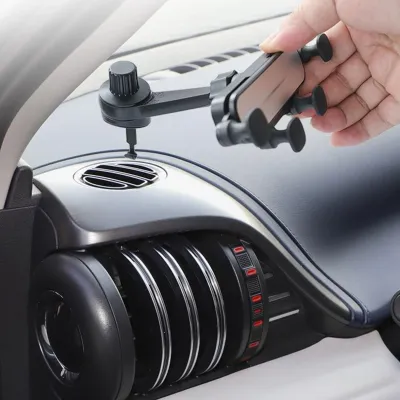
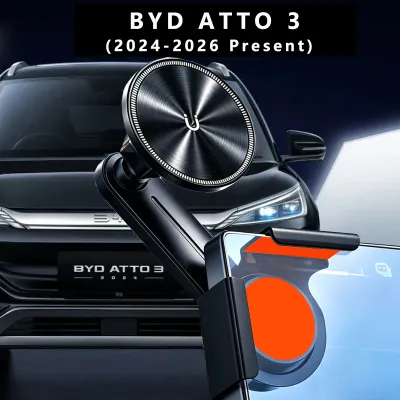
Prices are valid at publication and may change. Please refer to the product page for the latest price.
Recommended Mounting Styles for the Atto 3
To accommodate the unique cabin architecture of the Atto 3, you must select a mounting style that utilizes stable anchor points outside the screen’s rotation path. Three primary styles offer the necessary adjustability, stability, and safety.

Low-Profile Dashboard Adhesive Mounts
A low-profile adhesive mount is one of the cleanest ways to integrate a phone holder into the Atto 3’s futuristic dashboard. The key to success with this method is strategic placement. Positioning the mount on the flat, textured surface to the far right of the driver’s instrument cluster or on the lower center console trim—well below the screen’s lowest sweep point—keeps your phone secure and completely out of the rotation arc. This placement ensures that your phone remains easily readable for GPS navigation without cluttering the central dashboard area.
However, the Atto 3’s dashboard features soft-touch materials and unique textured synthetics that can make adhesive bonding difficult. You must select a mount that utilizes high-grade, heat-resistant adhesives (such as 3M VHB tape) specifically formulated to bond with textured automotive plastics. Standard cheap adhesives will quickly fail under the intense cabin heat that builds up when your car is parked in open-air car parks across Singapore. Choosing a mount with a compact base footprint also preserves the clean, wave-inspired aesthetic of the Atto 3’s interior while minimizing permanent residue on the premium trim.
Air Vent Mounts with Hook-Style Clips
The air vents in the BYD Atto 3 are highly stylized, resembling dumbbells or circular gears rather than traditional rectangular slats. Because of this unique design, standard spring-loaded horizontal vent clips are highly likely to slip off, fail to grip, or even snap the delicate plastic louvers. To safely utilize the vents for phone mounting, you must look for specialized hook-style or expandable metal claw clips. These mechanisms extend deep into the vent structure and hook securely around the internal support ribs, distributing the weight of your phone evenly without putting excessive pressure on the outer blades.
When using a vent mount, you must carefully evaluate the final position of your phone relative to the central screen. Because the center vents sit relatively close to the rotating display, a phone mounted here can easily swing or lean into the screen’s path when negotiating sharp turns or driving over speed bumps. Opt for a vent mount that features an offset extension arm. This allows you to position the phone cradle several centimeters to the side of the vent, ensuring a safe buffer zone between your phone and the edge of the rotating screen.
Long-Arm Windshield Suction Mounts
If you prefer to keep your dashboard and vents completely clear of accessories, a long-arm windshield suction mount is an excellent alternative. This style uses a heavy-duty suction cup attached to the front glass, paired with a multi-jointed, flexible, or telescopic arm. By extending the arm downward or outward, you can position your phone precisely in your line of sight while keeping the entire mounting apparatus completely isolated from the dashboard and the rotating screen’s movement.
When opting for a windshield mount in Singapore, you must account for the intense tropical sunlight and high UV exposure. Standard rubber suction cups can degrade, dry out, and lose their grip over time, causing the mount to fall unexpectedly while you are driving. Look for premium mounts that feature high-temperature silicone suction pads combined with a mechanical locking lever that creates a powerful vacuum seal. Additionally, you must remain mindful of local Land Transport Authority (LTA) regulations regarding windshield obstructions. Ensure the mount is positioned so that it does not block your view of the road, pedestrian crossings, or side mirrors.
Mount Types to Avoid with the Rotating Display
While searching for accessories, you will encounter many “universal” mounts that claim compatibility with all modern vehicles. However, several common mount designs are highly incompatible with the Atto 3 and can cause physical damage or safety hazards.
Direct-Screen or Bezel Adhesive Mounts
Some aftermarket mounts are designed to stick directly to the back or side bezel of your car’s central touchscreen. While this might work well on vehicles with fixed displays, it is highly dangerous for the Atto 3. Attaching any extra weight directly to the rotating display puts a continuous mechanical load on the electric rotation motor. Over time, this added weight can cause the motor to overheat, slip gears, or fail prematurely.
Furthermore, modern high-resolution displays generate a significant amount of internal heat. Sticking an adhesive mount directly to the screen’s casing can trap heat against the display panel, potentially leading to thermal throttling, localized screen discoloration, or permanent pixel damage. There is also a significant warranty risk: removing strong adhesives from the screen’s bezel can peel away the factory finish or damage the soft-touch plastics, which could void your vehicle’s interior warranty.
CD Slot Mounts
CD slot mounts remain popular because they utilize an otherwise unused space in older vehicles to provide a highly stable, eye-level mounting point. However, like almost all modern electric vehicles, the BYD Atto 3 does not feature an internal CD or DVD player. The dashboard is entirely digital, and the center console is dedicated to storage, wireless charging, and physical drive selectors. You should completely ignore any product listings or universal kits that advertise CD slot compatibility, as there is simply nowhere to insert them in the Atto 3’s cabin.
Steering Wheel and Airbag Zone Mounts
Safety should always be your primary concern when installing aftermarket accessories. You must strictly avoid any phone holders that clip directly onto the steering wheel. These mounts restrict your ability to steer smoothly, can snag on your clothing during emergency maneuvers, and turn your smartphone into a high-speed projectile if the driver’s airbag deploys.
Similarly, you must identify and respect the deployment zones of the vehicle’s SRS airbags. The passenger-side dashboard airbag deploys upward and outward with immense force. Placing an adhesive or suction mount anywhere on the passenger side of the dashboard or within the path of the side curtain airbags is extremely dangerous. Always consult your BYD Atto 3 owner’s manual to locate the exact boundaries of all airbag deployment zones before choosing a mounting location.
Essential Features to Look for in Your Mount
To ensure your chosen phone mount performs flawlessly alongside the Atto 3’s rotating screen, look for specific hardware features that maximize adjustability and ease of use.
First, prioritize mounts with multi-joint mechanical arms, such as dual ball joints or telescopic extensions. These features allow for precise, millimeter-level adjustments. When you transition your screen from landscape to portrait, having a highly adjustable mount means you can easily fine-tune the angle and distance of your phone to maintain a safe clearance gap without having to unmount and restick the base.
Second, consider choosing a strong magnetic mounting system, such as a MagSafe-compatible holder. Magnetic mounts allow for effortless, one-handed mounting and dismounting. Unlike mechanical clamps that require you to press side buttons or use both hands to secure your phone, a magnetic mount lets you simply place your phone against the pad. This significantly reduces driver distraction, allowing you to keep your eyes on the road. Ensure the magnet is rated for automotive use to prevent your phone from slipping off when driving over uneven road surfaces or speed humps.
Finally, look for mounts that incorporate built-in cable management clips or integrated wireless charging capabilities. The Atto 3’s cabin is highly digital, and loose charging cables hanging from the dashboard can easily get caught behind the rotating screen as it moves. A mount with integrated cable routing keeps your charging cords neatly tucked away, preventing dangerous snags and maintaining the clean, uncluttered look of your electric vehicle’s interior.
Installation and Safety Checklist for Singapore Drivers
Proper installation is critical to ensuring your phone mount remains secure and does not damage your vehicle’s interior. Follow this step-by-step checklist to achieve a professional, long-lasting installation:
- Check Material Compatibility: Before applying any adhesive, consult your BYD Atto 3 owner's manual to verify the materials used on your dashboard. Ensure that aftermarket adhesives are safe to use on these specific surfaces to prevent permanent discoloration or peeling.
- Clean the Surface Thoroughly: Use a clean microfiber cloth and a small amount of isopropyl alcohol to clean the mounting area. This step is crucial in Singapore's high-humidity environment, as it removes factory oils, dust, and interior detailing sprays that prevent adhesives from bonding properly. Ensure the cleaning agent is authorized for use on automotive plastics and let the surface dry completely.
- Apply and Cure: Press the adhesive base firmly onto the cleaned surface for at least 30 seconds. To achieve maximum bond strength, allow the adhesive to cure undisturbed for the manufacturer's recommended time (typically 24 hours) before attaching the weight of the mount or your phone.
- Perform a Clearance Test: Before driving, conduct a manual clearance test. Sit in the stationary vehicle and toggle the central screen between landscape and portrait modes. Watch the screen's path closely to ensure there is at least a two-centimeter gap between the screen's outer edges and your mounted phone at all points of the rotation.
- Verify Driver Visibility: Sit in your normal driving position and ensure the mounted phone does not block your view of the road, the side mirrors, or the digital instrument cluster.
Frequently Asked Questions (FAQ)
Can I use a wireless charging mount if the Atto 3 already has a wireless charging pad?
Yes, using a wireless charging mount is highly practical even if your Atto 3 is equipped with a built-in wireless charging pad. While the vehicle’s built-in pad is convenient for passengers or secondary devices, it is located low on the center console, making it unsafe to look at for navigation while driving. A dedicated wireless charging mount keeps your phone’s battery topped up while positioning the screen safely at eye level. If you choose to use a charging mount, ensure it has built-in thermal protection, as Singapore’s warm climate combined with wireless charging can cause smartphones to heat up quickly.
Will the screen rotation motor break if it hits a phone mount?
While the BYD Atto 3’s screen rotation motor is equipped with basic obstacle detection and torque limits designed to stop rotation when it encounters resistance, you should never rely on this safety feature. Repeated physical impacts or continuous resistance against a solid phone mount can cause premature wear on the motor’s internal gears, lead to alignment issues, or trigger system error codes on your dashboard. Ensuring absolute physical clearance is entirely the driver’s responsibility. Regularly check that your mount has not slipped or loosened over time to prevent accidental contact with the rotating display.
Community discussion
Share your experience or ask a question. Comments are reviewed before publication.