
Maximising the utility of your Tesla Model Y cabin requires addressing one of its most prominent interior design choices: the deep, open center console. While this cavernous storage space is excellent for holding larger items, it quickly becomes a cluttered void where smaller essentials like keys, cards, and sunglasses disappear. For drivers who prefer to keep their smartphone visible for secondary navigation or media control, finding a solution that combines storage organization with a secure phone mount is a logical upgrade. Choosing a high-quality center console organizer with an integrated phone holder keeps your cabin tidy while ensuring your device remains safely within your line of sight.
Verify Your Model Y Console Generation for Proper Fitment
Tesla has updated the interior design of its vehicles multiple times. The center console of the Tesla Model Y underwent a major redesign globally, transitioning from the original “Gen 1” console to the “Gen 2” console. This physical change directly impacts the dimensions, shape, and lid mechanisms of any aftermarket accessory you install.
The pre-refresh (Gen 1) console, found in early Model Y vehicles, is distinguished by its glossy piano-black finish. It features a flip-up lid at the front that covers the phone docking area, along with a middle compartment that opens via a hinged flip-up cover. Accessories designed for this generation rely on specific clip points and physical dimensions tailored to this older layout.
Products mentioned in this guide
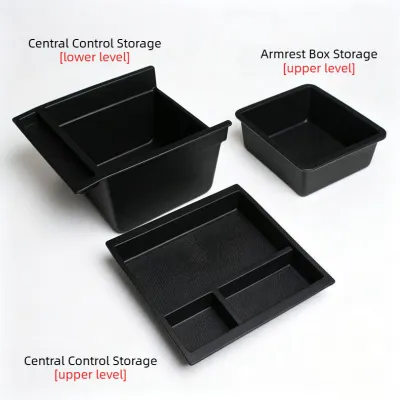
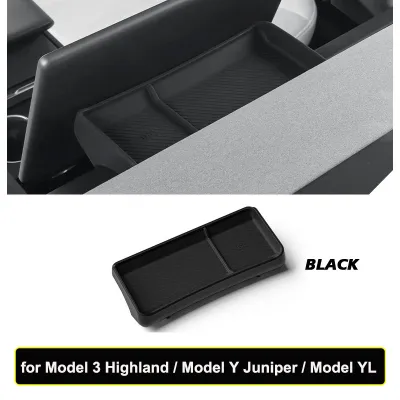
Prices are valid at publication and may change. Please refer to the product page for the latest price.
The refreshed (Gen 2) console, which is standard on more recent Model Y builds, features a matte finish, a sliding lid for the front compartment, and a fixed, suede-like dual wireless charging pad. The internal tracks and side rails of this console are completely different from the Gen 1 version. If you purchase an organizer designed for a Gen 1 console, it will not slide or sit properly on the rails of a Gen 2 console, and vice versa.
When shopping for interior upgrades, you might encounter listings using variations like the Tesla Model YL or simply Model Y; regardless of the label, verifying the physical dimensions of your specific console is the most critical step. Do not rely solely on generic product titles. Instead, physically inspect your vehicle’s console lid mechanism—whether it slides forward smoothly or flips upward on a hinge—and cross-reference your vehicle’s exact build date with the manufacturer’s compatibility list before making a purchase.
Key Features to Evaluate in Console Organizers with Phone Mounts
To select an organizer that enhances your driving experience rather than causing daily frustration, you must evaluate several distinct design elements.

Material and Finish: The Tesla Model Y interior relies on a clean, minimalist aesthetic with premium, soft-touch surfaces. An aftermarket organizer made of cheap, glossy plastic will clash with this design. Look for options constructed from high-grade, matte-finish ABS (Acrylonitrile Butadiene Styrene) plastic or polycarbonate blends that match the texture of the OEM console walls. Additionally, pay close attention to the interior lining of the organizer. High-quality trays feature removable liners made of silicone or thermoplastic elastomer (TPE). These rubberised liners are essential for dampening vibrations and preventing items like coins, keys, and charging adapters from rattling loudly during acceleration, cornering, or when the vehicle utilizes regenerative braking.
Phone Mount Mechanism: The method used to secure your phone determines how easy it is to use on a daily basis. Magnetic mounts, particularly those compatible with MagSafe, offer the cleanest look and allow for quick, one-handed attachment. However, they require your phone to have built-in magnets or a compatible case. Mechanical clamps offer a more universal fit for various phone sizes and rugged cases, but they can be bulky and often require two hands to secure or release the device. Angled drop-in slots are the most minimalist option, relying on gravity to hold the phone in a pre-carved groove. While highly durable due to having no moving parts, drop-in slots offer fixed viewing angles and may not accommodate thicker phone cases or pop-sockets. Ensure the mount’s positioning tilts the phone screen slightly toward the driver’s seat without blocking your view of the primary Tesla touchscreen.
Storage Capacity Trade-offs: Adding an organizer, especially a sliding tray, transforms your console into a double-decker storage system. While this makes frequently used items easily accessible, it naturally reduces the vertical clearance in the lower half of the bin. If you regularly store taller items, such as large water flasks, travel mugs, or bulky sunglasses cases, you must ensure the organizer can slide fully forward or backward to allow unobstructed access. Opt for low-profile trays that balance upper compartment depth with lower bin clearance.
Cable Management: Even though the Model Y features built-in wireless charging pads, many drivers still require physical cable connections for faster charging speeds or data transfer. A well-designed organizer must include dedicated cable routing channels, pass-through slots, or rubber grommets. These routing paths allow you to run a USB-C cable from the ports inside the deep bin up to your mounted phone without pinching, bending, or damaging the cable when you slide the organizer or close the main console lid.
Compare the Main Styles of Model Y Console Organizers
Understanding the different structural designs of these accessories allows you to choose a style that matches your daily routine and storage preferences.
Sliding Tray Inserts with Magnetic Phone Mounts
Sliding tray inserts represent the most common and easily reversible modification for the Model Y center console. These trays are designed with side flanges that rest perfectly on the factory guide rails built into the upper lip of the console bin. You can slide the tray forward to hide it under the wireless charging pad, or slide it back to expose the deeper storage space underneath.
The integrated phone holder on these models is typically a magnetic mount attached to an adjustable arm or a fixed pedestal on the front edge of the tray. This positioning keeps the phone highly visible and within easy reach, sitting just below the main dashboard screen. Because the mount is magnetic, mounting your phone is an instantaneous, one-handed action.
The primary trade-off with this design is the loss of deep vertical storage. Because the tray sits in the upper portion of the bin, any items stored underneath must be short enough to clear the bottom of the tray as it slides. Additionally, if the tray is loaded with heavy items, it may slide back unexpectedly during rapid acceleration unless the product features rubber friction stoppers or a secure locking tab along the rails.
Full Console Replacement Covers with Integrated Stands
For drivers seeking a highly integrated, factory-like appearance, full console replacement covers or overlay panels offer a more permanent solution. Instead of sitting inside the storage bin, these accessories either completely replace the factory sliding lid or adhere directly over the top of the existing console trim using automotive-grade double-sided tape.
These covers feature a built-in, angled phone stand or a low-profile mounting ball integrated directly into the panel surface. This design provides an exceptionally clean look, as the phone mount appears to be an original part of the vehicle’s interior rather than an aftermarket add-on. The structural rigidity of a fixed cover also minimizes phone vibrations while driving over uneven road surfaces.
However, the installation process for full replacement covers is significantly more involved than simply dropping in a tray. It often requires using plastic trim prying tools to release the factory clips holding the original sliding lid or side panels. You must exercise extreme caution during this process to avoid snapping the delicate plastic tabs or scratching the surrounding leatherette trim. It is also vital to verify that the replacement cover’s clipping mechanisms are designed specifically for your precise console generation to prevent loose fittings, squeaks, or rattles over time.
Drop-In Dividers with Angled Phone Slots
If you prefer a minimalist approach that prioritizes maximum storage volume over an elevated, high-visibility mount, drop-in dividers with angled phone slots are an excellent choice. These organizers typically consist of a flexible silicone grid or a set of interlocking ABS plastic dividers that press-fit into the bottom of the console bin, partitioning the large space into dedicated slots for wallets, cards, coins, and your phone.
The phone holder in this style is usually a simple, deep, slanted groove or a fold-out silicone flap located at the front of the divider. Your phone sits vertically or horizontally within this slot, keeping it secure and upright. Because the phone is nestled deep within the console bin, it remains completely out of sight from outside the vehicle, reducing the temptation for distracted driving while still keeping the device secure and rattle-free.
This style is highly recommended for drivers who rely entirely on the Tesla main screen for navigation and media controls but want a safe, designated spot to store their phone where it won’t slide around. It preserves the full depth of the console for bulkier items and requires zero complex installation, as the flexible silicone or plastic grid simply slips into place and can be removed in seconds for cleaning.
Installation, Safety, and Care for Your Model Y Interior
Properly installing and maintaining your center console organizer ensures it functions correctly without causing damage to your Tesla’s premium interior materials.
Installation Safety: Before placing any aftermarket organizer into your console, thoroughly clean the interior surfaces. Dust, sand, and small grit particles can act as abrasives. If an organizer is pressed tightly against a dirty console wall, the friction from vehicle vibrations can grind these particles into the factory plastic or leatherette, causing permanent scratches. Wipe the area down with a damp microfiber cloth and allow it to dry completely. If your chosen organizer uses adhesive backing, clean the mounting area with a mild isopropyl alcohol wipe to ensure proper adhesion. For clip-on or replacement styles, always use non-marring plastic trim tools and apply gentle, even pressure. If a component does not fit easily, do not force it; stop and verify that the accessory is compatible with your vehicle’s specific model year.
Driving Safety: When positioning your phone mount, you must ensure it does not compromise driving safety or vehicle operation. The mounted phone must not obstruct your view of the main Tesla touchscreen, particularly the left-hand side of the display which shows critical information such as vehicle speed, autopilot status, and warning lights. Additionally, ensure the phone and mount do not interfere with the physical movement of the gear selector stalk on the steering column, nor should they block access to the hazard light switch or the glovebox release button.
Climate and Maintenance: Singapore’s tropical climate presents unique challenges for car interiors. High humidity combined with intense cabin heat when parked outdoors can trap moisture inside enclosed spaces like the center console. Over time, this trapped moisture can lead to mold growth, mildew, and unpleasant odors. To prevent this, make it a habit to remove the console organizer periodically—ideally once a month—to vacuum out accumulated dust and check for any signs of moisture. Clean the organizer and its silicone liners using a mild, soapy water solution, dry them thoroughly, and reinstall them. Avoid using harsh chemical solvents or oil-based protectants, as these can degrade the silicone liners or damage the factory Tesla console finish.
Frequently Asked Questions (FAQ)
Will a console organizer block the OEM wireless charging pad?
Whether an organizer blocks the factory wireless charging pad depends entirely on its design and installation position. Standard sliding tray inserts sit inside the console bin and slide forward under the charging pad, meaning they do not physically block your phone from resting on the wireless charger. However, some full-cover overlays or organizers with raised mounting arms that sit directly in front of the console may partially obstruct access to the charging pads. When selecting an organizer, carefully review the product specifications to confirm if it allows unobstructed access to the dual wireless chargers. If you choose a style that covers the pads, ensure it provides dedicated cable routing paths so you can easily plug your phone into the internal USB-C ports for charging.
How do I prevent my phone from overheating on the console mount?
Smartphones can generate significant heat when running processor-intensive applications like GPS navigation while simultaneously charging. This thermal load is amplified in Singapore’s warm climate, particularly if the phone is mounted in direct sunlight streaming through the windshield or glass roof. To prevent your phone from overheating and entering thermal throttling or shutdown mode, consider choosing an organizer with a ventilated mount design that allows airflow around the back of the device. Additionally, you can adjust your vehicle’s air conditioning vents to direct cool air toward the center console area. When parking your Model Y outdoors in direct sunlight for extended periods, always remove your phone from the mount and store it in a shaded area of the cabin, or utilize Tesla’s Cabin Overheat Protection feature to keep the interior temperature within a safe range.
Community discussion
Share your experience or ask a question. Comments are reviewed before publication.