
Choosing between a dedicated Android car player and a smartphone mount for daily navigation involves balancing convenience, display quality, installation complexity, and overall cost. While a smartphone mount offers an immediate, low-cost solution, an Android head unit provides an integrated dashboard experience. The right choice depends on your vehicle’s compatibility, your budget, and how you manage daily driving distractions.
Evaluating these options requires looking beyond simple map viewing. Daily drivers must consider how each setup handles intense sunlight, routing audio through car speakers, and managing device temperatures during long commutes. By comparing these factors, you can determine which system fits your daily driving routine.
Core Differences in Navigation and Display Experience
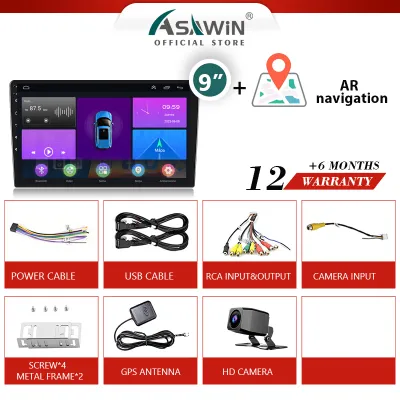
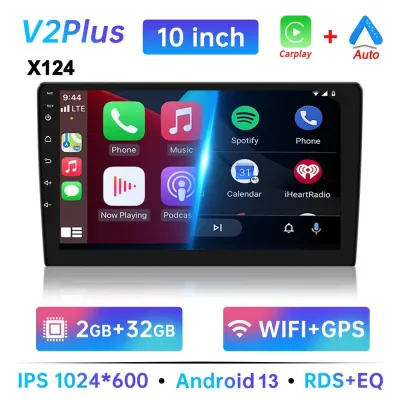
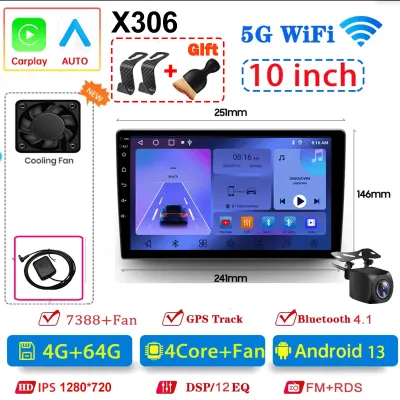
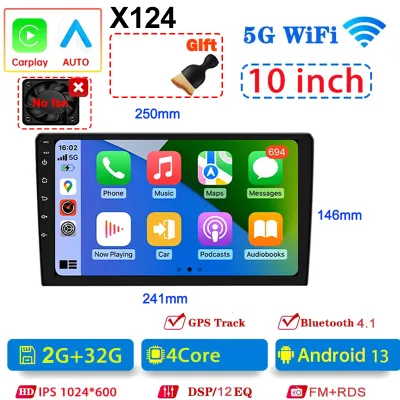
Screen size and visibility play a critical role in how easily you can read map details at a glance. A typical smartphone screen ranges from 6 to 6.7 inches, which can make small street names or complex junction layouts difficult to see when mounted on the dashboard. In contrast, an Android player for car typically offers a display size between 7 and 10 inches. This larger surface area allows for larger text, clearer lane guidance, and split-screen functionality, such as displaying navigation alongside media controls.
Products mentioned in this guide
Prices are valid at publication and may change. Please refer to the product page for the latest price.
Screen visibility under direct sunlight is another major differentiator. Smartphone screens often suffer from severe glare when positioned near the windshield, especially during bright midday drives in tropical climates. While some high-end phones have high peak brightness, prolonged exposure to direct sunlight can cause the screen to dim automatically to prevent overheating. Many aftermarket Android players feature matte or anti-glare screen coatings designed specifically for automotive use, though you should verify the display specifications, such as IPS or QLED technology, before purchasing.
GPS signal reliability can also vary significantly between the two setups. Smartphones rely on internal GPS receivers, which can sometimes struggle to maintain a lock when driving through dense urban areas with high-rise buildings, underpasses, or heavy tree cover. Android players typically utilize an external GPS antenna that is routed during installation to a position with a clearer view of the sky, such as the top of the dashboard or near the A-pillar. This external antenna generally provides more consistent positioning data in challenging environments.
Audio routing affects how clearly you hear turn-by-turn directions. A smartphone mount setup requires connecting the phone to the car’s audio system via Bluetooth, an auxiliary cable, or an FM transmitter. This can sometimes result in audio lag or require you to manually switch input sources on your radio. A dedicated Android player integrates directly into the vehicle’s audio wiring harness, allowing navigation prompts to automatically lower the volume of playing music or radio broadcasts before speaking directions through the car speakers.
Installation, Cost, and Vehicle Compatibility
The financial investment required for each setup varies widely. A high-quality smartphone mount and a reliable fast-charging cable typically cost between S$20 and S$80. Upgrading to an Android player for car represents a more significant financial commitment, with hardware prices generally ranging from S$150 to over S$800 depending on the processor, memory, and screen specifications. Professional installation services add to this cost, often ranging from S$80 to S$200 depending on the complexity of the vehicle’s dashboard.

Installing an aftermarket head unit involves electrical work, dashboard disassembly, and wiring integration. It is critical to state that improper wiring can damage your vehicle’s electrical system, void manufacturer warranties, or interfere with safety systems such as passenger airbags. Always consult your vehicle’s original manual and seek qualified professional installation before attempting to modify the dashboard or wiring harness. Additionally, when routing external GPS antennas or microphone cables, ensure they do not cross or obstruct any airbag deployment zones.
Vehicle compatibility is a primary hurdle when choosing an Android player. You must verify your vehicle’s dashboard dimensions and mounting standards before purchasing. Vehicles typically use either a Single-DIN (2 inches tall) or Double-DIN (4 inches tall) mounting slot. Many modern vehicles also require a vehicle-specific fascia panel, or dash kit, to ensure the aftermarket player fits flush with the existing dashboard contours without leaving unsightly gaps.
Retaining factory features like steering wheel buttons requires a compatible wiring harness and often a CANbus decoder. You must verify that the specific head unit model supports your vehicle’s make, model, and production year to ensure these integrations function correctly. If your vehicle uses proprietary digital communication protocols, a standard analog wiring harness will not be sufficient to retain steering wheel controls or vehicle settings menus.
Safety, Distraction, and Daily Usability
Mounting positions significantly impact your forward visibility and driving safety. Phone holders attached to the windshield or dashboard can block portions of your sightline, potentially creating blind spots. Vent-mounted holders avoid windshield obstruction but can block airflow and expose the smartphone to extreme temperature changes from the climate control system. A dedicated Android player sits in the factory radio location, keeping your windshield completely clear and maintaining original forward sightlines.
Touch target sizes influence how much time your eyes spend off the road. The larger display of an Android player allows for significantly larger buttons and touch targets within navigation apps. This design makes it easier to tap a detour or mute a route with a quick glance. Furthermore, many aftermarket head units retain physical volume knobs or integrate directly with your vehicle’s steering wheel buttons, allowing you to adjust audio levels or skip tracks entirely by feel.
Thermal management is a common issue for smartphones used for continuous navigation. Running intensive GPS mapping applications while simultaneously charging the battery generates substantial internal heat. When exposed to direct sunlight on a hot day, a mounted smartphone can quickly overheat, leading to thermal throttling, sluggish performance, or complete shutdown. Dedicated Android players are engineered for the harsh automotive environment, featuring large rear metal heatsinks, robust chassis designs, and sometimes active cooling fans to dissipate heat effectively.
Decision Framework: Choosing the Right Setup
To finalize your choice, evaluate your driving habits, vehicle ownership status, and budget against the specific requirements of each setup.
Choose a smartphone mount if:
- You operate on a limited budget and want to avoid installation fees.
- You drive a leased, rented, or company vehicle where permanent modifications are prohibited.
- You prefer to upgrade your navigation hardware every few years simply by upgrading your personal phone.
- Your daily driving consists of short, infrequent trips where a simple mount is sufficient.
Choose an Android player for car if:
- You own the vehicle and plan to keep it long enough to justify the hardware and installation costs.
- You prioritize a clean, factory-style dashboard aesthetic without exposed charging cables.
- You want a larger, permanent display that can also integrate auxiliary inputs like a reversing camera or dashcam.
- You frequently drive long distances and require robust thermal management and consistent GPS reception.
Before purchasing any aftermarket head unit, verify whether your vehicle features a highly integrated proprietary infotainment system. Some modern vehicles control climate settings, hybrid drivetrain displays, or advanced driver-assistance systems (ADAS) directly through the factory screen. Replacing such screens with an aftermarket unit can disable these essential vehicle functions, making a smartphone mount or a specialized integration interface the only viable option.
Frequently Asked Questions (FAQ)
Can I use my existing steering wheel controls with an aftermarket Android player?
Yes, but retention depends on compatibility and hardware. To use your existing steering wheel buttons, you generally need a vehicle-specific wiring harness and a compatible CANbus decoder or steering wheel control (SWC) interface. You must verify that the aftermarket head unit supports your vehicle’s specific communication protocol before purchasing. Some basic systems may require manual key mapping within the Android player’s settings menu, while highly integrated digital systems require a pre-programmed CANbus module to translate the button signals.
Does a dedicated Android car player drain the car battery when parked?
An Android player should not drain your car battery if it is wired correctly. Car head units require two power connections: a constant 12V wire (often yellow) to maintain memory settings, and a switched accessory (ACC) wire (often red) that only receives power when the ignition is turned on. If these wires are spliced together or connected incorrectly, the player will remain fully powered even when the engine is off, leading to parasitic battery draw. Always verify the wiring diagram or have the unit installed by a qualified professional to ensure the sleep mode functions correctly.
Community discussion
Share your experience or ask a question. Comments are reviewed before publication.