
Finding the perfect phone holder for the GAC Aion V requires a careful balance between accessibility and dashboard safety. The Aion V features a distinctive interior layout highlighted by a prominent, floating central infotainment screen that serves as the hub for most vehicle settings. Selecting the wrong type of mount can easily block this essential screen, obstruct your view of the road, or interfere with the vehicle’s air conditioning vents. To keep your dashboard organized and safe, the best solutions are low-profile console mounts, custom-fit screen-adjacent bezel clips, or carefully positioned suction mounts that respect the vehicle’s interior geometry.
When exploring various aion v accessories, you must prioritize options that do not compromise driver visibility or physical safety. In Singapore’s busy traffic and warm tropical climate, a secure mount that keeps your device stable without blocking cooling airflow is essential. By understanding the specific layout of your electric vehicle’s cabin, you can choose a mounting solution that integrates seamlessly with the dashboard while staying fully compliant with local safety standards.
Mapping the Aion V Dashboard: Clearance Zones and Blind Spots
The interior design of the GAC Aion V is built around a clean, high-tech aesthetic, dominated by a large, horizontal floating infotainment display. This central screen controls everything from navigation and media to climate settings, meaning any obstruction can significantly hinder your driving experience. Because the screen sits high on the dashboard, mounting a phone directly next to it or behind it can easily create a substantial blind spot, blocking your view of the left-side wing mirror or the road ahead.
Products mentioned in this guide
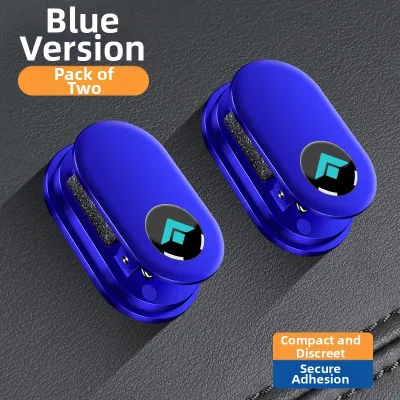
Prices are valid at publication and may change. Please refer to the product page for the latest price.
When planning where to place your phone holder, you must identify and strictly avoid the vehicle’s “no-mount zones.” The most critical of these is the passenger-side airbag deployment area, which covers the upper surface of the dashboard on the passenger side. Placing any heavy accessory or rigid mount in this zone creates a severe hazard, as a deploying airbag can launch the object into the cabin with extreme force. Additionally, the area directly above the driver’s digital instrument cluster must remain completely clear to prevent any obstruction of your primary driving telemetry.
Another crucial consideration for Singapore drivers is the placement of the air conditioning vents. The Aion V’s central vents are positioned directly below the infotainment screen to distribute cool air efficiently throughout the cabin. Using a bulky, universal vent-clip phone holder might seem convenient, but it blocks this vital airflow. In a tropical climate where cabin temperatures can rise rapidly, reducing the efficiency of your air conditioning leads to a less comfortable drive and forces the climate control system to work harder, which can subtly impact your electric vehicle’s battery range over time.
Before purchasing any adhesive-based phone mount, you should consult your specific Aion V model year’s owner manual to verify the exact materials used on your dashboard. Modern vehicle interiors often blend soft-touch synthetic leathers, textured vinyls, and hard ABS plastics. Adhesives that bond securely to hard plastics can cause permanent damage, bubbling, or discoloration when applied to soft-touch materials. Knowing the exact material composition of your chosen mounting location helps you select a compatible adhesive or opt for a non-invasive mechanical mounting alternative.
Recommended Mounting Solutions for an Unobstructed View
To maintain the sleek, minimalist look of your Aion V while keeping your smartphone secure, you need a mounting solution tailored to the vehicle’s specific cabin architecture. Standard, generic mounts often fail to accommodate the unique curves and screen placement of modern electric vehicles. The following mounting styles offer the best combination of stability, visibility, and interior protection.

Dedicated Console and Dashboard Base Mounts
Low-profile base mounts are designed to sit on the lower sections of the dashboard or along the flat surfaces of the center console, well below the driver’s primary line of sight. By keeping the phone positioned lower in the cabin, these mounts ensure that the entire floating infotainment screen remains completely unobstructed. This setup is highly practical for drivers who use the car’s built-in navigation system on the main screen and only need their phone visible for hands-free calls or secondary audio apps.
When installing a base mount, verifying adhesive compatibility with the Aion V’s interior surfaces is essential. Many high-quality mounts utilize specialized double-sided automotive adhesives designed to hold firmly under high temperatures but release cleanly when removed. However, textured or porous dashboard surfaces can prevent a proper seal, leading to a loose mount. To prevent damage to soft-touch dashboard materials, look for mounts that specify compatibility with synthetic leather or vinyl, and avoid using industrial-grade permanent glues that can strip the dashboard’s finish.
A reliable dashboard base mount must also offer excellent vibration resistance to handle the stop-and-go nature of city driving. Look for designs with a wide, semi-rigid base plate that distributes the weight of the phone evenly across the mounting surface. A narrow or flimsy base will allow the phone to sway or vibrate on uneven road surfaces, which is not only distracting but also places unnecessary stress on the adhesive bond, eventually causing it to fail.
Screen-Adjacent and Gap-Clip Mounts
Screen-adjacent and gap-clip mounts are among the most popular aion v accessories because they offer a clean, integrated appearance. These holders are engineered to snap securely into the natural panel gaps of the dashboard or clip directly onto the outer bezel of the floating infotainment screen. Because they utilize the vehicle’s existing structural seams, they provide an exceptionally stable mounting platform without the need for adhesives or permanent modifications.
While these mounts offer excellent stability, you must take precautions to protect the delicate interior trim and screen bezels from physical damage. The constant vibration of a vehicle in motion can cause hard plastic clips to rub against the dashboard panels, leading to unsightly scratches or paint wear. To prevent this, choose a gap-clip mount that features thick, high-density silicone or soft rubber padding on all contact points. This padding dampens road vibrations and acts as a protective barrier for your car’s interior finishes.
Positioning is also key when using screen-adjacent mounts. Because the Aion V’s central screen is already positioned high on the dashboard, a phone mounted directly to its side can easily creep into your field of vision. Opt for a mount equipped with an adjustable extension arm or a highly flexible ball joint. This allows you to position the phone slightly lower or angled toward your seat, keeping your forward view through the windshield completely clear while keeping the phone’s screen within your comfortable peripheral vision.
Low-Profile Suction Mounts (With Strict Placement Rules)
Suction mounts remain a versatile option, but they must be used with strict placement rules to ensure safety and visibility. Safe placement areas are limited to the lower right corner of the windshield (on right-hand-drive models) or a flat, non-textured section of the lower center console. Placing the suction cup in these lower, peripheral zones keeps the phone well away from both the central infotainment screen and the passenger-side airbag deployment zone.
You must strictly avoid placing suction mounts high on the center of the windshield or directly in front of the infotainment screen. A phone suspended in the middle of the glass creates a dangerous blind spot that can hide pedestrians, motorcycles, or traffic signals from your view. Furthermore, mounting a phone directly in front of the central display blocks your access to vital touch controls and can cause distracting reflections or glare during night driving.
Maintaining the suction cup is critical, especially when operating a vehicle in hot climates. High cabin temperatures can cause the air trapped inside the suction cup to expand, weakening the vacuum seal and causing the mount to fall unexpectedly. To ensure a reliable hold, regularly clean the suction pad and the mounting surface with water to remove dust and oil buildup. Check the security of the suction seal before every trip, and avoid leaving the mount under direct sunlight for extended periods when the car is parked.
Choosing the Right Build for Singapore's Tropical Climate
Singapore’s intense tropical climate presents unique challenges for car accessories. Vehicles parked outdoors are subjected to high heat and intense UV radiation, which can quickly degrade low-quality materials. When selecting a phone holder for your Aion V, choosing the right materials and build quality is essential for long-term durability and safety.
- Heat-Resistant Materials: Avoid cheap, low-grade plastic mounts that can warp, crack, or release toxic chemical fumes (off-gassing) when exposed to high cabin temperatures. Instead, look for mounts constructed from premium materials such as anodized aluminum alloys, polycarbonate, and UV-stabilized ABS plastics. High-grade silicone pads are also highly recommended, as they retain their shape and grip without becoming sticky or melting under the sun.
- Cable Management and Wireless Charging: A clean, uncluttered dashboard reduces driving distractions and improves safety. Consider mounts that feature integrated cable routing clips or built-in magnetic wireless charging pads. Neatly securing your charging cables prevents them from dangling near the steering column, gear selector, or blocking your physical access to the lower dashboard controls.
- Secure Mechanical Locking: Gravity-style mounts, which rely on the weight of the phone to pull the side grips inward, are often prone to rattling and can release the phone when driving over speed humps or during sudden braking. For a secure hold, prioritize mechanical locking mechanisms, such as auto-clamping electronic cradles or manual twist-lock systems, which physically clamp the phone in place.
- Power Input Verification: If you choose an electronic mount with active features like automatic clamping or wireless charging, you must verify its power requirements. Check your vehicle's documentation to ensure the built-in USB ports supply adequate current (typically 5V/2A or higher). If the built-in ports are insufficient, use a certified 12V cigarette lighter adapter to provide stable power without overloading the car's electrical systems.
Safety Boundaries and Singapore Traffic Compliance
Operating a mobile device while driving is strictly regulated under Singapore’s Road Traffic Act. While using a phone secured in a proper holder for GPS navigation is permitted, the physical installation must comply with local safety standards to ensure you do not face penalties or compromise road safety.
- Driver's Field of Vision: The law requires that the driver's forward field of vision remain completely unobstructed. Any phone holder mounted on the windshield or upper dashboard that blocks your view of the road, side mirrors, or blind spots is considered a safety hazard and can lead to traffic fines.
- Pre-Drive Safety Checklist: Before setting off, perform a quick physical check of your phone holder. Verify that the mount does not obstruct the full range of motion of your steering wheel or interfere with the gear selector. Most importantly, ensure the phone and mount are positioned well clear of any airbag deployment zones, particularly the steering wheel hub and the passenger-side dashboard.
- Minimizing Eye Movement: Position your phone so that viewing navigation maps requires only a brief glance of your eyes, rather than a turn of your head. Keeping the device close to your natural line of sight—but below the windshield level—helps you maintain situational awareness. Always input your destination and start your route before putting the car in motion.
- Dashboard Warranty Terms: Before applying strong adhesives or clip-on mounts that apply pressure to dashboard seams, review your vehicle's warranty guidelines regarding interior modifications. Some lease agreements or manufacturer warranties may exclude coverage for dashboard damage caused by aftermarket accessories. Opting for non-invasive, easily removable mounts is the safest way to protect your vehicle's interior warranty.
Frequently Asked Questions (FAQ)
Will an adhesive dashboard mount damage the Aion V's interior?
While modern automotive adhesives are designed to be removable, the soft-touch synthetic materials and textured finishes on the Aion V’s dashboard can react unpredictably to prolonged heat and chemical adhesives. Over time, the adhesive can bond permanently with the dashboard trim, leading to peeling, discoloration, or sticky residue when removed. To protect your vehicle’s interior, consider using a removable silicone gel pad or a dedicated mounting disk designed for textured surfaces. Always test any adhesive on a small, hidden area of the trim first, or consult your dealership for approved mounting accessories.
Can I use a standard air-vent mount in the Aion V?
Standard air-vent mounts are generally not recommended for the Aion V. The vehicle’s air vents feature specific, slim louvers designed for precise airflow direction, and the weight of a modern smartphone combined with road vibrations can easily crack or warp these delicate plastic slats. Furthermore, mounting a phone directly in front of the vent blocks valuable cool air, which is essential in Singapore’s tropical climate, and can cause condensation to form inside your phone, leading to potential hardware failure.
Community discussion
Share your experience or ask a question. Comments are reviewed before publication.